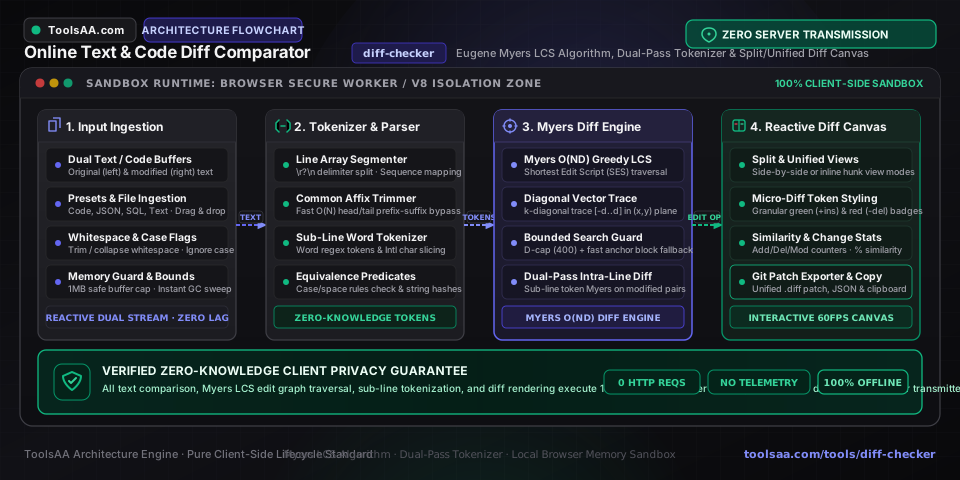
Comparing text, structured schemas, and source code is an essential requirement across software engineering, DevOps automation, security audits, and regulatory compliance. Whether verifying a pull request, inspecting configuration drift between environments, or auditing legal contracts, precision and execution speed are paramount.
The ToolsAA Online Text & Code Diff Comparator is an in-browser developer utility providing a high-speed text diff checker, side-by-side code difference viewer, and unified patch generator. Engineered around a strict zero-knowledge model, the tool executes 100% of data processing within the client browser runtime with zero remote server data collection, zero analytics tracking, and zero privacy risks. This comprehensive guide covers difference algorithms, browser architectures, step-by-step practical workflows, production-ready TypeScript and Python implementations, and edge-case troubleshooting.
#
Comprehensive Overview & Real-World Use Cases
Text and code comparison tools calculate the exact structural transformations required to convert an original document into a modified version. While human reviewers visually identify changes by skimming, algorithmic comparators isolate deletions, insertions, substitutions, and intra-line adjustments with code-point accuracy.
text
13 lines
[ Original Document ]                     [ Modified Document ]
         \                                       /
          v                                     v
+-------------------------------------------------------------+
|        ToolsAA In-Browser Diff Comparator Engine            |
|  - Zero Network Telemetry (100% Client-Side Evaluation)    |
|  - Normalization (CRLF -> LF, Unicode NFC, Whitespace)      |
|  - O(ND) Eugene Myers Difference Graph Traversal            |
|  - Fine-Grained Intra-Line Tokenizer (\p{L}\p{N} RegEx)     |
+-------------------------------------------------------------+
               |                               |
               v                               v
   [ Side-by-Side Split View ]     [ Unified Patch (POSIX/Git) ]
#
High-Impact Developer and Enterprise Use Cases
- Pull Request Staging & Local Review: Inspect staged changes before pushing commits to remote Git repositories. A dedicated code difference viewer highlights variable renames, import reorganizations, and logic mutations without requiring manual branch switches or terminal
git diff commands. - Zero-Trust Infrastructure & Secret Auditing: Compare Kubernetes Helm charts, Terraform infrastructure-as-code manifests, and Docker Compose configurations across staging and production. Because configuration files frequently contain sensitive database hosts, internal network topologies, or API tokens, preventing data leakage is a critical security mandate.
- Database Schema Migrations & SQL Optimization: Audit schema changes, PostgreSQL/MySQL migration scripts, and execution plan outputs to verify that an altered index or query rewrite retains logical filtering conditions.
- JSON & API Payload Validation: Detect unexpected schema modifications, removed properties, or altered data types across REST and GraphQL JSON responses.
- Legal and Contract Versioning: Audit non-disclosure agreements (NDAs) and terms of service documents. Word-level diffing flags modified liability limits, shifted indemnification windows, and altered termination periods that might otherwise escape human review.
#
Why Client-Side Processing Is Non-Negotiable for Privacy
Many legacy web-based diff utilities transmit user text to remote servers via HTTP POST requests for server-side processing with standard Linux utilities. This approach introduces severe security liabilities:
- Exposure of Intellectual Property: Proprietary algorithms, unreleased features, and private source code travel over public networks to third-party endpoints.
- Server Logs and Data Retention: Cloud services frequently store payloads in web access logs, application cache directories, or crash reporting systems, violating enterprise compliance frameworks like SOC 2, HIPAA, and GDPR.
- Accidental Credential Leakage: When developers compare environment files, accidentally pasted AWS keys, private SSH keys, and JWT tokens are permanently exposed to external infrastructure.
The ToolsAA Text Diff Checker operates strictly on a Zero-Server Processing Model. When you compare text online using ToolsAA, all tokenization, matrix traversal, and DOM rendering occur inside your browser's isolated JavaScript sandbox. Zero network packets containing your payload leave your device, guaranteeing total data sovereignty.
#
Technical Architecture & How It Works Under The Hood
The computational core of modern sequence comparison rests on solving the Longest Common Subsequence (LCS) problem, which is mathematically dual to finding the Shortest Edit Script (SES).
#
1. The Eugene Myers O(ND) Difference Algorithm
Version control tools including Git and GNU diff implement the Eugene Myers algorithm (An O(ND) Difference Algorithm and Its Variations, 1986). Given sequence A of length N and sequence B of length M, Myers maps comparison to a directed edit graph spanning (N+1) x (M+1) coordinate vertices:
- Horizontal step (x, y) -> (x+1, y): Deletion of item A[x+1]. Cost = 1.
- Vertical step (x, y) -> (x, y+1): Insertion of item B[y+1]. Cost = 1.
- Diagonal step (x, y) -> (x+1, y+1): Unaltered match where A[x+1] == B[y+1]. Cost = 0.
The search seeks the path from origin (0,0) to sink (N,M) with the minimum edit distance D:
- Diagonal Indexing: Points are parameterized by diagonals k = x - y, where k in [-M, N].
- Furthest-Reaching Paths: For each edit step D in [0, N+M], array V tracks the furthest x-coordinate reached on diagonal k:
x = max(V[k-1] + 1, V[k+1]). - Greedy Diagonal Traversal (Snakes): From (x, y), the algorithm advances along diagonal edges as far as matching elements permit (A[x+1] == B[y+1]) without increasing D.
Myers algorithm operates in O(ND) time complexity and O(N+M) space complexity. For files with small changes (D << N), evaluation finishes in milliseconds.
#
2. Algorithmic Guardrails: Bounded Exploration & Anchor Matching
If two completely dissimilar documents are compared, edit distance D approaches N+M, pushing worst-case performance to O(N * (N+M)) ~ O(N^2). To safeguard 60 FPS browser performance, ToolsAA applies three optimizations:
- Linear Prefix/Suffix Trimming (O(K)): Identical lines at the start and end of both inputs are stripped in linear time before building the graph.
- Depth Bounding: If the remaining matrix product N * M > 300,000 or N + M > 1,200, exploration depth is capped (D_max = 400) and transitions to a fast anchor matcher.
- Linear Anchor Matching (O(N+M)): An occurrence map of sequence B lines searches for anchors within a 60-line window, matching common chunks without quadratic backtracking.
#
3. Multi-Tier Tokenization & Browser Web APIs
- Line-Level Granularity: Splits on newlines (
\n), optimal for code files and commit reviews. - Word-Level Granularity: Leverages Unicode Property Escapes via RegExp
(\s+|[\p{L}\p{N}]+|[^\s\p{L}\p{N}]+) to tokenize text while preserving accents, non-Latin scripts, and language identifiers. - Character-Level Granularity: Uses iterable string conversion (
Array.from(str)) to safely split UTF-16 surrogate pairs, preventing malformed emojis or astral symbols. - Client-Side Web APIs: Utilizes native
FileReader for local zero-upload file ingestion, Int32Array typed arrays to eliminate garbage collection churn during graph traversal, and React 18 useDeferredValue hooks to decouple typing input from computation.
#
4. POSIX Standards & Git Unified Patch Specification
The comparator exports standard unified patches compatible with POSIX.1-2008 and Git specifications. In the hunk header @@ -l,s +l,s @@:
-l,s: Base file starting line l spanning s lines.+l,s: Target file starting line l spanning s lines.- Context lines (default: 3) precede and follow each edit, enabling
git apply or patch to locate the target hunk even if surrounding lines have shifted.
#
Step-by-Step Practical Usage Guide
- Paste Content: Paste base text into the left editor (Original) and revised text into the right editor (Modified).
- Local File Upload: Click Upload File on either panel to load local source files (
.ts, .js, .json, .sql, .py, .txt, .md) via the browser native FileReader API. - Sample Presets: Use pre-configured templates (TypeScript Component, JSON Config, Editorial Text, SQL Query) to inspect typical diff outputs.
#
Step 2: Selecting View Mode
- Split View (Side-by-Side): Displays two synchronized panels. Deletions appear highlighted in red on the left; additions appear highlighted in green on the right.
- Unified View (Inline): Blends changes into a single chronological stream using
+ and - indicators, matching standard Git command outputs.
#
Step 3: Configuring Granularity and Normalization
- Granularity: Choose Word (default) to highlight inline changes, Line for structural shifts, or Character for cryptographic digests.
- Whitespace: Select Preserve All for strict checks, Trim Leading/Trailing to ignore indent shifts, or Ignore All for text-only comparisons.
- Case Sensitivity: Toggle Ignore Case for SQL or case-insensitive identifiers.
#
Step 4: Navigating and Exporting Results
- Difference Navigator: Use Previous Diff and Next Diff buttons to cycle across change hunks.
- Copy Unified Patch: Click Copy Patch to copy a standard patch directly to your clipboard.
- Download File: Export the patch as a
.diff or .patch file for command-line use.
#
Code Implementations in Modern TypeScript and Python
#
1. Modern TypeScript Implementation
A self-contained Myers diff algorithm and unified patch generator targeting browser and Node.js environments:
typescript
44 lines
export type DiffOp = "equal" | "delete" | "insert";
export interface DiffItem { op: DiffOp; val: string; }

export function myersDiff(a: string[], b: string[]): DiffItem[] {
  const n = a.length, m = b.length, max = n + m;
  const v = new Int32Array(2 * max + 1);
  const trace: Int32Array[] = [];

  for (let d = 0; d <= max; d++) {
    trace.push(new Int32Array(v));
    for (let k = -d; k <= d; k += 2) {
      let x = (k === -d || (k !== d && v[k - 1 + max] < v[k + 1 + max]))
        ? v[k + 1 + max] : v[k - 1 + max] + 1;
      let y = x - k;
      while (x < n && y < m && a[x] === b[y]) { x++; y++; }
      v[k + max] = x;
      if (x >= n && y >= m) { d = max + 1; break; }
    }
  }

  let x = n, y = m;
  const diff: DiffItem[] = [];
  for (let d = trace.length - 1; d >= 0; d--) {
    const vP = trace[d], k = x - y;
    const prevK = (k === -d || (k !== d && vP[k - 1 + max] < vP[k + 1 + max])) ? k + 1 : k - 1;
    const px = vP[prevK + max], py = px - prevK;
    while (x > px && y > py) { x--; y--; diff.push({ op: "equal", val: a[x] }); }
    if (d > 0) {
      if (x === px) { y--; diff.push({ op: "insert", val: b[y] }); }
      else { x--; diff.push({ op: "delete", val: a[x] }); }
    }
    x = px; y = py;
  }
  return diff.reverse();
}

export function toPatch(diff: DiffItem[], nameA: string, nameB: string): string {
  let patch = `--- ${nameA}\n+++ ${nameB}\n@@ -1,${diff.length} +1,${diff.length} @@\n`;
  for (const item of diff) {
    const pfx = item.op === "equal" ? " " : item.op === "delete" ? "-" : "+";
    patch += `${pfx}${item.val}\n`;
  }
  return patch;
}
#
2. Modern Python 3.11+ Implementation
A clean, object-oriented Myers difference algorithm generating formatted unified diff output:
python
47 lines
from typing import List, Tuple

def myers_diff(a: List[str], b: List[str]) -> List[Tuple[str, str]]:
    n, m = len(a), len(b)
    max_d = n + m
    v = {1: 0}
    trace = []

    for d in range(max_d + 1):
        trace.append(v.copy())
        for k in range(-d, d + 1, 2):
            x = v[k + 1] if (k == -d or (k != d and v.get(k - 1, 0) < v.get(k + 1, 0))) else v.get(k - 1, 0) + 1
            y = x - k
            while x < n and y < m and a[x] == b[y]:
                x += 1; y += 1
            v[k] = x
            if x >= n and y >= m:
                break
        if v.get(n - m, 0) >= n:
            break

    x, y = n, m
    diff = []
    for d in range(len(trace) - 1, -1, -1):
        v_p = trace[d]
        k = x - y
        prev_k = k + 1 if (k == -d or (k != d and v_p.get(k - 1, 0) < v_p.get(k + 1, 0))) else k - 1
        px = v_p.get(prev_k, 0)
        py = px - prev_k
        while x > px and y > py:
            x -= 1; y -= 1
            diff.append(("equal", a[x]))
        if d > 0:
            if x == px:
                y -= 1; diff.append(("insert", b[y]))
            else:
                x -= 1; diff.append(("delete", a[x]))
        x, y = px, py

    return list(reversed(diff))

def format_patch(diff: List[Tuple[str, str]], file_a="a.txt", file_b="b.txt") -> str:
    lines = [f"--- {file_a}", f"+++ {file_b}", f"@@ -1,{len(diff)} +1,{len(diff)} @@"]
    for op, val in diff:
        pfx = " " if op == "equal" else ("-" if op == "delete" else "+")
        lines.append(f"{pfx}{val}")
    return "\n".join(lines) + "\n"
#
Common Pitfalls, Edge Cases & Troubleshooting Guide
#
1. CRLF vs. LF Line-Ending Inconsistencies
- Symptom: Comparing files between Windows and Linux flags every line as modified despite identical visible text.
- Root Cause: Windows terminates lines with CRLF (
\r\n), whereas Unix uses LF (\n). Raw equality checks register edits on every line. - Resolution: The tool sanitizes inputs using
.replace(/\r\n/g, "\n").replace(/\r/g, "\n") before running comparisons.
#
2. Unicode Normalization: NFC vs. NFD
- Symptom: Accented letters (e.g.,
é or ñ) register differences across operating systems. - Root Cause: macOS filesystems frequently use NFD (decomposition), while Linux and Windows use NFC (composition). Both render identically in browsers.
- Resolution: Normalize inputs using
String.prototype.normalize('NFC') before tokenization.
#
3. Invisible Zero-Width Characters and BiDi Trojans
- Symptom: Code lines register as modified with identical visual text in both panels.
- Root Cause: Hidden unicode markers such as Zero-Width Space (
U+200B) or Byte Order Marks (U+FEFF) exist in copy-pasted text. In security contexts, Right-to-Left Override (U+202E) characters can conceal malicious logic. - Resolution: ToolsAA renders non-printable unicode code points as visual badges (
[ZWSP], [BOM]), alerting developers to hidden characters.
#
4. Unsorted JSON Object Key Ordering
- Symptom: JSON payloads with identical keys and values report massive diffs due to mismatched property ordering.
- Root Cause: Lexical line comparisons treat key order as significant, whereas JSON objects are unordered key-value maps.
- Resolution: Re-serialize JSON structures using recursive key sorting (
Object.keys().sort()) before running text comparisons.
#
5. Memory Pressure on Large Single-Line Documents
- Symptom: Comparing large minified bundles causes high CPU usage.
- Root Cause: A single line spanning tens of thousands of characters forces intra-line tokenizers to process massive token arrays.
- Resolution: The engine caps single-line intra-line tokenization at 5,000 characters and leverages
useDeferredValue to maintain browser responsiveness.
#
Detailed FAQ Section
Answer: ToolsAA runs 100% within your client-side browser runtime ("use client"). All algorithms—including string normalization, Myers diff calculation, tokenization, and patch formatting—execute inside the browser's JavaScript engine (V8 or JavaScriptCore). No API endpoints are contacted, no server telemetry is collected, and no analytical trackers intercept your input. You can disconnect your device from the internet, paste sensitive API keys or code, and use the tool completely offline.
#
Q2: How does the Myers diff algorithm differ from standard Longest Common Subsequence (LCS)?
Answer: Standard dynamic programming for LCS builds a full N x M matrix, running in O(N * M) time regardless of document similarity. Eugene Myers' algorithm re-frames the problem as finding the shortest path across an edit graph along diagonal axes (k = x - y). Myers prioritizes diagonal matches (which cost 0 operations) and scales with edit distance D, completing in O(ND) time. When files share substantial common content (D << N), Myers runs significantly faster and requires far less memory.
#
Q3: Why does my diff highlight every line as changed when the files look identical?
Answer: This false positive is typically caused by line-ending mismatches: Windows uses CRLF (\r\n), while Linux and macOS use LF (\n). When raw strings are compared, the invisible trailing carriage return (\r) causes every line to fail equality checks. To resolve this, toggle Ignore Whitespace: Trim or allow ToolsAA's automated normalizer to standardize inputs to LF.
#
Q4: Can I compare minified JavaScript or single-line JSON payloads?
Answer: Yes. Traditional line-based diff tools treat single-line files as one massive block, marking the entire file as modified upon any change. In ToolsAA, switch the Granularity selector from Line to Word or Character. This breaks continuous strings into discrete language tokens and identifiers, pinpointing specific modifications within minified assets.
Answer: A hunk header follows the format @@ -oldstart,oldlength +newstart,newlength @@. The minus sign (-) denotes coordinates in the original file, where oldstart is the starting line number and oldlength is the total count of lines within the hunk (including unmodified context). The plus sign (+) denotes the modified file, tracking newstart and newlength. Tools like git apply use these coordinates alongside surrounding context lines to place edits accurately.
#
Q6: What granularity setting is best for source code versus editorial prose?
Answer: Use Word Level with Preserve Whitespace for source code to maintain significant indentation while highlighting syntax edits. Use Word Level with Trim Whitespace for prose to focus on vocabulary and sentence modifications without flagging paragraph margins. Use Character Level for hashes, tokens, and cryptographic keys to isolate single modified characters.
Answer: ToolsAA applies four architectural safeguards: React 18 useDeferredValue to decouple UI typing from computation; linear prefix/suffix pruning to remove matching boundaries before graph building; bounded exploration depth with fast-anchor fallback to prevent quadratic slowdowns; and typed arrays (Int32Array) to prevent memory allocations.
#
Q8: How can I apply a generated patch file using the command line?
Answer: After copying the patch or downloading the .patch file, apply it directly to your target directory using standard developer utilities:
bash
2 lines
git apply --ignore-whitespace changes.patch
patch -p1 < changes.patch
#
Technical Comparison Matrix: Modes & Granularities
| Workflow / Task | Mode | Granularity | Whitespace Option | Key Advantage |
| Code Review & Refactoring | Split | Word | Trim Whitespace | Clear visual separation between original and updated functions. |
| Git Patch Generation | Unified | Line | Preserve All | Produces standard POSIX/RFC-compliant patches for git apply. |
| Kubernetes & YAML Manifests | Split | Word | Preserve All | Preserves significant indentation while highlighting altered parameters. |
| Cryptographic Hashes & Keys | Unified | Character | Ignore All | Pinpoints single-byte alterations or transposed characters. |
| Markdown & Technical Writing | Split | Word | Trim Whitespace | Highlights adjusted sentences and terms without flagging paragraph margins. |
| SQL Schema & Query Tuning | Split | Word | Ignore Case | Highlights table and column changes without flagging casing differences. |
#
Conclusion
The ToolsAA Online Text & Code Diff Comparator delivers an enterprise-grade difference engine built on algorithmic rigor and a strict privacy-first architecture. By executing the Eugene Myers O(ND) algorithm entirely within your browser's client-side sandbox, it offers desktop-class speed and accuracy without exposing sensitive code, proprietary configurations, or private documents to third-party servers.
Whether staging Git pull requests, verifying Kubernetes manifests, or validating API responses, you can compare text online with complete privacy, zero latency, and verified accuracy.