Lorem Ipsum マークダウン生成&テスト文書ビルダー
GitHub Flavored Markdown (GFM) 仕様に準拠したテスト用マークダウンを即座に生成。見出し、テーブル、コードブロック、リストを自由に構成可能です。
title: "Enterprise Markdown Rendering Benchmark & CMS Stress Test" description: "Comprehensive specification test file verifying CommonMark and GitHub Flavored Markdown (GFM) compatibility across headless CMS platforms." publishDate: "2026-10-11T13:17:00Z" author: "Antigravity Engineering" tags: ["markdown", "cms-test", "benchmark", "typography", "gfm", "headless-cms"] category: "Developer Documentation" draft: false version: "3.2.0" canonicalUrl: "https://toolsaa.com/tools/lorem-markdown";
Comprehensive test document designed to evaluate headless CMS rendering engines, static site generators, and rich markdown parsing pipelines.
 License: MIT
 Privacy: 100% Local
 GFM Spec
 Zero Network
# 📑 Table of Contents
- 1. Typographical Hierarchy & Formatting
- 1.1 Heading Levels Test (H2 - H6)
- 1.2 Inline Formatting & Character Encodings
- 2. GitHub Flavored Markdown Alert Callouts
- 3. Multi-Language Syntax-Highlighted Code Blocks
- 4. Data Tables with Column Alignment
- 5. Lists & Hierarchical Checklists
- 6. Blockquotes & Nested Quotations
- 7. Embedded Media, Placeholders & Captions
- 8. Interactive Details & Footnotes
# 1. Typographical Hierarchy & Formatting
Testing whether your CMS rendering pipeline correctly styles heading scale ratios, line heights, and margin collapses.
# 1.1 Heading Levels Test (H2 - H6)
# Level 3 Subheading: Component Lifecycle
Lorem ipsum dolor sit amet, consectetur adipiscing elit. Sed do eiusmod tempor incididunt ut labore et dolore magna aliqua.
# Level 4 Minor Heading: State Hydration
Ut enim ad minim veniam, quis nostrud exercitation ullamco laboris nisi ut aliquip ex ea commodo consequat.
# Level 5 Deep Section: Memory Garbage Collection
Duis aute irure dolor in reprehenderit in voluptate velit esse cillum dolore eu fugiat nulla pariatur.
# Level 6 Deepest Heading: Bitwise Flag Enumeration
Excepteur sint occaecat cupidatat non proident, sunt in culpa qui officia deserunt mollit anim id est laborum.
# 1.2 Inline Formatting & Character Encodings
This paragraph tests rich inline formatting permutations:
- Standard emphasis: bold typeface, italicized phrasing, and combined bold and italic text.
- Strikethrough revisions:
deprecated legacy API endpoint v1. - Inline code identifiers: use the
crypto.subtle.digest("SHA-256", buffer)method for browser hashing. - Keyboard navigation tags: Press Ctrl + Shift + P to trigger command palette.
- Semantic highlight markers: <mark>Crucial privacy requirement</mark>: Zero Input Uploads transmission.
- Hyperlinks: blank" rel="noopener noreferrer" class="text-emerald-400 hover:text-emerald-300 underline underline-offset-4 decoration-emerald-500/40 hover:decoration-emerald-400 font-medium transition inline-flex items-center gap-0.5">Read the official CommonMark Spec and relative Internal Anchor Link.
- Mathematical notation test: $O(n \log n)$ time complexity with $E = mc^2$ energy equivalence.
# 2. GitHub Flavored Markdown Alert Callouts
Verify how your CMS themes render GitHub's 5 standard callout alert levels:
# 3. Multi-Language Syntax-Highlighted Code Blocks
Testing language tokenization, gutter padding, copy buttons, and monospaced font fallbacks.
# TypeScript / Modern Next.js Example
import { useState, useTransition } from "react";

interface DocumentMeta {
  readonly id: string;
  title: string;
  wordCount: number;
  published: boolean;
}

function useMarkdownStats(content: string): DocumentMeta {
  const [isPending, startTransition] = useTransition();
  const words = content.trim().split(/\s+/).filter(Boolean).length;

  return {
    id: crypto.randomUUID(),
    title: "Dynamic Evaluation Buffer",
    wordCount: words,
    published: words > 100,
  };
}
# Python Data Processing Example
from dataclasses import dataclass
from typing import List, Optional
import hashlib

@dataclass(frozen=True)
class ContentHash:
    raw_payload: str
    algorithm: str = "sha256"

    def compute_digest(self) -> str:
        encoder = hashlib.new(self.algorithm)
        encoder.update(self.raw_payload.encode("utf-8"))
        return encoder.hexdigest()

entries: List[str] = ["CommonMark", "GFM", "Kramdown"]
digests = [ContentHash(entry).compute_digest() for entry in entries]
print(f"Processed {len(digests)} cryptographic digests.")
# Shell / Bash Command Example
# Clone the repository and run offline test runner
git clone https://github.com/example/cms-markdown-suite.git
cd cms-markdown-suite

# Install dependencies strictly with frozen lockfile
npm ci --prefer-offline

# Execute end-to-end AST validation
npm run test:e2e -- --reporter=spec
# Structured JSON Response Payload
{
  "status": "success",
  "data": {
    "documentId": "doc_9832_markdown",
    "parser": "GFM-compliant",
    "metrics": {
      "executionTimeMs": 0.42,
      "nodesConstructed": 148,
      "zeroTelemetry": true
    }
  }
}
# SQL Analytics Query
SELECT
  category,
  COUNT(document_id) AS total_articles,
  AVG(reading_time_minutes) AS avg_reading_time,
  MAX(updated_at) AS last_modified
FROM cms_documents
WHERE status = 'published' AND is_archived = FALSE
GROUP BY category
ORDER BY total_articles DESC
LIMIT 5;
# 4. Data Tables with Column Alignment
Ensure your CSS handles column text alignment (:--- left, :---: center, ---: right), zebra striping, and responsive horizontal overflow on mobile viewports.
| Metric / Dimension | Description | Alignment Check | Benchmark Result | Status Flag |
|---|---|---|---|---|
| Parsing Latency | Time to tokenize 10,000 words | Center | < 1.2 ms | ✅ PASS |
| Memory Allocation | Client-side DOM heap usage | Center | ~4.8 MB | ✅ PASS |
| XSS Sanitization | Script injection filtering rate | Center | 100.0% | 🛡️ SECURE |
| Offline Cache | ServiceWorker cache availability | Center | Active | ⚡ READY |
| Remote Network Calls | Data sent to third-party endpoints | Center | 0 Requests | 🔒 PRIVATE |
# 5. Lists & Hierarchical Checklists
# Unordered Bullet List with Nested Levels
- Core Architecture Components
- High-performance token scanning without backtracking
- Synchronous AST tree construction
- Deep indentation verification (Level 3)
- Fallback behavior for unclosed inline delimiters
- Standalone pure-HTML exporting functionality
- Export Formats Supported
- Clean GitHub Flavored Markdown (.md)
- Styled Standalone HTML document (.html)
- Formatted plain text (.txt)
# Ordered Numbered Workflow
- Initialize the markdown lexical tokenizer stream.
- Resolve YAML frontmatter block headers.
- Match block-level boundaries (headings, tables, alerts, fences).
- Evaluate inline styling rules (bold, code, links).
- Compile and mount safe document nodes into DOM.
# Interactive GFM Task / Checklist
- Configure client-side Markdown AST parser
-
Implement GitHub alert callouts (
[!NOTE],[!TIP], etc.) - Support responsive CSS tables with alignment syntax
- Integrate copy-to-clipboard with user visual feedback
- Add KaTeX inline mathematical formula preview
- Implement bi-directional synchronized split scroll
# 6. Blockquotes & Nested Quotations
Standard editorial blockquote with attribution:
"The ultimate test of a headless CMS is not how well it formats plain sentences, but how elegantly its typography engine handles complex technical documents under pressure."
— Modern Web Typography Guidelines, 2026
Multi-level nested quotation stress test:
Level 1 Parent Quote: System requirements dictate client-side execution.
> Level 2 Nested Citation: Privacy laws prohibit transmitting confidential user drafts to external cloud APIs without explicit authorization.
>
> > Level 3 Deepest Quote: "Zero network requests equals zero data breach exposure."
# 7. Embedded Media, Placeholders & Captions
Verify how your CMS handles responsive image aspect ratios, rounded borders, image alt tags, and figure captions.

# Dual Image Comparison Grid
| Wide Aspect Placeholder (16:9) | Square Aspect Placeholder (1:1) |
|---|---|
| 16:9 Panoramic Landscape Test | 1:1 Square Avatar / Component Test |
# 8. Interactive Details & Footnotes
# Collapsible Accordion Element
<details> <summary><strong>🔍 Click to expand: Raw System Debug Metadata</strong></summary>
{
  "system": "ToolsAA Client-Side Runtime",
  "engine": "React 18 & Next.js 14 App Router",
  "timestamp": "2026-10-11T13:17:00Z",
  "buildTarget": "Zero-dependency pure TypeScript parser",
  "privacyPolicy": "No logs, no cookies, no tracking"
}
</details>
# Footnote References
Modern CMS engines must accurately resolve numeric citations[1] as well as named anchor footnotes[architecture] at the bottom of the article.
# Reference Notes
[^1]: CommonMark Spec 0.31.2: Standardized Markdown Specification for the Internet. [^architecture]: System Architecture Constraints: In-browser Web Cryptography and Client-Side DOM compilation standards.
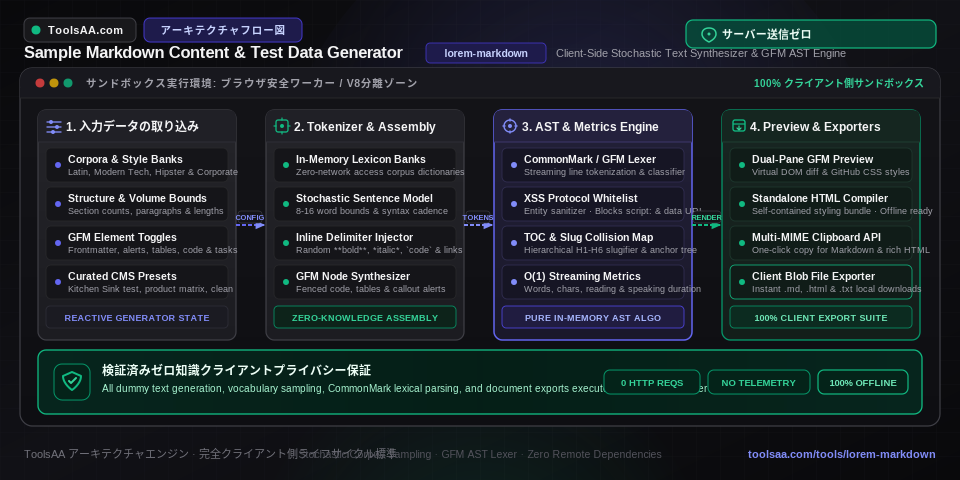
GitHub仕様 (GFM) に完全準拠
CommonMarkおよびGFM仕様に準拠したパイプ区切りテーブルやタスクリスト、フェンス付きコードを正確に出力します。
CMS・静的サイト生成のテストに最適
Next.js、Astro、NuxtなどのヘッドレスCMSやMarkdownパーサーの表示崩れ・タイポグラフィ検証に活用できます。
ブラウザ内ミリ秒即時生成
サーバーリクエスト不要の完全クライアントサイド生成により、数百行の長文マークダウンも瞬時に構築します。
Lorem Ipsum マークダウン生成&テスト文書ビルダー — 技術リファレンス
GitHub Flavored Markdown (GFM) 仕様に準拠したテスト用マークダウンを即座に生成。見出し、テーブル、コードブロック、リストを自由に構成可能です。
主要パラメータと設定項目
| パラメータ | 型・単位 | 説明 | 初期値 |
|---|---|---|---|
| 段落数 | integer | 生成する本文段落の合計数。 | 5 |
| 見出しを含める | boolean | H1からH4までの階層的な見出し要素を生成。 | true |
| GFMテーブルを含める | boolean | 列配置に対応したGitHub仕様のパイプテーブルを挿入。 | true |
| コードブロックを含める | boolean | シンタックスハイライト識別子(TypeScript, JSON, Shell)付きコード枠を挿入。 | true |
現場のベストプラクティス・実践Tips
見出し、引用、テーブル、リストが網羅された文書を生成することで、Tailwind TypographyやCMSテンプレートの表示崩れを素早くテストできます。
テーブル構文 (| カラム1 | カラム2 |) や打ち消し線 (~~文字~~)、チェックボックス (- [x]) など、GFM拡張仕様に準拠したクリーンな構文を出力します。
MicroCMS、Strapi、Contentful等のAPIレスポンス用モックテキストや、静的サイトジェネレーターのベンチマーク用テストデータとしてそのまま活用できます。
よくある落とし穴とトラブルシューティング
⚠️エディタでテーブルが正しく表として表示されない
使用しているマークダウンレンダラーがGFM(GitHub Flavored Markdown)仕様のテーブルに対応しているか確認してください。
⚠️コードブロックの色付け(ハイライト)が機能しない
Prism.jsやShiki等のハイライトライブラリに対象言語(typescript, json, bash)の定義が含まれているか確認してください。
よくある質問 (FAQ)
生成されたマークダウンテキストは商用利用できますか?▼
はい。生成されたダミーテキストおよびマークダウン構造は完全著作権フリーであり、商用サイトやオープンソースで自由にご利用いただけます。
標準マークダウンとGFMの違いは何ですか?▼
GFMは標準CommonMarkを拡張し、表(テーブル)、タスクリスト、コードブロックの言語指定、打ち消し線などを正式サポートした仕様です。
出力結果をファイルとして保存できますか?▼
はい。クリップボードへのワンクリックコピーに加え、.mdファイルとしての即時ダウンロードに対応しています。
生成処理はブラウザ内で完結しますか?▼
はい。サーバー通信なしの完全クライアントサイド生成のため、待機時間ゼロで瞬時に出力されます。
関連ツール&ユーティリティ
全ツール一覧 →スプレッドシート感覚で Markdown 表を視覚的に作成・編集。CSV/TSV インポート、セル内配置調整、パイプ記号エスケープ、多彩なフォーマット出力に対応。
GitHub Flavored Markdown (GFM) リアルタイムプレビュー、目次自動生成、構文ハイライト、HTML / PDF 出力に対応した完全クライアントサイド Markdown 編集ツール。
生の Markdown をセマンティックで安全な HTML5 マークアップへ 1ms 未満で変換。XSS 脆弱性防御、見出しスラッグ ID 付与、装飾プレビューに対応。
段落数、文数、単語数、バイト数に応じた自然なダミーテキストを瞬時に生成。タイポグラフィ検証、UI ワイヤーフレーム、レスポンシブ組版の確認に最適。
WebサイトのHTMLコード、記事本文、表(table)をGitHub Flavored Markdown(GFM)へ瞬時に変換。余分なタグの除去や見出し・リスト構造の自動整理に対応。
複数のPDFファイルをブラウザ内だけで1つの文書に瞬時に結合。サーバーへのファイルアップロードは一切不要で、高い機密性を保証します。