Online Regular Expression Tester & Debugger
ES2024 / ECMAScriptTest, debug, and benchmark regular expressions in real-time with capture group extraction, replacement previews, regex flag toggles, and syntax explanations.
Test String Input
Matches any digit from 0 to 9
Matches any character that is not a digit
Matches letters, digits, and underscore [a-zA-Z0-9_]
Matches any non-word character
Matches spaces, tabs, and line breaks
Matches any non-whitespace character
Matches any character except newline (unless 's' flag)
Matches any character in the brackets
Matches any character NOT inside brackets
Matches any character in range
Matches 1 or more occurrences (greedy)
Matches 0 or more occurrences (greedy)
Matches 0 or 1 occurrence (optional)
Matches exactly n occurrences
Matches n or more occurrences
Matches between n and m occurrences
Matches as few characters as possible
Matches beginning of string or line (with 'm')
Matches end of string or line (with 'm')
Matches at the boundary of a word
Matches where a word boundary does not exist
Groups expressions and captures matching value
Groups without capturing in result indices
Captures match under designated group name
Matches exact value previously captured in group 1
Asserts pattern follows without including it
Asserts pattern does NOT follow
Asserts pattern precedes without including it
Asserts pattern does NOT precede
Finds all matches rather than stopping at the first
Case-insensitive matching
^ and $ match beginning and end of each line
Allows '.' to match newline characters \n
Enables full Unicode surrogate pairs handling
Matches strictly starting at regex.lastIndex
ECMAScript RegEx Engine
Fully compliant with modern JavaScript regular expression specifications including named capture groups, lookbehinds, and unicode property escapes.
Interactive Group Extraction
Inspect matched strings with detailed breakdowns for numbered ($1, $2) and named (?<name>) capture groups alongside match start/end indices.
ReDoS Guarded In-Browser Execution
Evaluation is sandboxed locally with client-side timeout guards to protect against catastrophic backtracking without freezing your session.
Regex Tester Developer Reference
Developer utility for regex-tester.
Regular expressions match structured text patterns using character classes, quantifiers, lookarounds, and capture groups powered by JavaScript's RegExp engine. Test live highlights across global (`g`), multiline (`m`), case-insensitive (`i`), and dotAll (`s`) flags while guarding against catastrophic backtracking (ReDoS).
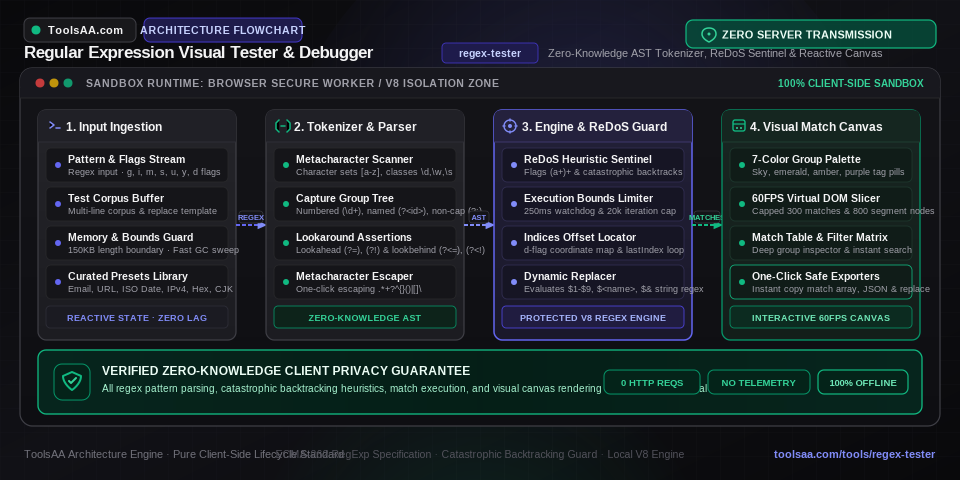
Key Parameters & Controls
| Parameter | Type / Unit | Description | Default |
|---|---|---|---|
| pattern | string (ECMAScript RegExp pattern) | Regular expression pattern syntax supporting character classes, quantifiers, lookaround assertions, numbered groups, and named groups. | ([a-zA-Z0-9._%+-]+)@([a-zA-Z0-9.-]+\.[a-zA-Z]{2,}) |
| flags | Array<"g" | "i" | "m" | "s" | "u" | "y"> | Engine compilation flags configuring global matching (g), case-insensitive matching (i), multiline line boundaries (m), dotAll newline matching (s), full Unicode surrogate handling (u), and sticky lastIndex matching (y). | ["g", "i"] |
| testString | string | Target text payload evaluated in real time against the compiled regular expression, supporting multiline strings up to 150,000 characters. | Welcome to ToolsAA! Contact privacy@toolsaa.com or support@domain.co.uk. |
| replacePattern | string | Substitution string template supporting group backreferences ($1..$n), named groups ($<name>), full match ($&), preceding prefix ($`), and trailing suffix ($'). | User: $1 | Domain: $2 |
| activeTab | "visual" | "matches" | "replace" | "cheatsheet" | Inspection view mode: visual syntax mark highlighting, detailed match index tree and JSON export, live substitution output, or interactive token reference. | "visual" |
| highlightMode | "groups" | "matches" | Visual highlighting granularity selecting whether distinct captured groups receive unique color badges or entire match spans share unified bounding marks. | "groups" |
Pro Tips & Best Practices
Avoid nested overlapping quantifiers such as (a+)+ or ([a-z]*)* which trigger exponential O(2^n) backtracking on failed matches. Refactor using mutually exclusive character classes (e.g. [^@\s]+) or possessive/atomic structures.
Use (?<groupName>pattern) to extract self-documenting data models and eliminate fragility caused by numeric index shifting ($1, $2) during schema refactoring.
Activate the 'y' (sticky) flag in combination with RegExp.lastIndex when constructing lexical scanners. Sticky matching enforces assertions strictly at the current cursor without scanning the remainder of the payload.
Switch to the 'Matches' tab and click 'Copy as JSON' to extract structured AST-like payloads including start and end offsets, match substrings, and named group maps directly into test suites.
Common Gotchas & Troubleshooting
⚠️SyntaxError: Invalid regular expression or unescaped slash
Literal forward slashes in URL paths or HTML tags must be escaped with a backslash (\/), or metacharacters can be escaped automatically using the 'Escape' button in the toolbar.
⚠️Execution Timed Out (250ms) Safeguard Triggered
The pattern exceeded the 250ms catastrophic backtracking threshold. Disassemble ambiguous nested quantifiers into strict, deterministic boundaries before re-evaluating.
⚠️Zero-width match causes infinite loop warnings
Patterns matching empty strings (such as ^, $, or a*) advance lastIndex by 1 automatically in global mode. Provide explicit character anchors or positive lookahead constraints to prevent zero-length cycles.
Frequently Asked Questions
Which ECMAScript specification does this regex engine follow?▼
The evaluator executes natively in the host JavaScript V8/SpiderMonkey runtime, strictly adhering to the ECMA-262 specification. It supports ES2018+ features including named capture groups (?<name>...), lookbehind assertions (?<=...), Unicode property escapes \p{...} (with flag u), and match indices (flag d).
How does the tool prevent browser freezes on catastrophic backtracking (ReDoS)?▼
The client evaluation loop employs a three-tier protection architecture: static heuristic pattern analysis for nested repetition, a strict 250ms monotonic execution cutoff via performance.now(), and an iteration ceiling capped at 20,000 passes and 1,500 maximum match records.
Are sensitive logs or tested payloads uploaded to any cloud server?▼
No. In accordance with ToolsAA privacy-first design, all pattern compilation, string scanning, and substitution run entirely in browser memory. No external API endpoints or network sockets are accessed during testing.
What is the maximum payload size supported for input strings?▼
The live engine evaluates strings up to 150,000 characters synchronously. For visual DOM rendering performance, highlight marks are capped at the first 300 matches or 40,000 characters to maintain 60 FPS scrolling, while all matches remain available in the Matches tab.
How do substitution tokens work in the replacement engine?▼
Replacements follow standard ECMAScript String.prototype.replace semantics: $1 through $99 insert numbered capture groups, $<name> inserts named groups, $& inserts the full match, $` inserts preceding text, $' inserts succeeding text, and $$ produces a literal dollar sign.
Related Tools & Utilities
All Tools →Visualize complex regex syntax as interactive railroad diagrams with branch tracing, character group inspection, and execution path breakdowns.
Test and simulate Nginx location block matching order (= exact, ^~ preferential prefix, ~ regex, ~* case-insensitive, / prefix) with request URIs.
Paste raw curl command and instantly generate clean JavaScript fetch / Axios syntax.
Inspect keyboard events in real time with event.key, event.code, which, keyCode, location, modifier flags, and cross-browser JavaScript event code snippets.
Build complex crontab schedules visually with minutes, hours, days, months, and interval selectors, complete with human-readable explanations.
Parse cron expressions into plain-language schedules, inspect next run timestamps across timezones, synthesize crontab rules, and audit Systemd/Quartz/AWS/K8s syntax.