Robots.txt Generator, Validator & Live Simulator
Generate compliant robots.txt files for Googlebot, Bingbot, and LLM crawlers. Test whether specific URL paths are allowed or blocked in real time using the official IETF RFC 9309 longest-match specificity standard.
1# ===========================================================================2# robots.txt - Generated with ToolsAA SEO Robots.txt File Generator & Tester3# RFC 9309 Compliant | Generated by ToolsAA4# ===========================================================================56User-agent: *7Allow: /8Disallow: /admin/9Disallow: /private/10Disallow: /api/11Disallow: /*.json$1213# ---------------------------------------------------------------------------14# Sitemaps15# ---------------------------------------------------------------------------16Sitemap: https://example.com/sitemap.xml1718# Host directive (supported by select search engines like Yandex)19Host: example.com20
Robots.txt & RFC 9309 Specification Reference Guide
Standard rules, algorithm behavior, and best practices for modern webmasters and software developers.
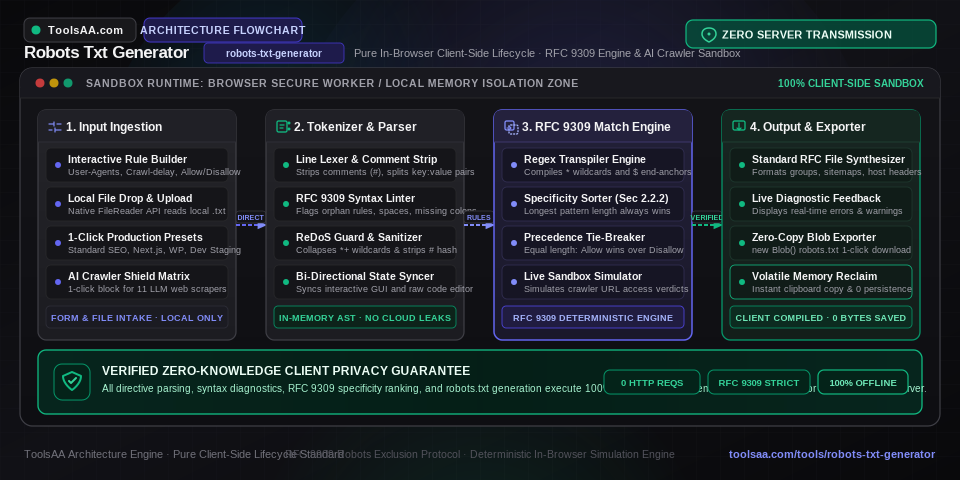
Zero-Knowledge Local Execution
All data processing, parsing, and compilation execute strictly inside your local browser memory. Zero external server uploads.
Instant Client-Side Engine
Instant real-time reactive computation delivers immediate feedback on every keystroke with zero network latency.
Production Standards & Compliance
Strictly validates syntax, edge cases, and formatting rules for dependable production output.
RFC 9309 Robots Exclusion Protocol & Crawler Directives Manual
Authoritative engineering specification for constructing, debugging, and validating production robots.txt files per IETF RFC 9309, Googlebot WRS rendering requirements, and search indexing policies.
A valid robots.txt file lives at https://example.com/robots.txt (UTF-8 text/plain, under 500 KiB) and controls crawling—not search indexing. Use Disallow to save crawl budget on private paths while allowing CSS and JS assets, and distinguish LLM training crawlers (GPTBot, ClaudeBot) from AI search bots (OAI-SearchBot, Claude-SearchBot, PerplexityBot) and user fetchers.
Search & AI Crawler Policy Reference Matrix (SEO vs GEO vs Training)
Distinction between traditional search engine indexers, real-time AI citation bots, user-triggered fetchers, and LLM training crawlers for granular robots.txt control.
| User-Agent Token | Operator | Crawler Role | Typical GEO-Safe Policy |
|---|---|---|---|
| Googlebot | Web Search Indexing | Allow public routes & CSS/JS assets | |
| OAI-SearchBot | OpenAI | AI Search Citation Indexing | Allow for ChatGPT Search citations |
| Claude-SearchBot | Anthropic | AI Search Citation Indexing | Allow for Claude search visibility |
| PerplexityBot | Perplexity | AI Search Citation Indexing | Allow for Perplexity source links |
| ChatGPT-User | OpenAI | User-Triggered Fetcher | Allow live user-prompt browsing |
| Claude-User | Anthropic | User-Triggered Fetcher | Allow user-triggered page reads |
| Perplexity-User | Perplexity | User-Triggered Fetcher | Allow live answer follow-up fetches |
| GPTBot | OpenAI | Foundation Model Training | Disallow: / if opting out of training |
| ClaudeBot | Anthropic | Foundation Model Training | Disallow: / if opting out of training |
| Google-Extended | Gemini Training Control Token | Disallow: / without affecting Googlebot |
Key Parameters & Controls
| Parameter | Type / Unit | Description | Default |
|---|---|---|---|
| User-Agent Token | string | Designates the crawler identity to which a directive block applies per RFC 9309 Section 2.2.1. Asterisk (*) acts as the universal fallback for all compliant search robots; specific tokens (e.g. Googlebot, Bingbot, GPTBot, ClaudeBot) define targeted crawler policies. | * |
| Disallow Paths | string[] | Specifies URI path prefixes that the designated crawler must not access. Path matching uses prefix evaluation. An empty Disallow value (Disallow:) explicitly permits crawling of all paths on the host. | ['/admin/', '/private/'] |
| Allow Paths | string[] | Overrides broader Disallow rules by granting explicit crawl permissions to sub-paths. Under RFC 9309 Section 2.2.2, when Allow and Disallow match identical path lengths, Allow takes precedence. | ['/public/', '/api/docs/'] |
| XML Sitemap References | string[] (Absolute URLs) | Declares one or more absolute URLs to the site's XML sitemaps or sitemap index files per RFC 9309 Section 2.2.4. Independent of user-agent blocks and readable by all crawlers. | ['https://toolsaa.com/sitemap.xml'] |
| Wildcard Expressions | boolean | Supports RFC 9309 pattern matching: asterisk (*) matches zero or more arbitrary characters, and dollar sign ($) anchors the match to the absolute end of the URL path (e.g. Disallow: /*.pdf$). | true |
| Crawl-Delay Notice | number (seconds) | Non-standard directive parsed by Bingbot and Yandex to pace HTTP requests. Formally IGNORED by Googlebot, which dynamically throttles crawling based on server response latencies. | 10 |
Pro Tips & Best Practices
When evaluating conflicting Allow and Disallow directives for a given URL, RFC 9309 Section 2.2.2 dictates that the directive with the longest character pattern wins. For example, if you have Disallow: /admin/ (7 characters) and Allow: /admin/public/ (14 characters), a request to /admin/public/page.html will match Allow and be crawled. If pattern lengths are equal, Allow takes precedence over Disallow.
In the modern era of the Google Web Rendering Service (WRS), Googlebot renders web pages identically to a headless Chrome browser to discover content and evaluate layout. If your robots.txt disallows /css/, /js/, or /static/ assets, Googlebot cannot render the visual layout, leading to false mobile-unfriendly flags, algorithmic soft-404s, and severe ranking drops.
A widespread misconception is that adding Disallow: /secret/ removes a page from Google search results. Robots.txt prevents crawling, NOT indexing. If external websites link to that disallowed URL, Google will still index the URL based purely on anchor text and metadata, displaying 'No information is available for this page' in SERPs. To prevent indexing, allow crawling and use <meta name="robots" content="noindex"> or HTTP header X-Robots-Tag: noindex.
RFC 9309 Section 2.1 establishes that robots.txt MUST reside at the exact root of the host domain (https://example.com/robots.txt) and return a text/plain MIME type with UTF-8 encoding. Googlebot parses a maximum of 500 KiB; any directives past 500 KiB are ignored. Furthermore, HTTP 5xx server errors cause Googlebot to halt all crawling site-wide for up to 30 days to avoid overloading a struggling server.
Common Gotchas & Troubleshooting
⚠️Google Search Console Reports 'Indexed, though blocked by robots.txt'
A sensitive admin or utility page appears in Google search results with a blank snippet and a warning in GSC. The page URL was disallowed in robots.txt, but external links or internal backlinks point to it. Because Googlebot cannot crawl the page, it cannot see your <meta name="noindex"> tag. Remove the Disallow: rule from robots.txt, allow Googlebot to crawl the page, and inject <meta name="robots" content="noindex"> into the page HTML.
⚠️CSS and JS Bundles Blocked by Overly Aggressive Wildcards
Google Mobile-Friendly test fails, reporting 'Page is not mobile-friendly' and screenshots show unstyled raw HTML. A wildcard rule like Disallow: /*?* or Disallow: /assets/ accidentally blocked JavaScript chunks and stylesheet assets with query parameters. Add explicit override rules: Allow: /*.css$ and Allow: /*.js$ under the Googlebot block.
⚠️Accidental Full-Site De-Indexing via Root Disallow (Disallow: /)
Entire website traffic vanishes following a production deployment or staging environment migration. A staging robots.txt with User-agent: * \n Disallow: / was deployed to the production web server. Immediately revert robots.txt to permit crawling, and trigger an urgent recrawl via the Google Search Console URL Inspection Tool.
Frequently Asked Questions
How do I create and generate a robots.txt file for Google and SEO?▼
To generate a valid robots.txt file for Googlebot and other web crawlers, use our online robots file generator to specify User-Agent rules (such as 'User-agent: *' or 'User-agent: Googlebot'), designate Disallow paths for private administrative directories (e.g., '/admin/'), and add explicit Allow paths for critical JavaScript and CSS assets. Finally, declare your XML sitemap URL at the bottom and place the generated file at your web server root (https://example.com/robots.txt).
Why is an online robots file generator essential for crawl budget optimization?▼
A robots.txt file generator ensures precise RFC 9309 compliance without syntax errors. Search engines allocate a finite crawl budget to each domain; by blocking non-canonical facets, duplicate internal search results, and staging endpoints while allowing modern rendering assets (CSS/JS), a properly formatted robots file prevents wasted crawl requests and accelerates Google indexing of your primary landing pages.
What is the legal status and RFC standard governing robots.txt?▼
In September 2022, the Internet Engineering Task Force (IETF) formally published RFC 9309 ('Robots Exclusion Protocol'), elevating the standard created by Martijn Koster in 1994 into an official Internet Standard. RFC 9309 formalizes syntax, parsing limits (500 KiB), URI location requirements, wildcard matching (* and $), and the longest-match rule for resolving conflicting Allow/Disallow directives.
How do the longest matching prefix and wildcard rules work in RFC 9309?▼
RFC 9309 evaluates directives by character length. If a URL matches both an Allow and a Disallow directive, the rule with the longer string pattern governs crawler access. For example, Disallow: /p and Allow: /page will resolve to Allow for /page/1. The asterisk (*) matches any sequence of characters, while the dollar sign ($) anchors the match to the end of the URL.
Why does Googlebot ignore the 'Crawl-delay' directive?▼
Googlebot does not support or parse the non-standard Crawl-delay directive. Google's crawling infrastructure is distributed across thousands of server nodes and relies on automated, real-time feedback loops that monitor server response times (TTFB) and HTTP error rates to dynamically modulate crawl speed. If your server is overloaded, return HTTP 503 (Service Unavailable) or 429 (Too Many Requests) headers to instruct Googlebot to back off; the legacy manual crawl rate setting in Search Console was officially retired in January 2024.
How do I separate AI training crawlers from AI search bots and user fetchers in robots.txt?▼
Modern AI ecosystems use three distinct crawler roles: (1) foundation-model training crawlers such as GPTBot, ClaudeBot, Google-Extended, Applebot-Extended, CCBot, and Bytespider; (2) real-time search indexers for generative citations such as OAI-SearchBot, Claude-SearchBot, and PerplexityBot; and (3) on-demand user-triggered fetchers such as ChatGPT-User, Claude-User, and Perplexity-User. To block LLM training while preserving AI search citations and user link previews, add Disallow: / only under the training user-agents while keeping search bots, fetchers, Googlebot, and Bingbot allowed.
What HTTP status code behavior does Googlebot exhibit for 404, 500, and 301 on robots.txt?▼
If robots.txt returns HTTP 404 (Not Found), Googlebot assumes no crawl restrictions exist and crawls the entire site. If robots.txt returns HTTP 5xx (Server Error), Googlebot halts all crawling site-wide to prevent worsening server instability. If robots.txt returns a 301 redirect, Googlebot follows up to five redirect hops until reaching the target text file.
Where must robots.txt be hosted, and what are its file size and encoding limits?▼
RFC 9309 dictates that robots.txt must be accessible via HTTP/HTTPS at the root path of the domain (e.g. https://example.com/robots.txt). It must be served as UTF-8 encoded text/plain. Major search engines enforce a 500 KiB size ceiling; any rules written past the first 500 KiB are discarded.
Related Tools & Utilities
All Tools →Test and validate robots.txt syntax against RFC 9309. Check user-agent crawl permissions, debug disallow paths, and inspect sitemaps with instant browser testing.
Inspect and debug HTTP Archive (HAR) logs with interactive waterfall charts, timing breakdowns (DNS, SSL, TTFB), status code filtering, and zero-upload security.
Query authoritative nameservers via DNS-over-HTTPS (DoH) to inspect A, AAAA, MX, TXT, CNAME, NS, SOA, CAA, and PTR propagation with raw DNS wire decoding.
Generate secure, structured ~/.ssh/config files with host aliases, ProxyJump bastion hops, IdentityFile key bindings, port forwarding, and hardening rules.
Create hardened Linux systemd .service files with Type=simple/forking/notify, non-root execution, restarts, and sandboxing.
Interactive Linux file permissions calculator and Unix chmod command builder. Convert numeric octal notation (755, 644, 777) to symbolic notation (rwxr-xr-x) with umask and recursive permission support.