Short title

Robots.txt Tester & Syntax Validator

Test and validate robots.txt syntax against RFC 9309. Check user-agent crawl permissions, debug disallow paths, and inspect sitemaps with instant browser testing.

Lbl load sample
Engine titleEngine subtitle
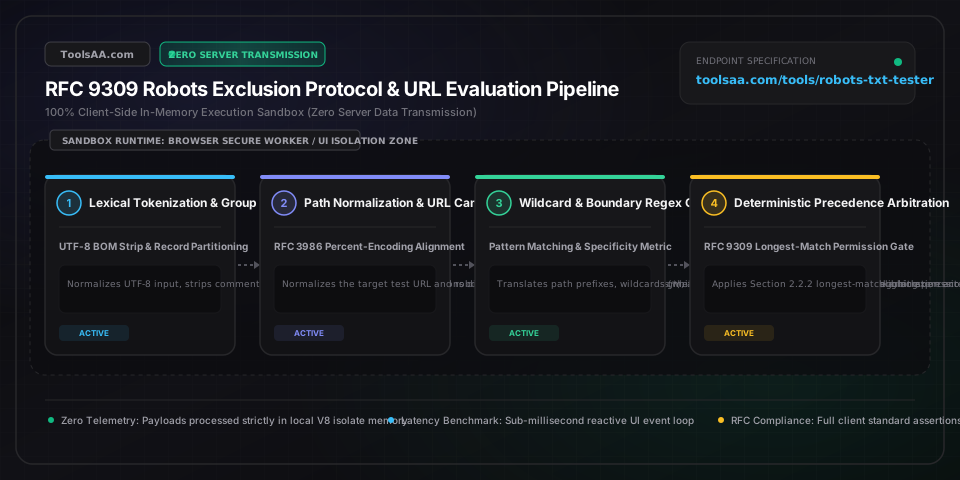
Step inputHTTP 200Step normalize29 Unit octetsStep ua partition (1)Rule line 1Step resolution2 Lbl candidatesVerdict allowed
Editor title
12 Unit lines•272 B•1 Unit groups
Valid rfc syntax
Verdict allowed

Verdict allowed sub

Googlebot
Winning rule labelRfc spec section
Rule lineRule line 8
Rule typeAllow: /catalog/
Rule length9 Unit octets
Resolution group matchedResolution wildcard fallback
Resolution reasonResolution allow precedence
Trace log title
[1]Normalized URI Path: /catalog/shoes?sort=price_asc
[2]Target User-Agent: Googlebot
[3]HTTP Response Simulation: 200
[4]No exact bot match; fallback to wildcard group (User-agent: *) at line 1
[5]Line 6: [Disallow: /*?*sort=] MATCH (Length: 9, Regex: ^/.*\?.*sort=)
[6]Line 8: [Allow: /catalog/] MATCH (Length: 9, Regex: ^/catalog/)
[7]Line 8: Equal length tie resolved: Allow takes precedence.
[8]Final Verdict: ALLOWED by winning rule on line 8
Lbl normalized path/catalog/shoes?sort=price_asc
Regime labelGooglebot Production Standard
Live stats lines12
Live stats groups1
Live stats sitemaps2
Live stats size272 B
Live stats statusStatus compliant
Tab verdictVerdict allowed
Technical Reference & Architecture Guide

Robots.txt Tester & Syntax Validator Guide

Test and validate robots.txt syntax against RFC 9309. Check user-agent crawl permissions, debug disallow paths, and inspect sitemaps with instant browser testing.

Robots.txt Tester & Syntax Validator Guide — Client-Side In-Memory Architecture & Data Flow

Key Parameters & Controls

User-agent DirectiveCrawler Identifier Pattern

Designates the specific crawler token or wildcards targeted by subsequent rule blocks. Case-insensitive; RFC 9309 specifies that exact matching crawler tokens take strict precedence over partial prefix matches and universal wildcard (*) groups.

Default: *
Disallow Path PatternURI Path Prefix Pattern

Specifies URI path prefixes that the designated crawler must not access. An empty Disallow value (Disallow:) signifies that all site paths are permitted for crawling.

Default: /private/
Allow Directive SpecificityURI Path Exception Pattern

Specifies URI path prefixes that crawlers are permitted to access, typically used to carve out exceptions within a broader Disallow path. In RFC 9309, when Allow and Disallow match identical path lengths, Allow takes precedence.

Default: /private/public-asset.js
Wildcard Asterisk (*) PatternPattern Matching Token

Matches any sequence of zero or more valid URI characters within path strings, commonly used to block dynamic query parameters (e.g., /*?*sort=) or specific file extensions (e.g., /*.pdf$).

Default: /*?*sort=
End-of-URI Anchor ($)Boundary Anchor Token

Explicitly anchors the matching pattern to the exact terminal end of the URL path or query string, preventing accidental prefix matching of longer nested paths.

Default: /exact-page$
Crawl-delay DirectiveRate Limiting Directive (Non-Standard)

Specifies a pause interval in seconds between consecutive crawler requests. Honored by Bingbot, Yandex, and Baidu, but strictly ignored by Googlebot, which relies on Google Search Console crawl rate settings.

Default: 10
Sitemap DeclarationMetadata Locator Directive

Declares the absolute HTTPS URL of the site XML sitemap or sitemap index file. Can appear anywhere in robots.txt outside or inside user-agent groups, but best practice places declarations at the document end.

Default: https://example.com/sitemap.xml
500 KiB File Size BoundaryProtocol Boundary Limit

Official RFC 9309 Section 2.1 specification limit for robots.txt files. Major search engines (including Google and Bing) truncate parsing at 500 kibibytes (512,000 octets), treating remaining content as nonexistent.

Default: 500 KiB

Pro Tips & Best Practices

RFC 9309 Longest-Match Specificity Rule Trumps Line Order

Unlike firewalls or access control lists that evaluate rules from top to bottom, the official Robots Exclusion Protocol (RFC 9309) mandates that the directive with the greatest number of matching characters always wins. If you declare Allow: /folder/sub/ (12 characters) after Disallow: /folder/sub/restricted/ (25 characters), the longer Disallow rule wins for matching child paths regardless of their order in the file.

The Critical WordPress admin-ajax.php JavaScript Rendering Trap

Blocking /wp-admin/ without explicitly declaring Allow: /wp-admin/admin-ajax.php prevents Googlebot Web Rendering Service (WRS) from executing asynchronous frontend AJAX requests. This causes Googlebot to render broken page layouts, fail mobile-friendly tests, and incorrectly devalue interactive components.

Robots.txt Disallow Does NOT Prevent Google URL Indexing

A Disallow directive tells search engines not to crawl or fetch the content of a page, but it does NOT remove or prevent the URL from appearing in Google search results if external links point to it. Google will index the URL as a bare link with the snippet 'No information is available for this page'. To reliably prevent indexing, allow crawling and implement <meta name="robots" content="noindex"> or the X-Robots-Tag: noindex HTTP header.

Complete Deprecation of the Noindex Directive in Robots.txt

Google officially ceased supporting the unofficial Noindex directive in robots.txt on September 1, 2019. Any noindex rules remaining inside robots.txt are treated as invalid syntax or completely ignored. Sites relying on this legacy hack risk accidental organic indexing of sensitive administrative and staging URLs.

Decoupling Search Indexing from Generative AI Training

To prevent your proprietary content from being ingested by AI models without sacrificing organic Google search rankings, block Google-Extended rather than Googlebot. Google-Extended is the distinct crawler token used for Gemini, Vertex AI, and AI Overviews training, whereas Googlebot handles core search web indexing.

UTF-8 Byte Order Mark (BOM) Silent Parser Invalidation

Saving robots.txt in UTF-8 with a Byte Order Mark (BOM: \uFEFF) causes strict parsers to fail to recognize the initial User-agent token on line 1, as the BOM precedes the characters. This effectively invalidates the first user-agent group and causes search engines to treat initial directives as orphaned comments.

Common Gotchas & Troubleshooting

⚠️URL displays 'Indexed, though blocked by robots.txt' warning in Google Search Console

This warning occurs when a page is disallowed in robots.txt, yet Google has discovered the URL via internal or external backlinks. Because Google cannot fetch the page content, it cannot see on-page noindex tags. To resolve this, remove the Disallow rule in robots.txt to permit crawling, add a <meta name="robots" content="noindex"> tag or X-Robots-Tag: noindex header to the HTML response, and wait for Googlebot to crawl and de-index the page.

⚠️Explicit Allow rule is ignored and URL remains Disallowed

Under RFC 9309 Section 2.2.2, directive evaluation is governed by character length specificity, not file position. If your Disallow rule contains more matching characters than your Allow rule (e.g., Disallow: /products/archived/ at 20 characters vs Allow: /products/ at 10 characters), the Disallow rule takes precedence. Ensure your Allow directive matches an equal or greater number of characters, using end anchors ($) or specific path segments.

⚠️Googlebot ignores Crawl-delay and exhausts web server CPU and memory

Googlebot has never supported or parsed the Crawl-delay directive in robots.txt. To throttle Googlebot crawl requests, adjust the crawl rate slider inside Google Search Console (Legacy Webmasters tools) or configure your web server or reverse proxy (Nginx, Cloudflare) to return HTTP 429 (Too Many Requests) or HTTP 503 (Service Unavailable) status codes with an explicit Retry-After: 120 header.

⚠️Directory Disallow rule inadvertently blocks un-slashed file names

Declaring Disallow: /press without a trailing slash matches every URL beginning with /press, including /press-releases/, /press.html, and /pressure-washing/. To restrict blocking exclusively to the directory and its sub-resources, always append a trailing slash: Disallow: /press/.

⚠️AI scrapers (CCBot, GPTBot) continue crawling despite wildcard User-agent Disallow

When a scraper declares its own distinct crawler token (e.g., GPTBot or CCBot), RFC 9309 mandates that an explicit group matching that token overrides the universal User-agent: * group. If your robots.txt contains a separate block for GPTBot with permissive rules, or if the bot operates via unannounced rotating proxies, wildcard rules are bypassed. Create explicit blocks for User-agent: GPTBot, User-agent: ClaudeBot, and User-agent: CCBot with Disallow: /.

Frequently Asked Questions

How does the RFC 9309 longest-match rule resolve conflicting Allow and Disallow directives?▼

Under IETF RFC 9309 Section 2.2.2, when a URL matches both an Allow and a Disallow directive within the same user-agent group, the parser calculates the length of each matching pattern in octets. The directive with the longest matching character length wins. For example, for the URL /shop/sale/shoes, Disallow: /shop/sale/ (11 characters) overrides Allow: /shop/ (6 characters). If both patterns have the exact same character length, RFC 9309 mandates that the Allow directive takes precedence.

Does blocking a URL in robots.txt prevent it from appearing in Google search results?▼

No. Blocking a URL in robots.txt only prevents search engine crawlers from downloading and parsing the content of that page. If other websites or internal pages link to the blocked URL, Google can still index the URL based on external anchor text, displaying it in search results without a snippet. To completely remove a page from Google search results, allow it in robots.txt and apply a noindex meta robots tag or X-Robots-Tag: noindex HTTP response header.

How do I block AI scrapers like GPTBot and ClaudeBot without harming organic SEO?▼

To block AI foundation model training scrapers while preserving organic search visibility, add explicit user-agent groups for AI bots with Disallow: /, while keeping User-agent: Googlebot and User-agent: Bingbot allowed. Common AI bot tokens include GPTBot, ChatGPT-User, ClaudeBot, AnthropicAI, CCBot, Google-Extended, PerplexityBot, Bytespider, and Diffbot. Blocking Google-Extended specifically disables AI training usage without impacting standard Google Search crawling or indexing.

What is the difference between robots.txt Disallow and the noindex meta tag?▼

Robots.txt Disallow is a crawl-prevention directive: it stops search engine bots from requesting the page file, conserving server bandwidth and crawl budget, but does not guarantee omission from search indexes. Conversely, the meta name="robots" content="noindex" tag is an indexation-prevention directive: it instructs search engines to remove the page from search result listings. For a noindex tag to be processed, search engines must be allowed to crawl the page in robots.txt.

Why does Google Search ignore the Crawl-delay directive in robots.txt?▼

Googlebot does not support the Crawl-delay directive because Google distributed crawling infrastructure uses dynamic, automated load-sensing algorithms that adjust request rates in real time based on origin server response latency and error rates. If Googlebot is placing excessive load on your server, manage the crawl frequency via the Google Search Console Crawl Rate settings, or return HTTP 429 or 503 status codes with a Retry-After header.

What is the maximum file size limit for a robots.txt file before search engines truncate it?▼

The official RFC 9309 standard establishes a maximum file size limit of 500 kibibytes (KiB), equivalent to 512,000 octets. Major search engines including Google and Bing truncate robots.txt files exceeding 500 KiB and process only the initial content, discarding all subsequent directives. Furthermore, if a robots.txt file takes longer than 30 seconds to fetch, search engines treat it as a temporary 5xx server error and may halt crawling entirely.

Related Tools & Utilities

All Tools →