Diff Checker & Text Compare Tool

Diff Checker & Text Compare Tool

Hero badge

Compare text, code, and files with our fast diff checker tool. Inspect side-by-side or inline character-level changes, ignore whitespace, and export unified diffs.

Presets
Pipe title
Metric similarity69.6%Metric myers distance8
Pipe step1CRLF→LF • NormalizedPipe step2D = 8 (O(ND))Pipe step3Opt granularity wordsPipe step4+5 / -3 (2 hunks)
Lbl granularity
Lbl original buffer: 11L • 21W • 193C|Lbl modified buffer: 12L • 24W • 237C
LF
1/2
1{
2 "status": 200,
3 "service": "auth-gateway",
4 "version": "1.4.2",
5 "features": ["oauth2", "jwt", "rate-limit"],
6 "timeoutMs": 5000,
7 "cache": {
8 "enabled": true,
9 "ttl": 3600
10 }
11}
1{
2 "status": 200,
3 "service": "auth-gateway",
4
5 "version": "1.5.limit"],
6 "features": ["oauth2", "jwt", "rate-limit", "mfa-totp,
7 "timeoutMs": 3000,
8 "cache": {
9 "enabled": true,
10 "ttl": 7200,
11 "ttl": 3600
12 }
13}
+5-3|2 Metric chunks
Opt granularity words|69.6% Metric similarity
Stat1 label
69.6%
Metric similarity desc
Stat2 label
+5 / -3
2 Metric chunks desc
Stat3 label
Lbl space optimized
Lbl zero telemetry

Client-Side Processing

High-performance calculation executed entirely in browser memory.

Zero Server Upload Privacy

All payloads remain strictly local with zero external server communication.

Production Ready Export

Clean, optimized output formats ready for immediate deployment.
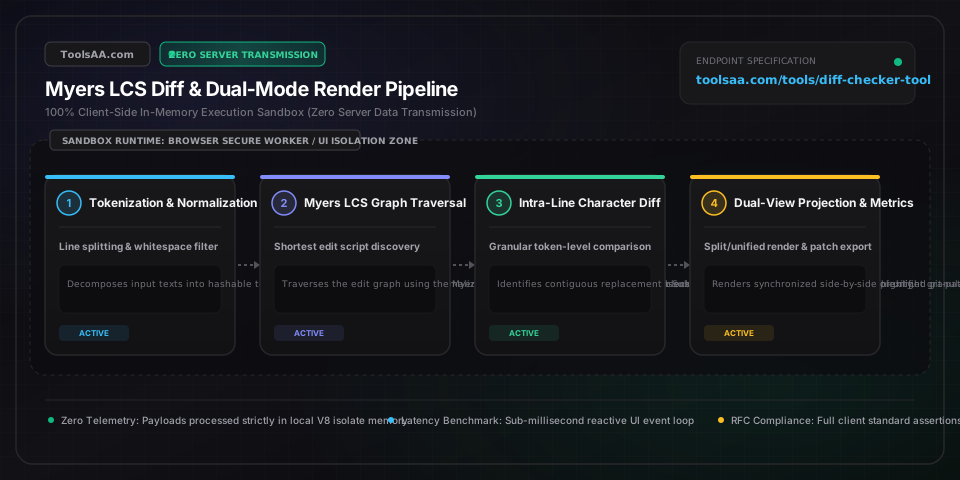
Technical Reference & Architecture Guide

Diff Checker & Text Compare Tool Guide

Compare text, code, and files with our fast diff checker tool. Inspect side-by-side or inline character-level changes, ignore whitespace, and export unified diffs.

Diff Checker & Text Compare Tool Guide — Client-Side In-Memory Architecture & Data Flow

Key Parameters & Controls

diffGranularitystring (lines | words | chars)

Defines tokenization boundary resolution for the Myers edit graph. Line mode tokenizes by newline delimiters (\n) for syntactic code diffs; word mode tokenizes via Unicode word boundaries (\b) for legal redlines; char mode executes atomic UTF-16 code point comparisons for cryptographic hashes and tokens.

Default: words
viewModestring (split | unified)

Controls visual layout presentation. 'split' renders synchronous dual-pane side-by-side columns with viewport scroll anchoring; 'unified' compiles a single-column POSIX-compliant patch view with hunk delimiters (@@ -l,s +l,s @@) per IEEE Std 1003.1.

Default: split
ignoreWhitespaceboolean

Normalizes whitespace tokens before constructing the shortest edit script. Strips carriage returns (\r\n to \n), collapses multiple spaces and tabs into single delimiters, and trims trailing line padding to eliminate cosmetic formatting changes.

Default: true
ignoreCaseboolean

Applies case folding via Unicode full case-mapping prior to Myers diagonal traversal, treating uppercase and lowercase glyphs as identical tokens while preserving original display casing in rendered hunks.

Default: false
similarityScorenumber (percentage 0.0 - 100.0%)

Normalized semantic similarity coefficient computed via the Dice-Sørensen metric: (2 × |LCS|) / (|A| + |B|) × 100%. Scores >= 80% indicate minor revisions, 50–79% denote substantial refactoring, and < 30% signify near-total content divergence.

Default: 100.0%

Pro Tips & Best Practices

Use Word Granularity for Legal and Editorial Redlines

When comparing contracts, NDAs, or markdown documentation, switch from Line to Word granularity. Line-based Myers diff treats an entire 200-word paragraph as a 100% deletion and re-insertion if a single punctuation mark or date changes, whereas word-level tokenization pinpoints the exact mutated word in high-contrast emerald and rose gutters.

Eliminate False Positives with Whitespace Normalization

Cross-platform collaboration frequently introduces invisible CRLF (Windows \r\n) vs. LF (Unix \n) line ending mismatches and space-versus-tab indentation drift. Enabling 'Ignore Whitespace' strips carriage returns and collapses token sequences, isolating genuine semantic logic modifications from non-functional whitespace mutations.

Export Clean Patches for Git and CI/CD Automation

Toggle viewMode to 'unified' before downloading .patch files. The output strictly follows POSIX IEEE Std 1003.1 and RFC unified diff format with valid two-line headers ('--- a/original' and '+++ b/modified') and standard hunk headers ('@@ -k,l +m,n @@'), enabling direct application via 'git apply patch.diff' or 'patch -p1'.

Leverage the SVG Minimap for Fast Long-Document Audits

When auditing files exceeding 1,000 lines, use the right-side SVG Diff Minimap viewport. Colored linear tick marks calculate proportional vertical coordinates (y = lineIndex / totalLines * canvasHeight), enabling one-click navigation directly to isolated mutations without manual DOM scroll hunting.

Common Gotchas & Troubleshooting

⚠️The entire document appears highlighted as deleted and re-inserted despite identical content.

This occurs when comparing files across mismatched operating system newline standards (Windows CRLF '\r\n' vs. Unix LF '\n') or differing UTF-8 BOM byte order marks (0xEF, 0xBB, 0xBF). Enable 'Ignore Whitespace' to strip carriage returns during lexical tokenization, or normalize line feeds to '\n' prior to diff execution.

⚠️Sub-line character diff runs slowly on massive minified JavaScript or single-line JSON files.

Character-by-character comparison has O((N+M)D) worst-case time complexity where D represents the edit distance. For single-line minified files exceeding 50,000 characters, switch granularity to 'Lines' or format the JSON first using an online JSON beautifier before comparing.

⚠️Synchronized scrolling between the two panes feels out of alignment on long paragraphs.

Split view panes align content using virtual line anchoring based on Myers deletion and insertion hunk pairs. When one document contains large asymmetric insertions, ensure 'Side-by-Side Lock' is active; the tool automatically inserts virtual placeholder gutters on the opposite pane to preserve parallel line alignment.

Frequently Asked Questions

How does the Myers diff algorithm compute line additions and deletions?▼

The Myers diff algorithm models text comparison as finding the shortest path on an edit graph where horizontal moves represent deletions and vertical moves represent insertions. By using greedy search along diagonal paths representing matching tokens, it discovers the Longest Common Subsequence (LCS) and generates the minimal possible edit script in O((N+M)D) time, where N and M are document lengths and D is the edit distance.

What is the difference between a unified diff and a side-by-side split diff?▼

A side-by-side split diff places the original and modified texts in two parallel columns, displaying additions and deletions side-by-side with synchronized scrolling. A unified diff combines both versions into a single sequential column, displaying unchanged context lines alongside deletions prefixed with '-' in red and additions prefixed with '+' in green, matching the standard format used by Git, GitHub, and terminal patch tools.

How do I ignore whitespace changes and carriage returns in diff comparison?▼

Activate the 'Ignore Whitespace' toggle in the configuration bar. This instructs the preprocessor to strip carriage returns (CRLF to LF), trim trailing spaces from every line, and treat sequences of multiple spaces or tabs as a single delimiter, isolating genuine code or content changes from formatting differences.

Can I generate a standard Git patch file from an online diff checker?▼

Yes. This tool generates standard RFC-compliant unified diff patch files. Switch to the 'Unified Diff' view or click 'Export .patch' to download a clean text file complete with file headers ('--- a/original', '+++ b/modified') and hunk headers ('@@ -1,5 +1,6 @@') that can be applied directly via the 'git apply' terminal command.

How is the text similarity percentage calculated in diff analysis?▼

The similarity score is computed using the Dice-Sorensen coefficient based on the Myers Longest Common Subsequence: Similarity = (2 * |LCS|) / (|Original Tokens| + |Modified Tokens|) * 100%. An exact match yields 100.0%, while completely disjoint documents yield 0.0%.

Related Tools & Utilities

All Tools →