cURL to Fetch Converter (JavaScript & Node)

cURL to Fetch Converter (JavaScript & Node)

Convert cURL to Fetch API syntax instantly. Parse HTTP headers, auth tokens, cookies, and JSON body payloads into modern async/await JavaScript code.

Lbl quick presets
Card input title
Lbl runtime flavor
Lbl timeout input10,000 Lbl ms
/**
 * Generated by ToolsAA cURL to Fetch Engine (ES2022 async/await)
 * Zero external dependencies. 100% Client-Side Executed.
 */
async function executeRequest() {
  const url = 'https://api.stripe.com/v1/payment_intents';

  const body = new URLSearchParams({
    'amount': '2000',
    'currency': 'usd',
    'payment_method_types[]': 'card',
  });

  const controller = new AbortController();
  const timeoutId = setTimeout(() => controller.abort(), 10000);

  try {
    const response = await fetch(url, {
      method: 'POST',
      headers: {
    'Content-Type': 'application/x-www-form-urlencoded',
    'Authorization': 'Basic ' + (typeof window !== 'undefined' ? btoa('sk_test_51MzEXAMPLESECRETKEY:') : Buffer.from('sk_test_51MzEXAMPLESECRETKEY:').toString('base64')),
      },
    body,
    credentials: 'include',
      signal: controller.signal,
    });

    clearTimeout(timeoutId);

    if (!response.ok) {
      throw new Error(`HTTP error! status: ${response.status} ${response.statusText}`);
    }

    // Automatic MIME response parser
    const contentType = response.headers.get('content-type') || '';
    if (contentType.includes('application/json')) {
      const data = await response.json();
      return data;
    }

    return await response.text();
  } catch (error) {
    clearTimeout(timeoutId);
    if ((error as any)?.name === 'AbortError') {
      console.error('Request timed out after 10000ms');
    }
    throw error;
  }
}

// Call request
executeRequest()
  .then(data => console.log('Response Payload:', data))
  .catch(err => console.error('Fetch Execution Failed:', err));

Svg pipeline title

Lbl tokens: 12•Lbl headers: 1•Svg score label 76%•BROWSER
Svg step1 titleSvg step1 desc12 Svg tokens suffix (220 Lbl chars)Svg step2 titleSvg auth active • Svg securePOST1 Lbl headersSvg step3 titleURLENCODED Lbl payload preview52 Lbl bytes abbr (Body)Svg step4 title76%BROWSER55 Lbl lines (10000ms)
Primary MetricRFC 9110 DFA
Lbl methodPOST
Lbl total headers1
Lbl payload typeURLENCODED
Efficiency / CapacityStat zero server
Net OutputBROWSER
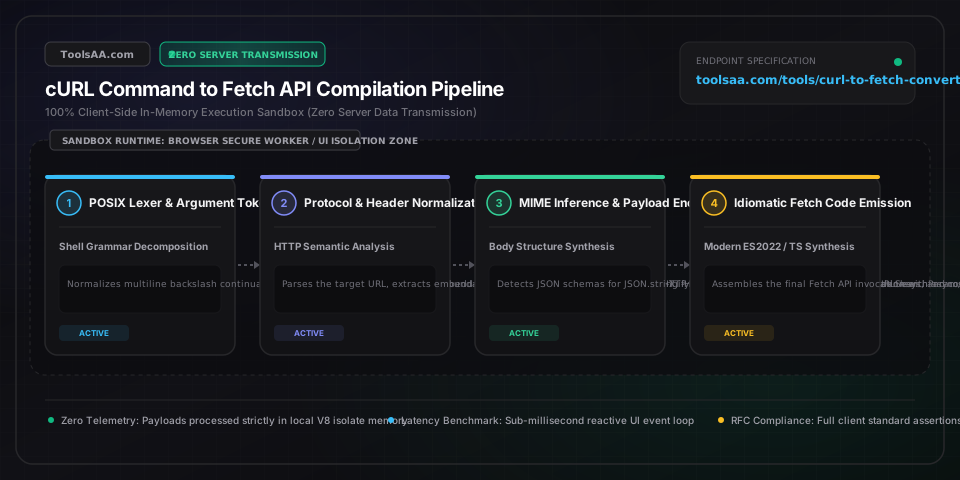
Technical Reference & Architecture Guide

cURL to Fetch Converter (JavaScript & Node) Guide

Convert cURL to Fetch API syntax instantly. Parse HTTP headers, auth tokens, cookies, and JSON body payloads into modern async/await JavaScript code.

cURL to Fetch Converter (JavaScript & Node) Guide — Client-Side In-Memory Architecture & Data Flow

Key Parameters & Controls

cURL Command CLI StringPOSIX Shell Command (Bash / Zsh)

Raw command-line invocation starting with 'curl'. Supports multiline backslash line continuations, single and double shell quote escaping, and standard POSIX flag conventions.

Default: curl -X GET 'https://api.example.com/data'
Target Runtime & Framework SyntaxJavaScript / TypeScript Target Flavor

Determines code emission formatting: standard browser ES2022 async/await, strongly typed TypeScript with ApiResponse generics, Node.js 18+ server syntax with AbortSignal, Next.js App Router with caching tags, or Axios client syntax.

Default: browser
HTTP Method Resolution (-X / --request)RFC 9110 HTTP Verb (GET, POST, PUT, DELETE, PATCH, HEAD)

HTTP request verb. When -X is omitted, cURL automatically defaults to GET unless request body flags (-d, --data, -F) are present, which implicitly switch the default method to POST.

Default: GET
HTTP Request Headers (-H / --header)HTTP Header Key-Value Pairs

Custom request metadata headers. Browser fetch implementations enforce forbidden header restrictions (e.g. Host, Content-Length, Cookie cannot be manually overwritten via Headers API for security isolation).

Default: Content-Type: application/json
Payload Data Body (-d / --data / -F)HTTP Request Body Entity

Data payload transferred in POST, PUT, or PATCH requests. Parsed dynamically into JSON.stringify() for JSON strings, URLSearchParams() for application/x-www-form-urlencoded, or FormData() for multipart uploads.

Default: {}
Basic & Bearer Authentication (-u / Bearer)Authorization Credential String

Authentication credentials. cURL -u user:pass is synthesized into 'Authorization: Basic <base64>', while -H 'Authorization: Bearer <token>' is extracted into structured variables with optional redaction masking.

Default: Bearer <TOKEN>

Pro Tips & Best Practices

Fetch Does Not Reject on HTTP 4xx or 5xx Statuses (The response.ok Trap)

Unlike cURL CLI (which prints error status codes) or Axios (which rejects promises on 4xx/5xx responses), the native JavaScript Fetch API only rejects its promise when a genuine network failure occurs or CORS blocks the request. A 404 Not Found, 401 Unauthorized, or 500 Internal Server Error still resolves successfully. You must explicitly evaluate 'if (!response.ok) throw new Error(`HTTP error! status: ${response.status}`);' before calling response.json() or response.text().

Never Manually Set Content-Type on Multipart/Form-Data in Fetch

When converting cURL -F ('--form') file upload commands to Fetch, do NOT set the 'Content-Type: multipart/form-data' header manually. Doing so strips the dynamic boundary parameter (e.g. 'boundary=----WebKitFormBoundary...') that the browser automatically generates to delimit payload segments. Simply pass the FormData instance directly to the body option, and the browser will automatically compute the correct Content-Type with boundary delimiters.

Handling cURL -d Form Data vs JSON Serialization Pitfalls

In cURL, passing -d without an explicit Content-Type header defaults to 'application/x-www-form-urlencoded', not JSON. Many developers mistakenly wrap -d 'key=val&foo=bar' inside JSON.stringify(). Always inspect whether your payload is key-value pairs (which should use 'new URLSearchParams({ key: 'val', foo: 'bar' })') or valid JSON (which requires 'JSON.stringify(data)' and an explicit 'Content-Type: application/json' header).

Browser Forbidden Header Restrictions vs Terminal cURL Capabilities

Terminal cURL can forge any HTTP header, including 'Cookie', 'User-Agent', 'Referer', and 'Host'. However, in browser JavaScript Fetch, the W3C Fetch specification designates these as 'Forbidden Header Names' to prevent cross-site request forgery and cookie theft. Browser fetch will silently discard manual 'Cookie' headers; instead, pass 'credentials: "include"' (or 'same-origin') to permit the browser's cookie jar to attach session tokens automatically.

Common Gotchas & Troubleshooting

⚠️TypeError: Failed to Fetch (CORS Error in Browser While cURL Succeeds in Terminal)

cURL is a command-line tool exempt from browser Same-Origin Policy (SOP). When running fetch() in client-side browser JavaScript against a third-party API that does not return 'Access-Control-Allow-Origin: *' headers, the browser blocks the response. To resolve this, call the API from a backend server (Node.js, Next.js Route Handler, or Cloudflare Worker) where CORS does not apply, or configure proper CORS headers on the destination server.

⚠️Unexpected Token in JSON at Position 0 When Parsing Body Response

This error occurs when calling 'await response.json()' on an API endpoint that returned an empty body (e.g., 204 No Content), an HTML error page (e.g., Cloudflare 502 Bad Gateway), or plain text. Always verify 'response.headers.get('content-type')?.includes('application/json')' before calling response.json(), or check 'const text = await response.text()' with safe JSON.parse wrapping.

⚠️Multipart Form File Upload Fails with 'No Boundary Found' on Backend Server

This happens when 'Content-Type: multipart/form-data' is explicitly declared in fetch headers. When using FormData(), remove the 'Content-Type' header entirely from the headers object. The browser or Node.js runtime will automatically inject 'multipart/form-data; boundary=----WebKitFormBoundary...' with the exact calculated multipart boundary.

⚠️cURL Command with Backslash Line Continuations Fails to Parse

When copying multiline cURL commands from bash scripts or developer documentation, trailing spaces after the backslash character ('\ ') cause bash and parsers to treat the newline as literal text rather than an argument continuation. Our parser automatically normalizes '\ ' and '\ ' tokens, stripping whitespace and merging multiline terminal snippets into a unified argument sequence.

Frequently Asked Questions

How do you convert a cURL command into JavaScript Fetch code?▼

To convert a cURL command to Fetch, parse the target URL from the command line, map -X to the fetch 'method' property (GET, POST, PUT, DELETE), convert each -H argument into key-value pairs inside the 'headers' object, format -d or --data payloads into 'JSON.stringify(payload)' or 'new URLSearchParams(payload)' inside the 'body' property, and wrap the call in an 'async/await' function with 'const response = await fetch(url, options)'.

Why does a cURL request work in terminal but fail with a CORS error in fetch?▼

cURL operates as a raw HTTP client without browser security sandboxing, so it ignores Same-Origin Policy and Cross-Origin Resource Sharing (CORS) rules. Modern web browsers enforce CORS to prevent unauthorized web applications from reading sensitive cross-origin data. If the target server does not send 'Access-Control-Allow-Origin' matching your web app's origin, the browser aborts the fetch call. To fix this, proxy the request through a backend server or serverless API route.

How do you handle cURL Basic Auth (-u user:password) in JavaScript Fetch?▼

In cURL, '-u username:password' sends HTTP Basic Authentication. In modern browser JavaScript Fetch, encode the credentials using Base64 via 'btoa("username:password")' and attach it as 'headers: { Authorization: `Basic ${btoa("username:password")}` }'. In Node.js, use 'Buffer.from("username:password").toString("base64")' to achieve the identical standard header value.

How do you send cookies in Fetch API like cURL -b cookie string?▼

In browser JavaScript, the 'Cookie' header is a forbidden header name and cannot be set programmatically in fetch() headers due to security standards. To send cookies stored in the browser for the target domain, set 'credentials: "include"' in the fetch options object. In Node.js server environments (where browser security restrictions do not apply), you can pass 'Cookie: session_id=xyz' directly inside the headers object.

What is the difference between cURL -d, --data-raw, and --data-urlencode in Fetch?▼

In cURL, '-d' and '--data-raw' transmit the exact string provided, defaulting to Content-Type 'application/x-www-form-urlencoded' unless overridden by -H. In Fetch, if the data is JSON, you must serialize it via JSON.stringify() with 'Content-Type: application/json'. If the cURL uses '--data-urlencode', parameter values are URL-encoded before sending, which in Fetch is natively handled by passing key-value pairs into 'new URLSearchParams({ key: value }).toString()'.

Related Tools & Utilities

All Tools →