Tool title short

Google SERP Simulator & Snippet Preview Tool

Lbl live engine

Preview Google SERP desktop and mobile search snippets with accurate pixel width truncation, rich snippet schema badges, sitelinks, and live CTR scoring.

Lbl presets label
Svg pipeline title
Svg status active|551Unit px Lbl title / 1140Unit px Lbl desc
Svg title bar551Unit px / 600Unit px (Status safe)Svg desc bar1140Unit px / 960Unit px Svg node inflation+24px (2 tokens)Matches: wireless, headphonesSvg rewrite riskLOW (24%)Risk low badge83Svg ctr power/ 100 max
Title input cockpit
54 Unit ch|551Unit px / 600Unit px
Lbl title actions
Lbl separator
154 Unit ch|1140Unit px / 960Unit px
Lbl rich features
★ 4.9 (1,420)
$299.99
Lbl device
Lbl theme
wireless headphones
A
Audiophile Gear›products › noise-canceling-wireless-headphones

Best Noise-Canceling Wireless Headphones (2026 Review)

★ 4.9(1,420)
·
$299.99Lbl in stock
Experience deep acoustic isolation with our top-rated wireless ANC headphones. Enjoy 40-hour battery life, spatial audio, and ...
Stat title usage551 / 600 Unit px
92%
Stat desc usage1140 / 960 Unit px
119%
Stat ctr rating83 / 100
Grade excellent

Client-Side Processing

High-performance calculation executed entirely in browser memory.

Zero Server Upload Privacy

All payloads remain strictly local with zero external server communication.

Production Ready Export

Clean, optimized output formats ready for immediate deployment.
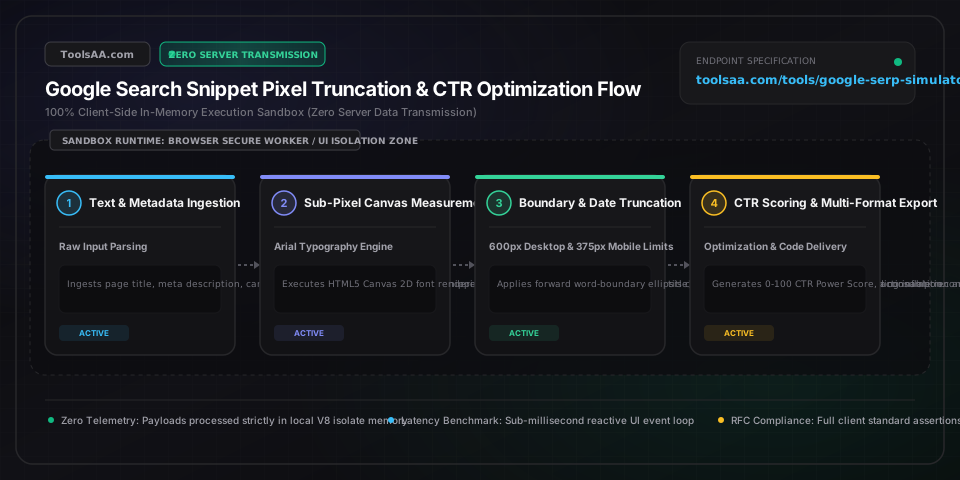
Technical Reference & Architecture Guide

Google SERP Simulator & Snippet Preview Tool Guide

Preview Google SERP desktop and mobile search snippets with accurate pixel width truncation, rich snippet schema badges, sitelinks, and live CTR scoring.

Google SERP Simulator & Snippet Preview Tool Guide — Client-Side In-Memory Architecture & Data Flow

Key Parameters & Controls

Page Title (SEO Title Tag)string

The HTML <title> tag rendered as the clickable headline in Google SERPs. Evaluated client-side via HTML5 Canvas measureText() in O(n) algorithmic complexity against Google desktop 20px Arial font metrics. Hard container cutoff occurs at 600px, requiring an optimal target corridor of 500px to 580px (~50-60 Latin characters or ~28-32 full-width CJK glyphs) to prevent ellipsis truncation.

Default: Google SERP Simulator & Snippet Preview Tool
Meta Descriptionstring

The HTML <meta name="description"> tag providing an editorial snippet below the headline. Evaluated against Google's 14px Arial rendering engine, bounded by a 960px container over a strict two-line desktop maximum (~155-160 Latin characters). Operates within an in-memory browser sandbox with zero network telemetry.

Default: Preview Google SERP desktop and mobile search snippets with accurate pixel width truncation, rich snippet schema badges, sitelinks, and live CTR scoring.
Canonical URL & Breadcrumbstring

RFC 3986-compliant absolute web URI parsed into hierarchical schema breadcrumb tokens (Domain › Category › Subpath) accompanied by an RFC 6596 canonical validation check, Punycode IDN normalization, and site favicon binding.

Default: https://toolsaa.com/tools/google-serp-simulator
Target Search Keywordstring

The primary lexical search query used to simulate Google's dynamic bolding mechanism. Matched substring tokens switch from font-weight 400 to 700, expanding glyph physical bounding boxes by 10% to 15% and triggering premature container overflow.

Default: google serp simulator
Rich Snippet Schema Badgesobject

Structured data schema attributes conforming to Schema.org vocabulary (Product, AggregateRating, Review, FAQPage). Evaluates visual SERP real estate inflation including star rating icons, numerical review count, localized currency pricing, in-stock status, and expandable sitelinks.

Default: { "ratingValue": 4.9, "reviewCount": 1240, "price": 0.00 }

Pro Tips & Best Practices

Design for Pixels, Not Arbitrary Character Counts

Google SERP headline containers are constrained by a strict 600-pixel visual boundary, not an arbitrary 60-character count. Because proportional typeface glyphs vary drastically—an uppercase Arial 'W' occupies 19px while a lowercase 'i' occupies only 4px—two headlines with identical 58-character lengths can differ in rendered width by over 160 pixels. Always calculate total visual pixel width via client-side Canvas font metrics, maintaining a safe 500px to 580px threshold.

Account for Dynamic Query Bolding Inflation

When a searcher's query terms match tokens within your title or meta description, Google automatically applies bold font-weight (700). Bold glyphs expand rendered width by 10% to 15% (for example, standard Arial 'm' measures ~14.4px whereas bold 'm' expands to ~16.2px). A title measuring 590px in plain text will breach the 600px threshold upon query matching, causing Google to truncate it with an ellipsis. Always benchmark your snippets against your highest-volume target keywords with bolding enabled.

Deduct 85px to 110px for the Published Date Prefix Penalty

For time-sensitive content, news, and technical documentation, Google's crawling algorithms automatically prepend a published or modified timestamp (e.g. 'Oct 24, 2026 — ') to the meta description. This prefix consumes between 85px and 110px of display width, permanently subtracting 13 to 18 characters from your desktop visual budget (reducing usable length from ~160 to ~142 characters). Always front-load your primary call-to-action and core semantic entities within the first 110 characters.

Harness Psychological Brackets and Year Tokens for CTR Multipliers

Empirical SERP click-through rate analyses reveal that bracketed modifiers (e.g., [2026 Guide], (Free Template), [Case Study]) yield an 18% to 33% increase in organic CTR without rank position changes. To maximize visibility, place your primary target entity in the initial 35 characters, follow with an emotional or economic value proposition, and anchor the title with parenthetical format qualifiers.

Common Gotchas & Troubleshooting

⚠️Google displays a completely different title from my HTML title tag in search results

Google algorithmic title rewrites occur on approximately 33% of indexed URLs when the HTML <title> is keyword-stuffed, exceeds 600px, uses repetitive boilerplate, or diverges from user intent. The algorithm substitutes the title with the page's primary <h1> heading, OpenGraph og:title, or high-frequency inbound anchor text. To neutralize rewrites, ensure the <title> tag closely aligns with the primary <h1>, restrict pixel width between 500px and 580px, and eliminate repetitive brand suffixes across internal taxonomy pages.

⚠️Meta description is truncated on mobile devices despite passing desktop pixel limits

Mobile Google SERP viewports (375px to 390px display width) enforce aggressive line-clamping and multi-line wrapping that truncates descriptions after approximately 110 to 120 characters, compared to 155 to 160 characters on desktop. Furthermore, mobile snippets render site names, favicons, and timestamps in prominent vertical card stacks. Position critical conversion hooks and high-intent keyword tokens within the initial 100 characters to guarantee complete cross-device rendering.

⚠️Rich snippet star ratings and FAQ accordions are not appearing in live Google SERP

Structured data rendering is an algorithmic privilege rather than a guaranteed display directive. Validate that your JSON-LD passes the Google Rich Results Test without schema syntax errors, verify AggregateRating references genuine third-party buyer feedback rather than self-serving aggregate reviews, and ensure FAQ text is directly visible in the static DOM. Note that Google core algorithmic updates restrict FAQ rich results predominantly to authoritative government and healthcare web resources.

Frequently Asked Questions

How many pixels wide can a Google title tag be before truncation occurs?▼

Google desktop search results enforce a hard visual truncation limit of 600 pixels rendered in Arial 20px font, while mobile viewports allow titles to wrap across two lines up to roughly 600 total pixels. To ensure title tags display completely without being cut off by an ellipsis (...), maintain your title tag length between 500px and 580px, which corresponds to approximately 50 to 60 standard Latin characters.

Why does Google rewrite or replace page titles in search results?▼

Google algorithms rewrite approximately 30% to 40% of page titles when the provided HTML <title> is excessively long (>600px), over-optimized with keyword repetition, boilerplate across multiple pages, or poorly aligned with the search query. In these instances, Google replaces the tag with the on-page <h1> heading, breadcrumb hierarchical labels, or inbound anchor text that more accurately reflects the destination content.

How does the published date prefix affect meta description length?▼

When Google prepends a published or modified date (e.g., 'Oct 24, 2026 — ') to a search snippet, it consumes 85 to 110 pixels of desktop visual width. This reduces available description room by approximately 13 to 18 characters, lowering your effective snippet threshold from ~160 characters down to ~142 characters. Always front-load your primary keywords and core value proposition within the first 110 characters.

How do rich snippets with star ratings impact search click-through rates (CTR)?▼

Rich snippets featuring Schema.org star ratings, review counts, and pricing badges increase organic search click-through rates by 15% to 35% across e-commerce and SaaS verticals by introducing visual contrast and social proof directly on the SERP. Implementing valid Schema.org Product, AggregateRating, or SoftwareApplication JSON-LD markup is mandatory for algorithmic rich snippet eligibility.

Why do bolded keywords in search results cause earlier snippet truncation?▼

When a user's search query matches words in your title or meta description, Google renders those matched terms in bold Arial (700 font weight). Bold glyphs are 10% to 15% wider than standard-weight glyphs (for example, standard Arial 'm' is ~14.4px wide while bold 'm' is ~16.2px wide). If a title tag is close to the 590px ceiling, query term bolding will push total pixel width over 600px and trigger premature truncation.

Related Tools & Utilities

All Tools →