Linux Permissions & Chmod Calculator
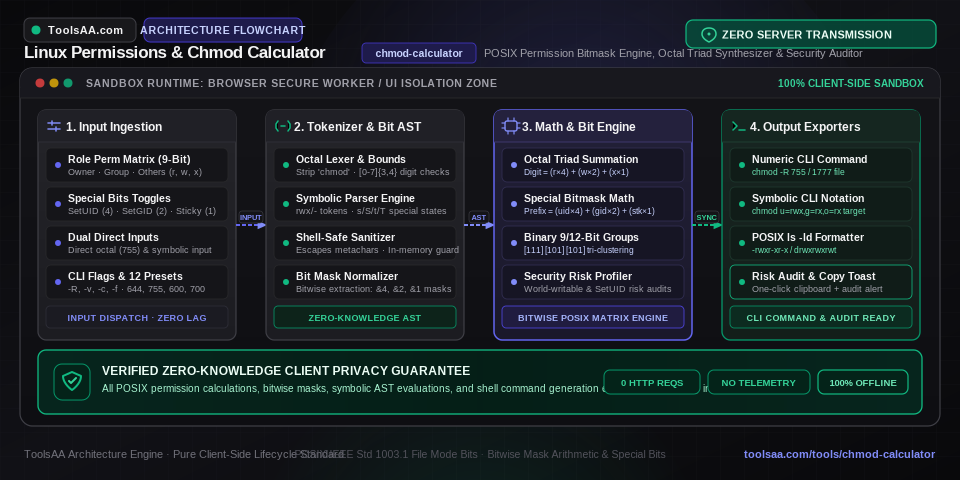
POSIX StandardVisual Unix file permissions calculator with numeric (755, 644) and symbolic (rwxr-xr-x) modes. Real-time two-way matrix sync, SetUID/SetGID/Sticky bits, and instant chmod command generator.
3 or 4 digits: [Special][Owner][Group][Others]
9 or 10 characters (optional file prefix - or d)
Auto-quoted for shell safetyStandard POSIX Safe
Interactive Permission Matrix
Owner (User)
File creator or ownerGroup
Users in assigned groupOthers (World)
Everyone else on systemPermission Representations
- Owner: Can read, modify (write), and execute programs / access folders.
- Group: Can read, cannot write, and execute.
- Others: Can read, cannot write, and execute.
Chmod Command Generator
bash / zshchown www-data:www-data script.shLinux Permissions Reference & Quick Lookup Table
Click any row below to instantly load that permission setup into the calculator.
| Numeric | Symbolic | Permission Name | Typical Unix Use Case | Action |
|---|---|---|---|---|
| 755 | rwxr-xr-x | Standard Executable | Web root folders, CGI scripts, binaries, public dirs | Apply |
| 644 | rw-r--r-- | Standard Static File | Web pages, CSS, JS, images, general documentation | Apply |
| 600 | rw------- | Private Secret File | SSH private keys (~/.ssh/id_rsa), .env configs, passwords | Apply |
| 700 | rwx------ | Private User Directory | ~/.ssh folder, root scripts, private backup directories | Apply |
| 400 | r-------- | Read-Only Key | AWS EC2 .pem private keys, locked TLS certificates | Apply |
| 664 | rw-rw-r-- | Group Writable File | Collaborative project files, shared group logs | Apply |
| 775 | rwxrwxr-x | Group Writable Folder | Shared team build directories, CMS uploads folders | Apply |
| 660 | rw-rw---- | Owner & Group Secret | Database socket files, internal team credentials | Apply |
| 777 | rwxrwxrwx | Full World Access | Never recommend for production. Quick local debugging only | Apply |
| 1777 | rwxrwxrwt | Sticky Temp Directory | Unix /tmp and /var/tmp shared directories | Apply |
| 4755 | rwsr-xr-x | SetUID Root Executable | System tools needing temporary root rights (su, passwd) | Apply |
| 2755 | rwxr-sr-x | SetGID Directory | Shared directory where new files inherit parent group | Apply |
Zero-Knowledge Local Execution
All data processing, parsing, and compilation execute strictly inside your local browser memory. Zero external server uploads.
Instant Client-Side Engine
Instant real-time reactive computation delivers immediate feedback on every keystroke with zero network latency.
Production Standards & Compliance
Strictly validates syntax, edge cases, and formatting rules for dependable production output.
Chmod Permissions Calculator & Command Generator — Reference Guide
Visual Linux/Unix file permissions calculator. Convert octal modes, symbolic notations (rwxr-xr-x), and flags into chmod commands.
Linux Numeric & Symbolic Permissions Quick Reference Table
Standard Linux / Unix chmod permission octal values, symbolic representations, and recommended security use cases for files and directories.
| Octal | Symbolic | Permission Name | Access Rights (User / Group / Others) | Standard Use Case |
|---|---|---|---|---|
| 777 | rwxrwxrwx | Full Public Access | Read, Write & Execute for All | Temporary shared folders (/tmp), development scratchpads (insecure in production) |
| 755 | rwxr-xr-x | Standard Executable / Dir | Owner: Read/Write/Exec; Group & Others: Read/Exec | Web root public directories (/var/www/html), shell scripts, binary executables |
| 750 | rwxr-x--- | Restricted Group Access | Owner: Read/Write/Exec; Group: Read/Exec; Others: None | System service directories, admin scripts shared with operations group |
| 700 | rwx------ | Private User Directory | Owner: Read/Write/Exec; Group & Others: None | User home directory (~/), private SSH key directory (~/.ssh) |
| 666 | rw-rw-rw- | Public Read / Write | Read & Write for All, No Execute | Inter-process communication pipes, generic shared cache data files |
| 644 | rw-r--r-- | Standard Public File | Owner: Read/Write; Group & Others: Read Only | HTML, CSS, images, standard web files, public system configuration files |
| 640 | rw-r----- | Protected Config File | Owner: Read/Write; Group: Read Only; Others: None | Database connection configs (wp-config.php, .env) with web server group |
| 600 | rw------- | Private Confidential File | Owner: Read/Write; Group & Others: None | SSH private keys (~/.ssh/id_rsa), SSL/TLS private keys, master .env files |
| 1777 | rwxrwxrwt | Sticky Bit Directory | All: Read/Write/Exec; Only owner can delete | System temporary directory (/tmp, /var/tmp) preventing deletion by other users |
Key Parameters & Controls
| Parameter | Type / Unit | Description | Default |
|---|---|---|---|
| User (Owner) Permissions | Bitmask (Read: 4, Write: 2, Execute: 1) | Access privileges for the file or directory owner. | 7 (rwx) |
| Group Permissions | Bitmask (Read: 4, Write: 2, Execute: 1) | Access privileges for members of the file's assigned group. | 5 (r-x) |
| Others Permissions | Bitmask (Read: 4, Write: 2, Execute: 1) | Access privileges granted to all other system users. | 5 (r-x) |
| Special Bits | Bitmask (SUID: 4, SGID: 2, Sticky: 1) | Advanced Unix execution flags (SetUID, SetGID, and Sticky Bit). | 0 (none) |
Pro Tips & Best Practices
Use 755 (drwxr-xr-x) for directories so the web server process can traverse and list folders securely without giving write rights to others.
Use 644 (-rw-r--r--) for PHP/HTML/CSS files. Sensitive config files containing database passwords should be restricted to 600 or 400.
Apply chmod 1777 on shared folders like /tmp so all users can write files but only owners can delete their own files.
Common Gotchas & Troubleshooting
⚠️Directory Permission Denied error despite read permissions
Directories require Execute (x) permission to be entered and traversed. Read permission alone only allows listing filenames without reading metadata.
⚠️SetUID flag ignored on shell scripts
Modern Linux kernels disable the SUID/SGID bit on interpreted scripts (e.g., #!/bin/bash or python) for security. Use sudoers or compiled wrappers instead.
Frequently Asked Questions
How do I calculate Linux file permissions with this chmod calculator?▼
To calculate Linux file permissions, select the desired Read (4), Write (2), and Execute (1) checkboxes for Owner, Group, and Others. The calculator instantly generates the 3-digit octal value (e.g. 755 for executables/directories or 644 for documents), the 10-character symbolic notation (rwxr-xr-x), and the executable bash chmod command.
What is the difference between chmod 777 and chmod 755?▼
chmod 777 grants full read, write, and execute permissions to everyone on the system, creating severe security vulnerabilities. chmod 755 grants write access only to the owner, while allowing group and others to read and execute.
How do octal numbers map to rwx permissions?▼
Read equals 4, Write equals 2, and Execute equals 1. Adding the numbers produces an octal digit between 0 and 7 for each of Owner, Group, and Others.
What does the Sticky Bit (1xxx) do in Linux?▼
The Sticky Bit prevents regular users from deleting or renaming files in a shared directory unless they are the owner of the file or root.
How do I recursively apply permissions to directories and files separately?▼
Use find: 'find . -type d -exec chmod 755 {} +' for directories, and 'find . -type f -exec chmod 644 {} +' for files.
Related Tools & Utilities
All Tools →Generate /etc/logrotate.d/ configuration files with daily/weekly rotation, gzip compression, dateext, size limits, and postrotate scripts.
Create hardened Linux systemd .service files with Type=simple/forking/notify, non-root execution, restarts, and sandboxing.
Generate Supervisord program configuration blocks with auto-restart, process counts, log redirection, environment variables, and user privileges.
Build systemd timer and companion service unit files with OnCalendar scheduling, OnBootSec intervals, Persistent execution, and random delays.
Design Kubernetes RBAC Role, ClusterRole, RoleBinding, and ClusterRoleBinding resources with API groups, resource verbs, and Subject service accounts.
Create and test robots.txt SEO files with Allow/Disallow directives, user-agent rules, crawl-delay, and XML sitemap links.