Universal Custom QR Code Generator & Vector Exporter
High-resolution SVG/PNG QR code generator with custom foreground/background colors, embedded logos, and custom module geometries. Everything runs 100% locally in your browser with zero server uploads.
QR Code Content
Enter any web URL. When scanned with a smartphone camera, users will be prompted to open it.
Colors & Module Geometry
Logo & Center Emblem
Error Correction Level (ECC)
Live High-Res Preview
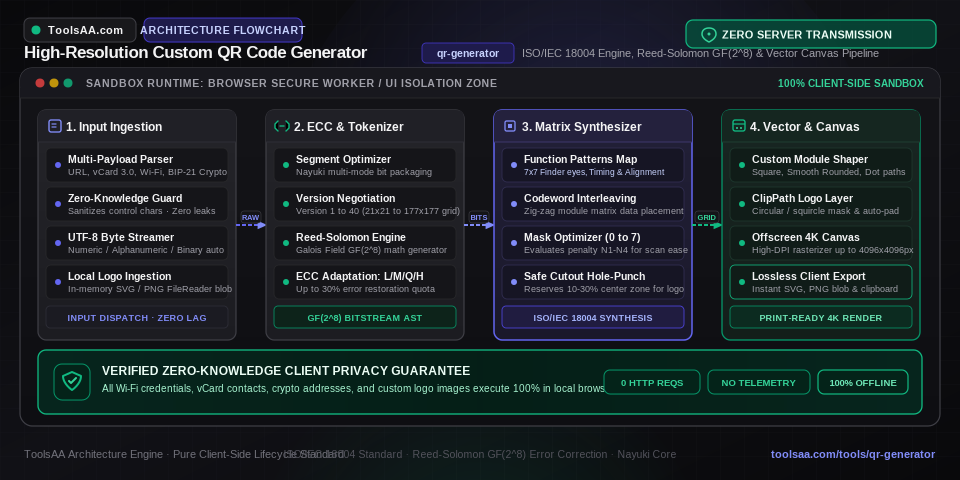
Neither your confidential Wi-Fi credentials, personal vCard contacts, nor uploaded brand logo images leave your local browser machine. Computation uses standard HTML5 Canvas and mathematical Reed-Solomon polynomial Galois Fields running entirely in client JavaScript.
100% Private Browser Execution
All data processing, parsing, and compilation execute strictly inside your local browser memory. Zero external server uploads.
Instant Interactive Calculation
Instant real-time reactive computation delivers immediate feedback on every keystroke with zero network latency.
Production Standards & Compliance
Built on verified domain equations and engineering reference constants for dependable results.
Universal QR Code Generator & Vector Serialization Technical Guide
Technical guide and ISO/IEC 18004 specifications for generating standards-compliant 2D barcodes across URL, Wi-Fi, vCard, Email, and SMS schemas with vector SVG export.
QR codes follow ISO/IEC 18004 across Versions 1 to 40 using four Reed-Solomon error correction levels (L 7%, M 15%, Q 25%, H 30%). Level M suits everyday links and Wi-Fi cards, while Level H supports center logo overlays. Export crisp vector SVG files for print or high-DPI PNGs directly in your browser.
ISO/IEC 18004 QR Code Error Correction & Maximum Capacity Matrix
Official ISO/IEC 18004 Reed-Solomon error correction levels, damage recovery thresholds, Version 40 maximum byte capacities, and recommended physical scan environments.
| ECC Level | Damage Recovery | Max Binary Bytes (V40) | Max Alphanumeric (V40) | Recommended Print & Digital Use Case |
|---|---|---|---|---|
| L (Low) | ~7% | 2,953 bytes | 4,296 chars | Clean digital screens, long URLs, compact vCards with no center logo overlay |
| M (Medium) | ~15% | 2,331 bytes | 3,391 chars | General web links, Wi-Fi cards, product packaging (best balance of density & durability) |
| Q (Quartile) | ~25% | 1,663 bytes | 2,420 chars | Outdoor flyers, industrial labels, restaurant table menus exposed to wear |
| H (High) | ~30% | 1,273 bytes | 1,852 chars | Branded QR codes with center logo overlays, harsh industrial environments, receipts |
Key Parameters & Controls
| Parameter | Type / Unit | Description | Default |
|---|---|---|---|
| Payload Type Schema | enum ('url' | 'wifi' | 'vcard' | 'text' | 'email' | 'phone' | 'sms') | Defines the semantic payload schema and prefix format. Encodes structured micro-formats such as WIFI:, BEGIN:VCARD, mailto:, and tel: that trigger native OS handlers on iOS and Android when scanned. | url |
| Error Correction Level | enum ('L' | 'M' | 'Q' | 'H') | Sets the Reed-Solomon error correction level per ISO/IEC 18004. Level L (7%), Level M (15%), Level Q (25%), and Level H (30%). Level M provides the optimal balance of recovery durability and compact module density for general consumer scanning. | M |
| Version Ceiling / Mask Pattern | integer [1..40] | 'auto' | Controls QR code grid dimensions ranging from Version 1 (21 x 21 modules) up to Version 40 (177 x 177 modules). When set to 'auto', selects the smallest viable version capable of housing the payload at the chosen ECC level. | auto |
| Output Vector / Image Format | enum ('svg' | 'png') | Selects the rendering format. SVG delivers resolution-independent vector paths with zero file degradation for print and CAD workflows; PNG provides rasterized bitmap output optimized for digital web and mobile screens. | svg |
| Pixel Density / Dimension | integer [128..4096 px] | Specifies pixel width and height for exported PNG raster graphics. High resolutions (1024px to 4096px) ensure crisp reproduction at 300+ DPI on physical print collateral. | 1024 |
| Module Color & Background | string (Hex pairs) | Sets foreground and background colors. Standard black-on-white provides maximum optical reflectance and universal compatibility across all camera sensors and barcode scanners. | #000000 / #ffffff |
Pro Tips & Best Practices
QR code version and grid density expand proportionally with payload byte length. A 150-character URL generates a dense Version 7 (45 x 45 grid) code requiring tight camera focus and larger print dimensions. By shortening URLs to under 30 characters, the generator produces a simple Version 2 or 3 (25 x 25 to 29 x 29 grid) code with large modules that can be scanned effortlessly from several meters away.
To allow mobile devices to automatically join Wi-Fi networks without typing passwords, encode the standard Wi-Fi configuration string: WIFI:T:WPA;S:MyNetworkSSID;P:MySecretKey;H:false;;. Special characters (;, :, \, ") within the SSID or password must be escaped with a preceding backslash (\).
While modern iOS and Android operating systems support standard vCard 3.0 (BEGIN:VCARD...END:VCARD), dense vCards containing photos and extensive notes inflate QR versions to Version 10+, making them hard to scan on older phone cameras. For basic contact details (Name, Phone, Email, Org), the compact MECARD format (MECARD:N:Doe,John;TEL:123456789;EMAIL:john@example.com;;) generates a significantly smaller footprint.
Optical physics dictates that the scan distance to QR code size ratio for smartphone cameras is approximately 10:1. To ensure reliable scanning from a distance of 2 meters (e.g. on a poster or trade booth banner), the physical QR code must measure at least 20 x 20 cm. For desktop tabletop menus or business cards scanned at 20 cm, a minimum size of 2 x 2 cm is required.
Common Gotchas & Troubleshooting
⚠️Camera Struggles to Focus Due to Excessive Code Density
The QR code contains hundreds of microscopic dots, and the smartphone camera must be held unnaturally close or fails to register. An oversized payload (e.g., a 500-word text block or huge URL) paired with high error correction (ECC H) forced the generator to emit a high Version code (Version 10+). Shorten the payload text, use shortened redirect URLs, or lower ECC from 'H' to 'M'.
⚠️Wi-Fi QR Code Generates 'Unable to join network' Error on Phone
Scanning the Wi-Fi code opens a prompt, but tapping 'Join' fails to connect. The security type parameter was misconfigured (e.g., T:WEP instead of T:WPA), or special characters in the Wi-Fi password were not escaped with backslashes. Confirm whether the router uses WPA2/WPA3 Personal, verify SSID capitalization, and ensure backslash escaping on semicolons.
⚠️Physical Printed Code Fails Scanner Reads Under Laminated Plastic Gloss
The code prints with crisp edges, but once laminated with glossy plastic, scanners fail under indoor lighting. Specular glare and light reflection from the laminate wash out module contrast on the camera sensor. Print with a matte finish, increase physical code dimensions by 20%, and maintain a strict 4-module quiet zone.
Frequently Asked Questions
How do QR code versions (1 to 40) correspond to data capacity and grid dimensions?▼
ISO/IEC 18004 defines 40 QR code versions. Version 1 measures 21 x 21 modules. Each subsequent version increments grid width and height by 4 modules, up to Version 40 which measures 177 x 177 modules. Higher versions contain more data codewords and alignment patterns, accommodating up to 7,089 numeric characters or 2,953 binary bytes under Level L error correction.
What do the four Error Correction Levels (L, M, Q, H) mean and which should I use?▼
The four levels represent Reed-Solomon data recovery capacity: Level L (7%), Level M (15%), Level Q (25%), and Level H (30%). For standard digital screens and clean print flyers, Level M is the industry standard providing robust protection without inflating module density. Level H is reserved for industrial harsh environments or when placing a logo in the center.
Do generated static QR codes ever expire or require subscription renewals?▼
No. Static QR codes encode the destination URL, text, or credentials directly into the physical matrix of black and white modules. There is no intermediate redirect server, tracking database, or third-party cloud hosting involved. As long as the printed modules remain legible and the destination target exists, the QR code functions perpetually without fees.
How does the Wi-Fi QR code specification work across iOS and Android?▼
Both iOS and Android natively parse the WIFI: protocol string. The scanner extracts the network SSID, authentication type (WPA, WEP, or nopass), password, and hidden network flag. The operating system prompts the user with a single tap to connect to the Wi-Fi network without manual password entry.
What is the recommended physical print size for business cards, flyers, and billboards?▼
Apply the standard 10:1 distance-to-size ratio. For objects scanned close-up (business cards, table tents at ~20 cm), a minimum size of 2 x 2 cm (0.8 x 0.8 inches) is required. For A4 flyers scanned at 50 cm, use 5 x 5 cm. For posters and billboards scanned from 5 meters away, the physical code must measure at least 50 x 50 cm.
Are vector SVG QR codes superior to high-resolution PNG files for printing?▼
Yes. SVG is an XML-based vector format consisting of geometric path instructions rather than fixed pixels. An SVG QR code can be scaled to the size of a building with zero pixelation or edge blurring, ensuring optimal contrast and edge sharpness for commercial printing equipment.
Related Tools & Utilities
All Tools →Design beautiful, branded QR codes with custom dot shapes, corner eye styles, gradient backgrounds, and embedded center logos with high error correction.
Scan QR codes and barcodes instantly online using your webcam, camera, or image file upload. Decodes WiFi, vCards, URLs, and 2FA secrets 100% locally in browser.
Generate custom WiFi QR codes instantly with real-time vector preview. Supports WPA3, WPA2, WEP, and hidden networks. Download high-res SVG, PNG, or print guest signs and table tents.
Create contact vCard 3.0/4.0 QR codes containing full name, phone number, email, company, title, address, and website for instant scanning into smartphone address books.
Decode Morse code from audio files or live microphone in real time. Features automatic carrier frequency detection, adaptive noise filtering, WPM tracking, and live spectrogram.
Generate enterprise-grade linear 1D barcodes with custom quiet zones, check-digit computation, human-readable labels, and instant vector SVG and PNG downloads.