Card config title
14/32 Unit bytes
Hint ssid
Lbl password safetyMaximum Protection (High-security grade)
Lbl hiddenDesc hidden
Card styling title
15% Recovery
Hint ecc
Lbl contrast good
19.9:1Badge camera ready
Lbl export res
Scan with your phone camera to connect to high-speed guest WiFi.
Generate custom WiFi QR codes instantly with real-time vector preview. Supports WPA3, WPA2, WEP, and hidden networks. Download high-res SVG, PNG, or print guest signs and table tents.
Hint ssid
Hint ecc
Generate custom WiFi QR codes instantly with real-time vector preview. Supports WPA3, WPA2, WEP, and hidden networks. Download high-res SVG, PNG, or print guest signs and table tents.
Service Set Identifier denoting the broadcast name of the wireless local area network. Can contain any UTF-8 characters up to 32 bytes in length. Colons, semicolons, backslashes, and double quotation marks must be escaped with a preceding backslash when serializing into the ZXing WIFI payload schema.
Authentication and cryptographic protocol governing the access point. "WPA" covers WPA-Personal, WPA2-PSK (AES/CCMP), and modern WPA3-Personal (SAE/Simultaneous Authentication of Equals). "WEP" denotes legacy 64/128-bit RC4 encryption (deprecated by the Wi-Fi Alliance). "nopass" indicates an unencrypted open access point requiring no pre-shared key.
The network security passphrase. Per IEEE 802.11i specifications, WPA/WPA2/WPA3 pre-shared keys must contain between 8 and 63 printable ASCII characters (or exactly 64 hexadecimal characters representing the 256-bit pre-computed pairwise master key). WEP passphrases must contain either 5 or 13 ASCII characters (10 or 26 hexadecimal characters).
Denotes whether the wireless access point suppresses its SSID broadcast in standard 802.11 beacon frames. When set to "true" (H:true in the payload), scanning client smartphones send targeted 802.11 probe requests specifically searching for the hidden SSID rather than passively waiting for public beacon advertisements.
Reed-Solomon algebraic redundancy ratio applied during matrix synthesis. Level "M" (15% restoration capacity) provides the optimal balance of module density and scan speed for paper printouts. Level "H" (30% restoration capacity) is mandatory when overlaying central branding logos, graphics, or when cards are mounted behind reflective acrylic or laminated plastic.
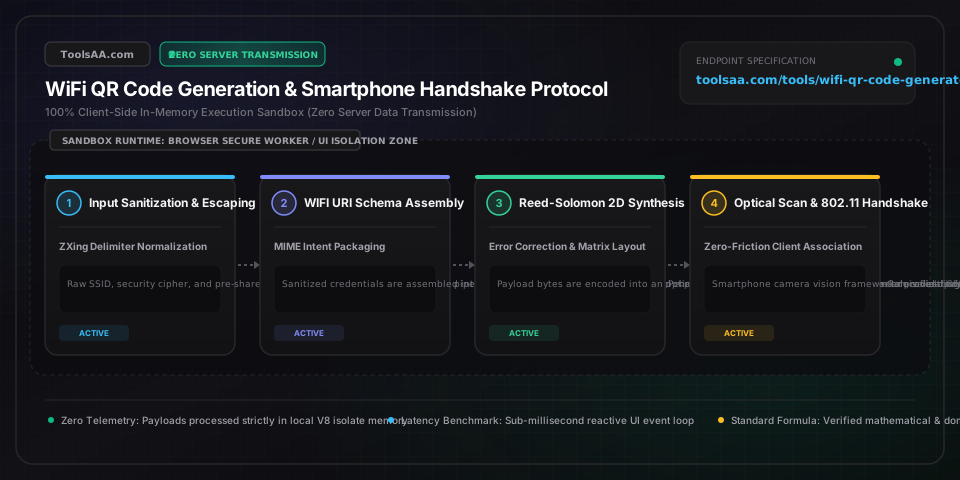
The de facto international standard for WiFi QR codes (originated by the ZXing Project and recognized by Apple iOS and Android) uses the format WIFI:T:<auth>;S:<ssid>;P:<password>;H:<hidden>;;. If an SSID or passphrase contains a semicolon (;), colon (:), backslash (\), or double quote ("), each special character MUST be preceded by a backslash escape character (e.g., P:pass\;word\:123;). Failing to escape delimiters truncates the property parser, resulting in invalid credentials or prompt failures on iOS Camera.
Calculate physical print dimensions using the optical rule: Minimum Print Width = Scan Distance / 10. For a tabletop acrylic tent card scanned at 30 to 40 cm (12 to 16 inches), the printed QR matrix must measure at least 3.5 to 4.0 cm (1.4 to 1.6 inches) wide. For a wall poster intended to be scanned from a standing distance of 1.2 meters (4 feet), the printed QR matrix must measure at least 12 cm (4.7 inches) across to ensure mobile lenses can resolve individual data modules.
The standard WiFi QR schema designates WPA3-Personal networks using the identifier T:WPA; rather than T:WPA3;. Standard mobile operating systems (iOS 13+ and Android 10+) handle WPA2-PSK and WPA3-SAE transparently under the T:WPA; token by probing the router's beacon frames during the 802.11 handshake. Using non-standard tags like T:WPA3; or T:SAE; causes older Android versions and non-Apple devices to throw parsing errors or fail to recognize the barcode as a network credential.
When superimposing a custom company logo or WiFi symbol in the center of a QR code, always enforce Error Correction Level H (30% Reed-Solomon redundancy). Ensure the visual icon footprint does not exceed 18% to 22% of the total QR area, and preserve a blank quiet border (2 modules wide) around the central glyph. Never cover any of the three primary Finder Patterns (the concentric position-detection squares in the top-left, top-right, and bottom-left corners) or the Alignment Pattern in the bottom-right.
When generating a QR code for a closed network that does not broadcast its SSID in beacon frames, you MUST explicitly include the parameter H:true;. Without this flag, iOS and Android device scanners assume the network is visible; when passive channel scanning fails to detect the SSID, the connection attempt aborts after a 10-second timeout. Specifying H:true; forces the mobile operating system to transmit active directed 802.11 probe requests containing the explicit SSID.
Ensure the payload string strictly matches the standard schema beginning with WIFI: and terminating with double semicolons ;;. Verify that all reserved characters (colons, semicolons, and backslashes) in the SSID and passphrase are preceded by an escaping backslash. If the code was generated with leading spaces, carriage returns, or enclosing quotation marks, mobile camera drivers will fail to identify the WiFi MIME intent and default to plain text search.
Verify that the encryption type matches the physical router configuration exactly. If your router requires WPA2-AES but the QR code was generated with T:WEP; or T:nopass;, the handshake will fail. Additionally, check for trailing whitespace inadvertently copied into the password input field, and confirm whether the SSID contains case-sensitive letters or special UTF-8 unicode characters that may have been mangled during serialization.
Check the contrast ratio between the foreground modules and background canvas. QR optical scanners require a minimum contrast ratio of 4:1, and the foreground dots must be darker than the background (never invert with light dots on a dark background for printed materials). If the sign is mounted behind glossy acrylic or glass, reposition it away from direct overhead spotlights to eliminate specular glare that washes out the camera sensor.
iOS strictly enforces 802.11 wireless security guidelines. If your router uses legacy WEP, obsolete WPA-TKIP, or combines 2.4 GHz and 5 GHz bands under differing security protocols, iOS may block the connection for security reasons. Ensure your access point is configured for WPA2-AES (CCMP) or WPA3-Personal, verify that the H:true; flag is present if the SSID is non-broadcasting, and avoid non-standard schema tags like T:WPA2; (use standard T:WPA;).
A WiFi QR code encodes a compact text string conforming to the standardized ZXing WIFI protocol: WIFI:T:<Authentication>;S:<NetworkSSID>;P:<Password>;H:<HiddenFlag>;;. When a smartphone camera scans this 2D barcode, the operating system's native vision framework recognizes the WIFI: prefix as a system configuration intent. Instead of opening a web browser, the device automatically passes the parsed SSID, authentication type, and pre-shared key to the internal network daemon, prompting the user with a single-tap 'Join Network' modal.
On modern versions of iOS (iOS 11+) and Android (Android 10+), scanning a WiFi QR code immediately displays a system confirmation dialogue to connect without showing the plain-text password on the scan card. However, because static QR codes encode data directly into the geometric 2D matrix, anyone with a generic barcode reader app can view the underlying raw text payload (P:YourPassword;). If network confidentiality is critical, isolate visitors on a dedicated Guest VLAN with client isolation enabled rather than relying on QR code obfuscation.
In the standard WiFi QR protocol, the tag T:WPA; is universally used for both WPA2-PSK (AES) and modern WPA3-Personal (SAE), allowing client hardware to negotiate the highest mutually supported cipher during the 802.11 handshake. T:WEP; specifies legacy Wired Equivalent Privacy (an obsolete, insecure 1997 standard vulnerable to instantaneous cryptanalysis). T:nopass; specifies an open, unencrypted network with no password. Always choose WPA for contemporary consumer, business, and enterprise networks.
When a router has SSID broadcast disabled, it does not announce its name in standard beacon frames. By default, smartphones passively listen for broadcast beacons before attempting association. If a WiFi QR code does not include the hidden network parameter H:true;, the phone will listen on active channels, fail to hear the beacon, and report 'Network Not Found' or timeout after 10 seconds. Including H:true; forces the mobile operating system to transmit active 802.11 probe requests directly querying for the hidden SSID.
Yes, provided you generate the QR code with Reed-Solomon Error Correction Level H (30% recovery capacity) and limit the central logo's visual footprint to less than 20% of the total barcode area. The Reed-Solomon algorithm mathematically reconstructs missing or occluded data modules. However, the logo must leave all three corner Finder Patterns and the timing tracks completely unobstructed, and must maintain an empty quiet border around the logo to prevent scanner optical interference.
Instant VAT calculator to add or remove value added tax. Calculate gross, net price, and tax breakdown across UK, EU, and global standard or reduced VAT rates.
Calculate your TDEE and daily maintenance calories with precision. Compare Mifflin-St Jeor, Katch-McArdle & macro splits for weight loss, cutting, or bulking.
Calculate sample and population standard deviation, variance, mean, and margin of error instantly. Clean messy datasets with outlier detection and normal curve.
Calculate take home pay and salary from gross to net across hourly and annual rates with federal and state tax brackets, FICA, and 401(k) deductions.
Calculate return on investment (ROI) and annualized ROI (CAGR) instantly. Compare net profit, investment length, inflation drag, and target gain milestones.
Scan QR codes and barcodes instantly online using your webcam, camera, or image file upload. Decodes WiFi, vCards, URLs, and 2FA secrets 100% locally in browser.