Lbl in browser badge
Tab camera
Lbl no code hint
Lbl no code detected
Lbl no code hint
Scan QR codes and barcodes instantly online using your webcam, camera, or image file upload. Decodes WiFi, vCards, URLs, and 2FA secrets 100% locally in browser.
Lbl no code hint
Lbl no code hint
Scan QR codes and barcodes instantly online using your webcam, camera, or image file upload. Decodes WiFi, vCards, URLs, and 2FA secrets 100% locally in browser.
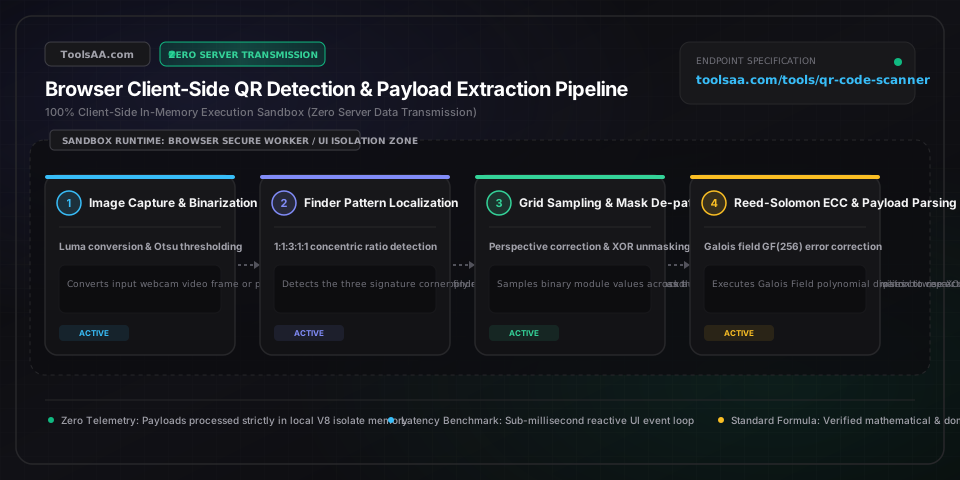
Reed-Solomon recovery capacity: Level L (~7% damage recovery), Level M (~15%, industry default), Level Q (~25%), and Level H (~30% damage tolerance for logos and scuffed physical surfaces).
Defines geometric matrix module count from Version 1 (21x21 modules, 41 alphanumeric chars) up to Version 40 (177x177 modules, 4,296 alphanumeric characters). Module formula: N = 4 * Version + 17.
Image filter configuration applied prior to raster binarization: Direct Native BarcodeDetector, Adaptive Local Otsu Thresholding, Contrast Stretching, or Inverted Luminance Polarity.
Character decoding interpretation mapping: Universal UTF-8, ISO-8859-1 (Latin-1 standard), Shift_JIS (Japanese QR JIS X 0510 standard), or ASCII Binary.
Standard QR specifications (ISO/IEC 18004) mandate dark modules over a light quiet zone. If a mobile app or website renders white modules on black, standard decoders fail immediately; activating the Invert Colors toggle flips luminance values to restore instant decode.
Low indoor lighting causes sensor grain and soft edges on finder pattern corners. Increasing the Contrast slider to 150% and applying Otsu adaptive binarization converts subtle gray gradients into crisp 1-bit black/white modules before feeding to the Reed-Solomon engine.
Never automatically open decoded URLs directly in your browser. Inspect the parsed domain, verify the root SSL certificate domain against suspicious typosquatting lookalikes, and use the Clean URL feature to strip session hijacking tokens and UTM tracking query strings.
When scanning a billboard or screen from an acute side angle, position all three square finder pattern targets inside the frame. The decoder calculates the 3x3 homography matrix to project the distorted quadrilateral back into a square coordinate plane.
Verify camera access permissions in your browser URL lock icon. If another application (Zoom, Teams, OBS) is holding exclusive hardware lock on the camera device, close that app and use the Device Switcher dropdown to re-initialize the media stream.
Check if any of the three square finder pattern corners are severed. If finder patterns are intact, switch preprocessing to Binarize Threshold and adjust the slider between 100 and 160 until the damaged data area passes Reed-Solomon parity verification.
Take a screenshot of the QR code using Win+Shift+S (Windows) or Cmd+Shift+4 (Mac), switch to this tool, and press Ctrl+V (or Cmd+V) to paste the image directly from your clipboard. The browser decodes the image instantly in local memory without requiring a webcam or uploading any files to a remote server.
The official ISO/IEC 18004 standard requires dark modules with a light quiet zone border so decoders can calculate the 1:1:3:1:1 black-to-white finder pattern timing ratio. When a QR code has light modules on a dark background, the ratio is reversed; enabling the Invert Colors mode flips pixel values to restore valid pattern recognition.
A QR code can sustain between 7% and 30% physical destruction depending on its configured Error Correction Level: Level L recovers up to 7% missing codewords, Level M recovers ~15%, Level Q recovers ~25%, and Level H recovers up to 30%. However, if any of the three large corner finder patterns are completely destroyed, the scanner cannot orient the grid regardless of ECC level.
Standard QR Code Model 2 features three corner position detection patterns, supports versions 1 (21x21) to 40 (177x177), and stores up to 7,089 numeric characters. Micro QR Code features only one position detection pattern, versions M1 (11x11) to M4 (17x17), and is designed for tiny physical spaces (e.g. circuit boards, pharmaceuticals) storing up to 35 numeric characters.
Drop or scan the WiFi QR code into the scanner. The parser automatically deconstructs the standard schema (WIFI:S:<SSID>;T:<WPA|WEP|blank>;P:<PASSWORD>;H:<true|false>;;) and displays the exact network SSID, security encryption protocol, and revealed plaintext password with a 1-click Copy Password button.
Calculate your pregnancy due date, current gestational age in weeks and days, conception date, and ultrasound milestones with clinical Naegele and IVF accuracy.
Add watermark to PDF files with text or image stamps. Customize opacity, angle, tile patterns, and page ranges with zero file upload privacy in your browser.
Add page numbers to PDF documents online for free. Number PDF pages with Bates stamping, custom page offsets, Roman numerals, and exact printer safe margins.
Calculate your one rep max (1RM) instantly using validated Brzycki, Epley, and Lander formulas. Features RPE adjustment, plate loading, and rep max percentages.
Calculate daily protein, carbs, and fat with our macro calculator. Set personalized BMR, TDEE, calorie deficit or surplus, and macro ratios for any fitness goal.
Calculate historical and future inflation, purchasing power decay, cumulative CPI rates, and cost-of-living adjustments with instant client-side precision.