Add Page Numbers to PDF & Number Pages

Add Page Numbers to PDF & Number Pages

Add page numbers to PDF documents online for free. Number PDF pages with Bates stamping, custom page offsets, Roman numerals, and exact printer safe margins.

Lbl quick presets
Title control deck
US Letter (8.5 × 11 in)
Living-Wellness-Guide-Sample.pdfLbl sample doc notice
bottom-center
Lbl marginsLbl unit pt text
Lbl margin x
36Unit pt
Lbl margin y
36Unit pt
Lbl gripper safe
Lbl duplex facing

Lbl duplex mirror hint

Lbl front matter romanLbl front matter roman hint
Lbl typography
Lbl font
Lbl font size
pt
Lbl color
#111827
Lbl has background
100%
Lbl page 1 Lbl of 6
Lbl recto leaf
Page 1 of 6X:276 Y:36
Page 1 of 6(bottom-center)
Lbl coord x 276Unit pt|Lbl coord y 36Unit pt
Badge gripper safe
Stat total pages6 Unit pages
Stat stamped pages6 Lbl active short
Stat safe statusBadge gripper safe
Notice authoritative privacy
Technical Reference & Architecture Guide

Add Page Numbers to PDF & Number Pages Guide

Add page numbers to PDF documents online for free. Number PDF pages with Bates stamping, custom page offsets, Roman numerals, and exact printer safe margins.

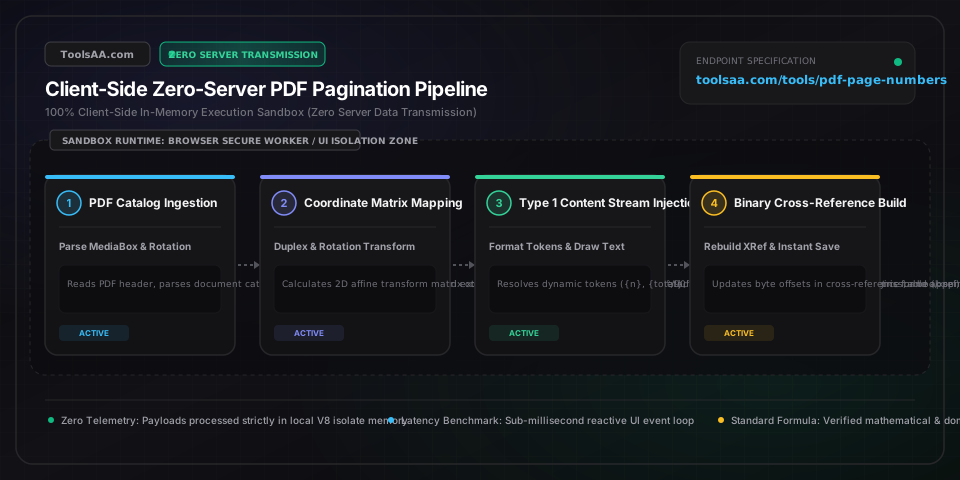
Add Page Numbers to PDF & Number Pages Guide — Client-Side In-Memory Architecture & Data Flow

Key Parameters & Controls

Page Margin & Printer Safe Zone (pt / mm)PostScript Print Points (72 pt = 1 in = 25.4 mm)

Distance from the document trim boundary to the text baseline. Commercial offset presses and desktop laser printers enforce a physical non-printable gripper margin of 18 pt to 36 pt (0.25 in to 0.5 in). Setting margins below 18 pt risks mechanical edge clipping during duplex printing.

Default: 36 pt (12.7 mm)
Bates Numbering Zero-Padding (Federal Rule 34b)Sequential Digit Pattern (3 to 9 digits)

Legal discovery standard under US Federal Rules of Civil Procedure Rule 34(b). Pads sequential integers with leading zeros (e.g., 6 digits: 000001 through 999999) to maintain strict alphabetical and chronological sorting across scanned evidentiary document databases.

Default: 6 digits (000001)
Physical vs Display Page Index OffsetPage Offset Integer

Decouples the document physical sheet order from visible human pagination. Enables skipping unnumbered cover pages, executive summaries, or roman-numeral front matter while maintaining accurate total page calculations.

Default: Start page: 2, Display start: 1
Binding Gutter Allowance (Duplex Facing Pages)Binding Edge Margin Allowance

Additional margin added to the inside binding edge (left margin on odd recto pages, right margin on even verso pages). Compensates for 12 pt to 24 pt of sheet depth consumed by perfect binding, spiral coil, or saddle-stitch spines.

Default: 18 pt inside gutter
Vector Typography Metrics (Standard 14 Fonts)Standard Vector Typographic Metric

Universal standard vector typefaces (Helvetica, Times-Roman, Courier) natively supported across all PDF viewers. Delivers instant vector text stamping with crisp 1200 DPI print fidelity without embedding heavy font tables or increasing file size.

Default: Helvetica Regular (10 pt)

Pro Tips & Best Practices

Avoid Edge Misalignment on Rotated Landscape Pages

Landscape presentation slides and mixed-orientation pages often carry internal 90-degree or 270-degree rotation tags on a standard portrait sheet. In unadjusted coordinate spaces, stamping at bottom-center places numbers along the side edge. Always enable automatic rotation detection so numbers consistently align relative to the visual reading orientation of every slide.

Prevent Clipping with Visible Trim and Crop Alignment

Many scanned documents and prepress PDFs define an oversized canvas with active crop or bleed margins. Anchor all margin calculations strictly to the visible crop boundaries rather than the raw outer canvas to prevent numbers from disappearing into hidden bleed areas or getting sliced off by page trimming.

Duplex Facing Margins for Booklet and Saddle-Stitch Printing

When publishing double-sided books, academic theses, or reports, never center numbers without testing spine thickness. Folded pages naturally consume paper depth along the binding. Use alternating outside corners—odd pages on the right, even pages on the left—paired with an extra 18 pt to 24 pt inside spine gutter so numbers remain comfortably visible.

Maintain Crisp Vector Quality Without Page Image Flattening

Low-quality converters flatten PDF pages into 150 DPI bitmap images, destroying crisp text, links, and vector clarity while multiplying file size tenfold. Direct vector pagination appends genuine typographic text streams into the page layer, ensuring razor-sharp 1200 DPI print quality while adding less than 1 KB per page.

Preserve Archival Integrity and Court Metadata

Modifying documents submitted for court filings, regulatory audits, or permanent institutional archives requires preserving original document metadata and PDF/A conformance tags. Direct vector stamping preserves the underlying file structure and compliance attributes without stripping essential document history.

Common Gotchas & Troubleshooting

⚠️Page numbers appear sideways or upside down on landscape presentation slides

The source document contains an internal 90-degree or 270-degree rotation tag. Enable 'Auto-Detect Page Rotation' so the pagination engine automatically aligns text horizontally relative to your natural reading orientation on every slide.

⚠️Numbered text is clipped or invisible on scanned legal exhibits

Scanned files frequently feature non-zero crop boundaries or dark scanned margins. Set page margins to at least 36 pt (0.5 in / 12.7 mm) from the visible edge, and activate an opaque pill badge behind the numbers to guarantee crisp contrast over scanned borders.

⚠️Document fails to process due to password security or edit permissions

The PDF is secured with owner or user encryption under standard AES security. PDF specifications prevent modifications without authorized access. Remove the security restrictions in your authorized PDF software using your password before applying pagination.

⚠️Total page count shows the incorrect total when skipping cover pages

The standard total placeholder counts all physical sheets in the file. When unnumbering covers, title pages, or tables of contents, select the '{range_total}' placeholder instead of '{total}' so the footer accurately displays the total within your active numbered range (e.g., 'Page 1 of 12').

⚠️Numbers are hard to read over dark images or colored header bands

Enable the high-contrast badge feature with a subtle semi-transparent background plate (or white text with a protective edge buffer), ensuring every digit remains perfectly legible regardless of underlying artwork or photography.

Frequently Asked Questions

How to add page numbers to PDF starting from page 2 or page 3?▼

Set 'Start Numbering From Page' to 2 (or 3) and set 'First Number Value' to 1. This keeps your cover page, title sheet, or executive summary completely unnumbered while labeling the subsequent sheet as 'Page 1' or 'Page 1 of N'. The offset calculates automatically without modifying original document layout.

How does Bates numbering work for legal discovery and trial exhibits?▼

Bates numbering is a formal document identification protocol mandated under Federal Rule of Civil Procedure 34(b) for legal discovery and court exhibits. It pairs an alphanumeric prefix (such as a case code or party identifier like 'PLTF-') with a fixed-width sequential number padded with leading zeros (e.g., 'PLTF-000001' through 'PLTF-000500'). This guarantees an unambiguous, chronological audit trail across thousands of evidentiary pages.

How do Bates numbering and standard page numbering differ in court filings?▼

Standard page numbering tracks internal reading order within a single standalone document (e.g., 'Page 1 of 24') and restarts at 1 for every new file. Bates numbering assigns an uninterrupted, global serial identifier across an entire evidentiary production spanning dozens or hundreds of separate PDF files (e.g., Document A concludes at 'EX-000340', and Document B immediately starts at 'EX-000341'), creating a tamper-evident chain of custody.

Why are PDF page numbers cut off when printing or viewing on mobile?▼

Page numbers get cut off when positioned within the physical printer hardware non-printable gripper margin—typically 0.25 to 0.35 inches (18 to 25 points) from the paper edge—or outside the document's active crop boundary. Setting margins to at least 36 points (0.5 inches or 12.7 mm) guarantees safe clearance within the universal printable zone across standard US Letter (8.5 × 11 in) and international A4 (210 × 297 mm) formats.

How to number PDF pages with alternating duplex margins for bound books?▼

Enable 'Duplex Facing Pages' mode to position numbers on alternating outside corners: odd pages (recto / right-hand side) display page numbers on the outer right edge, while even pages (verso / left-hand side) mirror them to the outer left edge. This simultaneously reserves an inside spine gutter allowance of 18 pt to 24 pt (6.35 mm to 8.5 mm), preventing numbers and text from disappearing into the binding spine of spiral-bound reports, theses, or booklets.

Related Tools & Utilities

All Tools →