Cron Expression Parser & Crontab Tester

Cron Expression Parser & Crontab Tester

Parse cron expressions into clear human schedules. Inspect next execution timestamps across timezones, validate crontab syntax, and project upcoming run dates.

Presets label
Lbl tokens count5/5
MIN
*/5
HOUR
*
DOM
*
MON
*
DOW
*
Lbl schedule cadenceEvery 5 minutes past every hour.
Lbl high order varsBadge overrun safe
Lbl estimated runtime1 Unit minutes
Lbl svg pipelineBadge in memory
LEX5 Unit tokensASTLbl bitmaskPOSIXCleanRUNSafeSLOT10 Unit outputs
Title upcoming schedule(10 occurrences)
Th indexTh target timeTh weekdayTh countdownTh jitter slotTh utc iso
1Nov 03, 2026, 03:20Tuein 3m 48sexact2026-11-03T03:20:00.927Z
2Nov 03, 2026, 03:25Tuein 8m 48sexact2026-11-03T03:25:00.927Z
3Nov 03, 2026, 03:30Tuein 13m 48sexact2026-11-03T03:30:00.927Z
4Nov 03, 2026, 03:35Tuein 18m 48sexact2026-11-03T03:35:00.927Z
5Nov 03, 2026, 03:40Tuein 23m 48sexact2026-11-03T03:40:00.927Z
6Nov 03, 2026, 03:45Tuein 28m 48sexact2026-11-03T03:45:00.927Z
7Nov 03, 2026, 03:50Tuein 33m 48sexact2026-11-03T03:50:00.927Z
8Nov 03, 2026, 03:55Tuein 38m 48sexact2026-11-03T03:55:00.927Z
9Nov 03, 2026, 04:00Tuein 43m 48sexact2026-11-03T04:00:00.927Z
10Nov 03, 2026, 04:05Tuein 48m 48sexact2026-11-03T04:05:00.927Z
Primary MetricVal ast valid
Efficiency / CapacityVal5 field
Net Output10 SLOTS
Stats card4in 3m 48s
Stats card524 / 24 HRS
Stats card6Val100 local
Technical Reference & Architecture Guide

Cron Expression Parser & Crontab Tester Guide

Parse cron expressions into clear human schedules. Inspect next execution timestamps across timezones, validate crontab syntax, and project upcoming run dates.

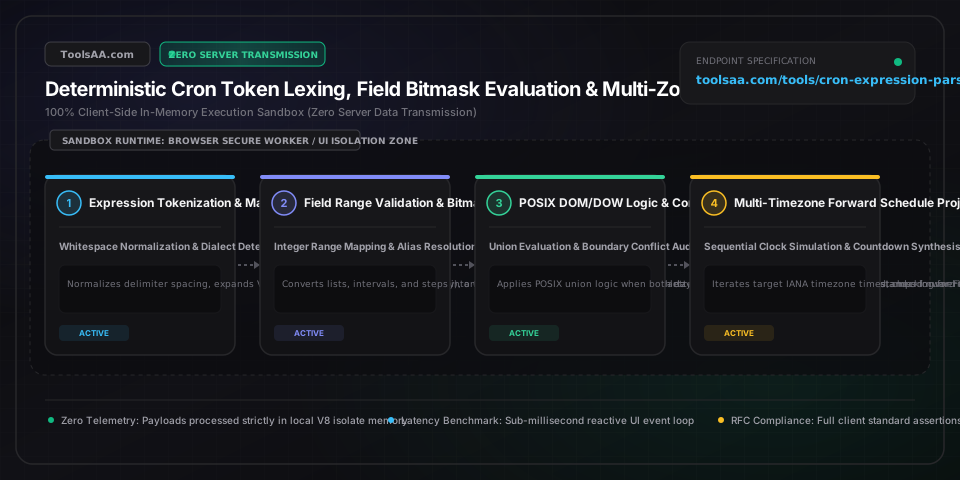
Cron Expression Parser & Crontab Tester Guide — Client-Side In-Memory Architecture & Data Flow

Key Parameters & Controls

Minute Field (Field 1 in POSIX, Field 2 in Quartz)Integer Set [0-59], Asterisk (*), Step (/n), Range (a-b), List (,)

Specifies exact minute of the hour when the job triggers (0-59). Evaluated via 60-bit integer bitmasks with O(1) membership checks; step syntax */15 triggers at minutes 0, 15, 30, and 45 past every hour.

Default: 0 (Top of Hour)
Hour Field (Field 2 in POSIX, Field 3 in Quartz)Integer Set [0-23] 24-Hour Format

Specifies the hour of day in 24-hour military notation (0-23), where 0 represents midnight (00:00) and 23 represents 11:00 PM. Range 9-17 matches typical ISO 8601 business working hours across IANA timezones.

Default: * (Every Hour)
Day of Month Field (Field 3 in POSIX, Field 4 in Quartz)Integer Set [1-31], Question Mark (?), Last (L), Nearest Weekday (W)

Specifies calendar date within the month from 1 to 31. Invalid dates exceeding month length (e.g. 31 in April, 30 in February) are safely bypassed during calendar rollover verification.

Default: * (Every Day)
Month Field (Field 4 in POSIX, Field 5 in Quartz)Integer Set [1-12] or 3-Letter Aliases [JAN-DEC]

Specifies the calendar month from 1 (January) to 12 (December). POSIX systems support case-insensitive 3-letter strings (JAN-DEC), mapped internally to a 12-bit integer bitmask.

Default: * (Every Month)
Day of Week Field (Field 5 in POSIX, Field 6 in Quartz)Integer Set [0-7] or 3-Letter Aliases [SUN-SAT], Nth Day (#), Last (L)

Specifies the day of the week. Under POSIX IEEE 1003.1 and Vixie cron, both 0 and 7 designate Sunday (1=Monday, ..., 6=Saturday). Case-insensitive abbreviations (SUN-SAT) eliminate off-by-one dialect confusion.

Default: * (Every Day of Week)
Seconds Field (Field 1 in Quartz / Spring, Omitted in POSIX)Integer Set [0-59] High-Resolution Seconds

Extended high-resolution first field in 6-field schedulers (Quartz, Spring Framework). Standard 5-field UNIX crontab does not support seconds and treats leading 6th tokens as invalid syntax.

Default: 0 (Zero Seconds)
Year Field (Optional Field 7 in Quartz, Field 6 in AWS EventBridge)Integer Set [1970-2099], Asterisk (*), Omitted in POSIX

Optional or mandatory trailing calendar year field supported by enterprise schedulers to bound recurring jobs to specific historical or future epoch years without infinite recurring loops.

Default: * (Unbounded / Every Year)
Pro Tips & Best Practices

POSIX Day-of-Month and Day-of-Week Co-occurrence Operates as Logical OR, Not AND

In standard Vixie and POSIX IEEE 1003.1 cron specifications, when both the day-of-month (field 3) and day-of-week (field 5) contain non-wildcard values, the scheduler evaluates them with a logical OR condition. For example, 0 0 13 * 5 does NOT execute exclusively on Friday the 13th; rather, it executes on the 13th day of every month AND every Friday of every month. To restrict execution strictly to Friday the 13th, keep day-of-week as * and test the weekday within the bash command payload: 0 0 13 * * [ $(date +\%u) -eq 5 ] && /opt/backup.sh.

Step Values (*/N) Reset at Field Boundaries and Create Non-Uniform Modulo Gaps

A common developer misconception is that */25 * * * * will run continuously every 25 minutes. In reality, cron step expressions evaluate strictly within the 0-59 minute boundary: 59 / 25 yields executions only at minute 0, minute 25, and minute 50. When the clock advances to the next hour (e.g., from 01:50 to 02:00), the field resets back to minute 0, creating a 10-minute gap instead of a 25-minute period. If true fixed intervals spanning hour boundaries are required, use Systemd monotonic timers (OnUnitActiveSec=25m) or token-bucket task queues.

Always Standardize Server Crontabs to UTC to Immunize Against Daylight Saving Time Clashes

Running crontab daemons in local timezones with Daylight Saving Time (DST) causes severe scheduling anomalies. During the spring-forward transition (+1 hour), schedules configured between 02:00 and 02:59 are skipped entirely because that clock hour does not exist. During the autumn fall-back transition (-1 hour), jobs in that window run twice. Always set system clocks and crontab environments to TZ=UTC, and calculate business-hour offsets statically to eliminate timing double-executions and skipped runs.

Vixie Cron Percent Signs (%) Must Be Escaped with Backslashes in Crontab Command Fields

In crontab files, the unescaped percent sign % has a special syntactic meaning: it is translated by the cron daemon into a newline character, and all subsequent data is piped to the command standard input. Attempting to run inline formatting commands like date +%Y-%m-%d will cause silent script truncation or cryptic syntax errors. You must escape every percent sign as date +\%Y-\%m-\%d or encapsulate the invocation inside an external executable shell script.

Common Gotchas & Troubleshooting

⚠️Crontab Throws Syntax Error: Paste of 6-Field or 7-Field Expression into Linux /etc/crontab

Standard UNIX/Linux crontab expects exactly 5 space-delimited fields. Expressions copied from Java Quartz, Spring Framework, or AWS EventBridge include a leading seconds field (e.g. 0 0 12 * * ?) or a trailing year field. When pasted into standard crontab, the 6th token is parsed as the username or command name, resulting in a syntax failure. Strip the leading seconds token and trailing year, and convert ? wildcards to standard asterisks *.

⚠️Cron Job Executes at the Wrong Local Time or Unexpected Hour

Crontab daemon evaluates schedules against the system local hardware and kernel timezone (/etc/timezone or /etc/localtime). In cloud environments (AWS EC2, Docker containers, Kubernetes nodes), the default system clock is UTC. A schedule written as 0 9 * * 1-5 intending 9:00 AM US Eastern Time will fire at 9:00 AM UTC (4:00 AM EST). Explicitly prepend CRON_TZ=America/New_York at the top of your crontab file (Vixie cron 4.1+) or translate your schedule to UTC.

⚠️Cron Job Fails to Run or Environment Variables ($PATH) Missing

Cron executes tasks inside a sterile, non-interactive, non-login shell with a minimal default PATH (typically /usr/bin:/bin). Tools installed in /usr/local/bin, ~/.nvm, or /opt/homebrew will fail with command not found errors. Define an explicit PATH=/usr/local/bin:/usr/bin:/bin at the top of your crontab, or invoke all executables and binaries using absolute paths (e.g., /usr/bin/python3 /opt/app/job.py).

⚠️Unexpected Double Execution Frequency When Combining Day of Month and Day of Week

As mandated by POSIX standard IEEE 1003.1, when both day-of-month and day-of-week fields are specified with values other than *, the evaluation operates as an OR statement rather than an AND condition. The job fires whenever the date matches OR whenever the day of the week matches. To enforce simultaneous match criteria, set day-of-week to * and embed an inline POSIX date test in the command: 0 3 1-7 * * [ $(date +\%u) -eq 1 ] && /opt/first-monday.sh.

Frequently Asked Questions

How do you calculate the exact next run time of a cron expression?▼

The next run time is calculated by advancing an ISO 8601 base timestamp minute-by-minute (or second-by-second in 6-field engines) and evaluating each candidate against pre-compiled 64-bit bitmasks using bitwise AND operations with O(n) step complexity. When all fields match simultaneously—subject to POSIX DOM/DOW non-wildcard union logic—the timestamp is recorded as a valid execution instant. In browser sandboxes, all AST parsing and projection execute in isolated JavaScript memory without server communication.

What is the difference between standard Linux 5-field cron and Quartz 6-field cron?▼

Standard POSIX/Linux cron uses 5 space-delimited fields (Minute, Hour, Day-of-Month, Month, Day-of-Week) operating at 1-minute granularity, whereas Java Quartz and Spring Framework schedulers use 6 or 7 fields by prepending a mandatory Seconds field (0-59) and optionally appending a Year field (1970-2099). Furthermore, Quartz introduces special characters like ? (unconstrained field) and L (last day of month or week), which cause fatal syntax errors if fed into standard UNIX crontabs.

What is the difference between asterisk (*) and slash (/step) in cron syntax?▼

An asterisk (*) acts as an unconstrained wildcard matching every valid integer in that field domain (e.g., minutes 0 through 59), whereas a slash (/step) defines a modulo interval that evaluates only discrete steps starting from a base index within field boundaries. For example, */15 matches minutes 0, 15, 30, and 45, whereas 10-30/5 restricts the step sequence strictly within the bounded range to evaluate 10, 15, 20, 25, and 30.

Why does 0 0 13 * 5 run on every Friday instead of just Friday the 13th?▼

Under POSIX standard IEEE 1003.1, if both the day-of-month (field 3) and day-of-week (field 5) contain non-wildcard values, the scheduler evaluates them using logical OR disjunction rather than logical AND conjunction. As a result, the job fires on the 13th day of any month as well as on every Friday regardless of date. To achieve an AND condition, set day-of-week to * and test the weekday inside the command script using [ $(date +\%u) -eq 5 ].

What do the question mark (?) and L characters mean in cron expressions?▼

In Quartz, Spring, and AWS EventBridge cron dialects, the question mark (?) specifies no specific value to resolve field ambiguity between day-of-month and day-of-week, while the L character denotes Last (such as the final calendar day of the month or the last Friday with 5L). Standard POSIX IEEE 1003.1 crontabs do not recognize ? or L and reject expressions containing them as invalid syntax.

How do Daylight Saving Time (DST) spring-forward and fall-back affect scheduled cron jobs?▼

During the 1-hour spring-forward DST transition, jobs scheduled within the skipped wall-clock window (typically 02:00:00 to 02:59:59) are skipped entirely because that hour never elapses, while during the 1-hour autumn fall-back transition, jobs scheduled in that repeated window trigger twice unless pinned to UTC. To prevent skipped or duplicate executions, production servers should always maintain hardware clocks and crontab daemon processes in UTC.

Related Tools & Utilities

All Tools →