HTML Entity Encoder & Decoder
OWASP XSS ProtectedConvert text and code to named, decimal, and hexadecimal HTML entities to prevent XSS injection and preserve special characters.
Interactive HTML Entity Reference & Quick Sheet
Quick reference guide for standard named and numerical entities across HTML5, XML, and ASCII typography.
| Char | Named Entity | Decimal | Hexadecimal | Description | Action |
|---|---|---|---|---|---|
| < | Less-than sign | ||||
| > | Greater-than sign | ||||
| & | Ampersand | ||||
| " | Double quotation mark | ||||
| ' | Single quotation mark / Apostrophe | ||||
| NBSP | Non-breaking space | ||||
| “ | Left double quotation mark | ||||
| ” | Right double quotation mark | ||||
| ‘ | Left single quotation mark | ||||
| ’ | Right single quotation mark | ||||
| — | Em dash | ||||
| – | En dash | ||||
| … | Horizontal ellipsis | ||||
| • | Bullet point | ||||
| © | Copyright symbol | ||||
| ® | Registered trademark symbol | ||||
| ™ | Trademark symbol | ||||
| § | Section sign | ||||
| ¶ | Pilcrow / Paragraph sign | ||||
| ° | Degree symbol | ||||
| € | Euro currency symbol | ||||
| $ | Dollar sign | ||||
| £ | Pound sterling currency symbol | ||||
| ¥ | Yen / Yuan currency symbol | ||||
| ¢ | Cent currency symbol | ||||
| ± | Plus-minus sign | ||||
| × | Multiplication sign | ||||
| ÷ | Division sign | ||||
| ≠ | Not equal to | ||||
| ≤ | Less-than or equal to | ||||
| ≥ | Greater-than or equal to | ||||
| ∞ | Infinity sign | ||||
| √ | Square root / Radical sign | ||||
| ∑ | N-ary summation (Sigma) | ||||
| ∏ | N-ary product (Pi) | ||||
| π | Greek small letter pi | ||||
| Ω | Greek capital letter Omega | ||||
| α | Greek small letter alpha | ||||
| λ | Greek small letter lambda | ||||
| ♥ | Black heart suit | ||||
| ♠ | Black spade suit | ||||
| ♦ | Black diamond suit | ||||
| ♣ | Black club suit | ||||
| ← | Leftwards arrow | ||||
| → | Rightwards arrow |
Zero-Knowledge Local Execution
All data processing, parsing, and compilation execute strictly inside your local browser memory. Zero external server uploads.
Instant Client-Side Engine
Instant real-time reactive computation delivers immediate feedback on every keystroke with zero network latency.
Production Standards & Compliance
Strictly validates syntax, edge cases, and formatting rules for dependable production output.
HTML Entity Encoder & Decoder — Reference Guide
Convert text and code to named, decimal, and hexadecimal HTML entities to prevent XSS injection and preserve special characters.
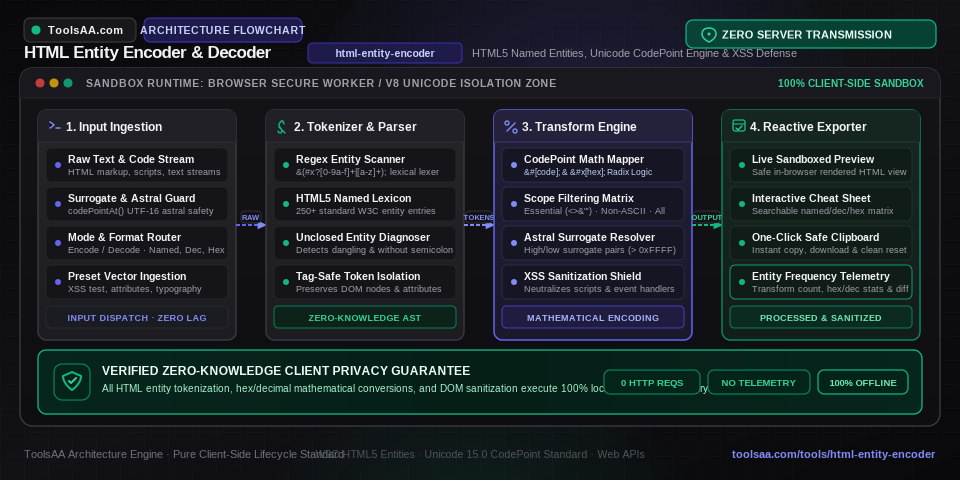
Key Parameters & Controls
| Parameter | Type / Unit | Description | Default |
|---|---|---|---|
| Input Text / Markup | String | HTML tags, code snippets, or text to encode or decode. | <script>alert('XSS');</script> |
| Entity Format | Enum | Named (&), Decimal (&), or Hexadecimal (&). | named |
| Scope | Enum | Essential XSS only, non-ASCII symbols, or all characters. | essential |
Pro Tips & Best Practices
Always encode the five core characters (& < > " ') before interpolating untrusted user input into HTML body or attribute contexts.
XML engines only recognize five default named entities (& < > " '). Use decimal or hex entities for broader symbols in XML.
Use the sandboxed live HTML preview toggle to visually verify how decoded markup will render in a real browser engine.
Common Gotchas & Troubleshooting
⚠️Ampersands are double-encoded (&amp;)
Ensure you are not re-encoding already escaped HTML entities.
⚠️Entities like ' fail in legacy HTML4
Use ' for single quotes to ensure universal compatibility across legacy HTML4 and modern HTML5.
Frequently Asked Questions
Why are HTML entities required?▼
Characters like < and > indicate markup tags. Converting them to entities allows browsers to render them as text instead of executing them as code.
What are the 5 essential XML/HTML entities?▼
& (&), < (<), > (>), " ("), and ' or ' (').
Is client-side encoding sufficient for web security?▼
Client-side encoding helps prepare data and test vectors, but server-side sanitization is mandatory to fully secure applications against XSS.
When should I use named entities (&) versus numeric entities (&)?▼
Named entities like &, <, and > are easier for human developers to read and debug in standard HTML documents. Numeric decimal (&) and hexadecimal (&) entities are universally compatible with strict XML and legacy parsers that lack full HTML5 named entity tables.
Related Tools & Utilities
All Tools →Transform raw HTML markup into clean, production-ready React JSX/TSX syntax with automatic class->className and inline style conversions.
Encode and decode query strings, URLs, and UTF-8 characters instantly.
Convert PNG, JPG, SVG, WebP, GIF, and ICO images to Base64 Data URIs, HTML img tags, CSS backgrounds, and React JSX.
Encode and decode Base64 strings or binary files instantly. Supports URL-safe base64url, UTF-8 unicode, MIME line wrapping, Data URLs, and live error repair.
Convert SQL CREATE TABLE definitions into MikroORM entity classes with @Entity, @PrimaryKey, @Property, @Index, and relationship decorators.
Convert SQL CREATE TABLE DDL statements into TypeScript TypeORM entity classes with @Column, @PrimaryGeneratedColumn, and relations.