Kubernetes YAML Manifest & Schema Validator (Before kubectl apply)
Catch subtle YAML indentation errors, forbidden tab characters, deprecated API versions, selector label mismatches, and multi-port naming violations directly inside your browser. No manifest data or tokens are transmitted to any server.
Zero-Knowledge Local Execution
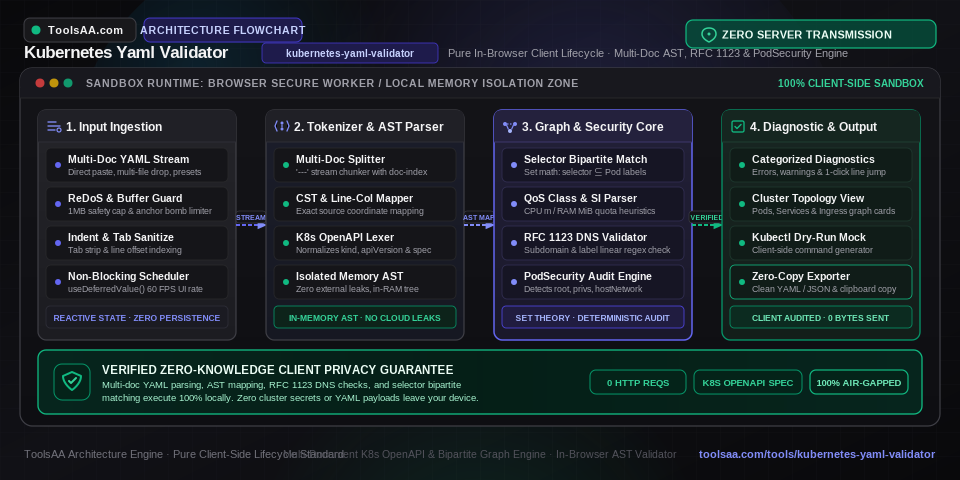
All data processing, parsing, and compilation execute strictly inside your local browser memory. Zero external server uploads.
Instant Client-Side Engine
Instant real-time reactive computation delivers immediate feedback on every keystroke with zero network latency.
Production Standards & Compliance
Strictly validates syntax, edge cases, and formatting rules for dependable production output.
Kubernetes YAML Validator Developer Reference
Developer reference for client-side Kubernetes manifest validation, multi-resource cross-referencing, and schema diagnostics.
Key Parameters & Controls
| Parameter | Type / Unit | Description | Default |
|---|---|---|---|
| yamlInput | string | Raw Kubernetes manifest text in YAML format, supporting single or multi-document streams separated by triple dashes (---). | K8S_SAMPLES[0].yaml |
| activeTab | "diagnostics" | "resources" | "crossref" | "kubectl" | "json" | Active workspace view displaying schema diagnostics, resource tree, cross-resource reference map, generated kubectl commands, or JSON AST. | "diagnostics" |
| severityFilter | "all" | "error" | "warning" | "info" | Diagnostic log filter controlling visibility of schema errors, deprecated API warnings, and best-practice recommendations. | "all" |
| searchFilter | string | Query string to isolate diagnostic entries by field path, error code, or target resource name. | "" |
Pro Tips & Best Practices
Inspect the cross-reference tab to verify that `spec.selector.matchLabels` on Deployments match Pod template labels and corresponding Service selectors before applying manifests to clusters.
Separate combined manifests with standard `---` document delimiters to run batch linting across ConfigMaps, Deployments, and Services in a single client-side validation pass.
Use the kubectl tab to copy equivalent `kubectl apply --dry-run=client -f -` shell commands for pre-flight pipeline integration and schema debugging.
Common Gotchas & Troubleshooting
⚠️YAML Tab Indentation Syntax Error
Kubernetes YAML parsers forbid tab characters (`\t`) for indentation. Convert tabs to 2 ASCII spaces (` `) and verify column alignment across nested mappings.
⚠️Unresolved Service Selector Target
Switch to the Cross-Reference tab to locate Services whose `spec.selector` key-value pairs do not match `metadata.labels` on any Pod template in the manifest stream.
⚠️Browser Lag on Files Exceeding 1MB
The recommended input limit is 1,000,000 characters. Decompose monolithic Helm or Kustomize template outputs into per-workload manifest files to preserve responsive linting.
Frequently Asked Questions
Does the validator transmit YAML manifests to an external server?▼
No. All YAML parsing, schema conformance checks, and cross-reference evaluations execute entirely client-side in browser memory, ensuring compliance with air-gapped security policies.
How are CustomResourceDefinitions (CRDs) evaluated?▼
Standard Kubernetes core and apps APIs are checked against strict schema definitions, while unrecognized CRDs are verified for valid YAML syntax and metadata compliance without raising spurious schema errors.
Can the validator parse multi-document manifests separated by triple dashes?▼
Yes. The parser splits input streams on `---` delimiters, validating each manifest document independently while constructing a unified relationship graph across ConfigMaps, Secrets, and Services.
What is the purpose of the JSON tab export?▼
Kubernetes API machinery converts YAML manifests into JSON before schema evaluation and admission control. The JSON tab exposes the exact representation sent over the wire to kube-apiserver.
Related Tools & Utilities
All Tools →Safely parse complex multi-document YAML manifests into compact or formatted JSON with strict syntax error alerts.
Create production-ready Kubernetes Deployment manifests with pod replicas, resource limits, health probes, and rolling update strategies.
Size Kubernetes Pod CPU millicores, memory requests and limits, node packing density, and bin-packing headroom for multi-container clusters.
Create fine-grained Kubernetes NetworkPolicy YAML manifests with Ingress/Egress CIDR blocks, podSelector labels, namespaceSelector, and port restrictions.
Generate production-ready Kubernetes ConfigMap and Secret (Opaque, TLS, docker-registry) YAML manifests with base64 encoding and immutability.
Convert standard crontab schedules into complete Kubernetes CronJob manifests with restartPolicy, concurrencyPolicy, and resource limits.