Harmonious Color Palette & WCAG Contrast Generator
Generate accessible, harmonized color schemes with real-time WCAG 2.1 contrast audits, color blindness simulation, and CSS/Tailwind export.
Harmonious Palette Swatches
Accessibility & WCAG Contrast
Verify legibility against ISO & W3C WCAG 2.1 Level AA (4.5:1) and Level AAA (7.0:1) standards in real-time.
Live Legibility Preview (Simulated Rendering)
Design with Confidence and Full Accessibility
This paragraph represents body copy (14px/16px). Accessible color contrast prevents eye strain for billions of web users and satisfies compliance standards for public institutions and enterprise products.
Cross-Palette Contrast Matrix
Inspect contrast ratios between all colors in your active palette to find optimal foreground / background pairings.
| BG \ FG | #1 | #2 | #3 | #4 | #5 |
|---|---|---|---|---|---|
Slot 1 (Light Tint) | — | ||||
Slot 2 (Primary Base) | — | ||||
Slot 3 (Deep Shade) | — | ||||
Slot 4 (Complementary) | — | ||||
Slot 5 (Accent Tint) | — |
Live UI Component Mockup
Preview how your harmonious palette looks when applied across real-world web application elements.
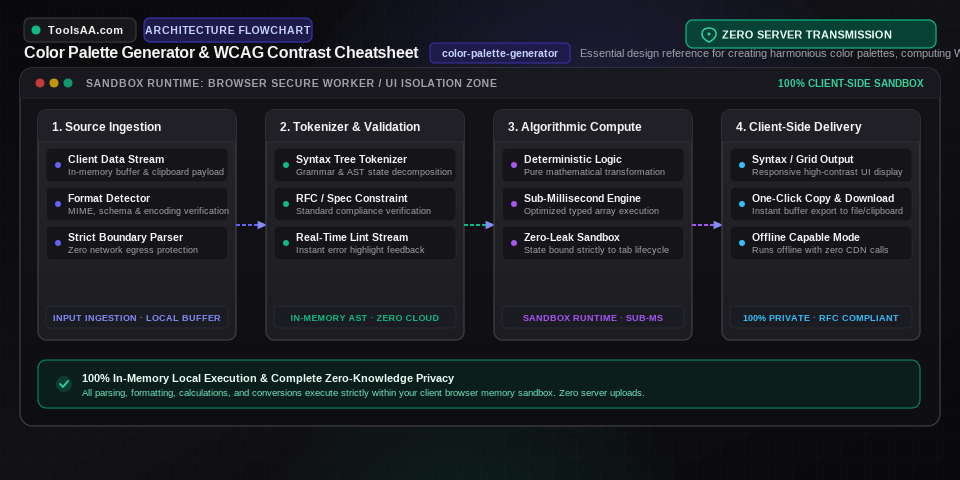
Client-Side Architecture
Fast, resilient, and privacy-preserving tools running completely inside the modern browser runtime.
WCAG 2.1 Compliant Design
Design systems built with accessible ratios provide superior clarity in diverse lighting conditions.
Tailwind CSS Design System Ramp (50 — 950)
Full 11-step shade scale derived from your seed color for design system tokens.
Palette Export
Instantly copy or download your palette in production-ready formats.
:root {
  /* Harmonious Color Palette (complementary) */
  --color-light-tint-1: #dcdcfa;
  --color-primary-base-2: #6467f2;
  --color-deep-shade-3: #0105da;
  --color-complementary-4: #f2ef64;
  --color-accent-tint-5: #f7f6ca;
}100% Private Browser Execution
All data processing, parsing, and compilation execute strictly inside your local browser memory. Zero external server uploads.
Instant Live Preview
Instant real-time reactive computation delivers immediate feedback on every keystroke with zero network latency.
Production Standards & Compliance
Outputs clean, cross-browser CSS and visual values verified against modern web layout standards.
Color Palette Generator & WCAG Contrast Cheatsheet
Essential design reference for creating harmonious color palettes, computing WCAG 2.1 AA/AAA contrast ratios, and simulating vision deficiencies.
Key Parameters & Controls
| Parameter | Type / Unit | Description | Default |
|---|---|---|---|
| Base Anchor Color | HEX / HSL | Starting color coordinate used to calculate harmonic intervals across color wheel. | #6366f1 |
| Harmony Model | complementary | triadic | analogous | etc. | Geometric angular step on HSL color wheel for generating harmonic colors. | complementary |
| WCAG Target | AA (4.5:1) | AAA (7.0:1) | Minimum luminance contrast ratio required for accessible text legibility. | AA Normal |
Pro Tips & Best Practices
Allocate 60% of UI surface to dominant background neutral, 30% to secondary surface/cards, and 10% to high-contrast accent call-to-actions.
To satisfy WCAG 1.4.1 (Use of Color), always supplement red warning badges with descriptive icons and text labels for color-blind users.
Click 'Copy Code' under CSS mode to paste ready-to-use :root { --color-primary: ... } variables directly into your global stylesheet.
Common Gotchas & Troubleshooting
⚠️Bright yellow or cyan text fails WCAG AA on white background
High-saturation yellows have high relative luminance (~0.85), yielding very low contrast against white (1.0). Use our 'Auto-Fix for AAA' button to deepen lightness until 4.5:1 is achieved.
⚠️Complementary palette feels harsh and vibrating
Colors placed 180° apart with identical high saturation produce simultaneous chromatic vibration. Reduce the saturation or adjust lightness of one of the complementary pair.
Frequently Asked Questions
What is the mathematical difference between WCAG AA and AAA?▼
WCAG AA requires a 4.5:1 contrast ratio for normal text (under 18pt) and 3:1 for large text. WCAG AAA requires a stringent 7.0:1 ratio for normal text and 4.5:1 for large text.
How does the 'Auto-Fix for AAA' algorithm work?▼
It locks your chosen hue and saturation, then iteratively nudges the perceptual lightness (L) value in HSL space until the calculated contrast ratio crosses the required 7.0:1 threshold.
Which color vision deficiencies are simulated?▼
The simulator models Protanopia (red-cone deficiency, ~1% of males), Deuteranopia (green-cone deficiency, ~5% of males), Tritanopia (blue-cone deficiency), and Achromatopsia (monochrome vision).
Can I export this palette directly to Tailwind CSS?▼
Yes! Switch the export tab to Tailwind to generate a colors: { ... } configuration object ready to paste into tailwind.config.js.
Related Tools & Utilities
All Tools →Evaluate foreground and background color contrast against WCAG 2.1 Level AA/AAA and APCA readability standards with live text simulation and auto-fixes.
Extract color palettes from images instantly. Generate dominant hex, RGB, and HSL swatches, export CSS or Tailwind tokens, and test WCAG accessibility contrast.
Upload any image to pick exact pixel colors with loupe magnification, automatically generate harmonious dominant color palettes, and copy HEX, RGB, HSL, or CSS codes.
Test UI palettes and designs against Protanopia, Deuteranopia, Tritanopia, and Achromatopsia using accurate color blindness matrix transforms.
Convert HEX color codes into CSS rgb(), rgba() with opacity, hsl(), hsv(), and print-ready CMYK values with real-time contrast checking and WCAG compliance ratings.
Design smooth, modern multi-layered box shadows with custom elevation steps, ambient light diffusion, colored glows, and Tailwind classes.