Lbl dropzone
Lbl dropzone sub
Extract color palettes from images instantly. Generate dominant hex, RGB, and HSL swatches, export CSS or Tailwind tokens, and test WCAG accessibility contrast.
Lbl dropzone
Lbl dropzone sub
Extract color palettes from images instantly. Generate dominant hex, RGB, and HSL swatches, export CSS or Tailwind tokens, and test WCAG accessibility contrast.
The target quantity of discrete color centroids extracted from the image. For harmonious living spaces, family photo albums, and digital design systems, 5 to 7 colors establish the optimal aesthetic balance across canvas background, card surfaces, primary focal tone, vibrant secondary accents, and high-contrast text elements.
The mathematical clustering methodology used to isolate hues: Modified Median Cut recursively subdivides RGB bounding boxes to capture vivid accent details; K-Means groups pixels by nearest Euclidean centroid in CIELAB space for true statistical prevalence; Saturation Boost amplifies saturated pixels by an exponential weight (S^1.5) to prevent muted background textures from drowning out lively subject colors.
The minimum perceptual color distance required between extracted swatches in uniform CIELAB color space. Values below 2.0 are virtually imperceptible to the human eye, values between 5.0 and 12.0 represent comfortably distinct and harmonious shades, while values exceeding 15.0 prevent visual redundancy and ensure high-contrast palette clarity.
The normalized maximum dimension of the processing canvas used for pixel analysis. Downsampling to 256px scans 65,536 sample pixels in under 16 milliseconds without causing device lag or battery drain, while preserving the exact natural color distribution and tonal balance of multi-megapixel photographs.
The opacity boundary below which semi-transparent pixels are either filtered out or composited over a clean neutral backdrop. Setting an alpha cutoff at 128 (50% opacity) prevents transparent PNG edges, watermarks, and drop-shadow fringes from corrupting your palette with artificial black (#000000) or murky gray swatches.
Standard RGB distance formulas (sqrt(ΔR² + ΔG² + ΔB²)) fail to match human visual biology because human cone cells are substantially more sensitive to green wavelength shifts (555 nm) than to blue or red. Clustering in a perceptually uniform color space such as CIELAB or OKLAB eliminates muddy brown artifacts and accurately mirrors how human eyes perceive natural color vibrancy in photography.
In outdoor, landscape, and lifestyle photography, 60% to 80% of all pixels typically belong to desaturated sky, pavement, foliage shadows, or indoor walls. Simple frequency counting often produces a dull palette of five near-identical grays. Applying non-linear saturation weighting (multiplying pixel vote weight by S^1.5) ensures vibrant focal subjects—such as a runner's jacket or a family's warm floral centerpiece—are prioritized alongside dominant backdrop tones.
Never place pure white (#FFFFFF) text on extracted mid-tone colors without measuring relative luminance. Under WCAG 2.1 criteria, accessible standard body text requires a minimum 4.5:1 contrast ratio, while bold or 18pt+ headlines require 3.0:1. If an extracted swatch has a relative luminance (L) higher than 0.18, pure white text immediately fails accessibility; pair it with deep slate text (#0F172A) instead to prevent eye strain.
When processing transparent PNG graphics, digital renderers interpret fully transparent pixels as RGBA(0, 0, 0, 0). Without explicit alpha cutoff masking, an icon with large transparent areas will falsely produce pure pitch black (#000000) as its most dominant swatch. Enforcing an alpha threshold of 128 or compositing against a pure white matte completely eliminates dark edge halos.
When translating an extracted photo palette into real-world home decor, presentation slides, or web interfaces, allocate approximately 60% of the visual field to your dominant calm neutral, 30% to a supporting structural secondary tone, and 10% to your highest-saturation accent color. This classic proportional distribution mirrors natural scenic beauty and prevents sensory visual overload.
Increase the Delta-E Perceptual Tolerance Threshold to 15.0 or 18.0 and switch the extraction engine from K-Means to Modified Median Cut. This forces the algorithm to merge visually indistinguishable neighboring tones and traverse wider chromatic spectrums, ensuring rich variety across light and dark tones.
Web browsers enforce strict cross-origin security policies that prevent color extraction when images are loaded from third-party servers lacking permissive access headers. To resolve this, save the image locally and use the file upload selector, drag and drop the picture directly into the browser, or paste it directly from your clipboard (Ctrl+V / Cmd+V) for instant client-side analysis.
Extremely high-resolution camera images contain over 40 million individual pixels. While the palette extractor automatically downsamples files to an optimized 256px sampling grid, processing ultra-large files on mobile devices can cause momentary delays. Ensure hardware graphic acceleration is turned on in your browser settings, or resize the image to standard dimensions prior to uploading.
Recent iPhones, iPads, and high-end monitors capture and display photos in the Display P3 wide color gamut, whereas standard digital color swatches default to sRGB color space. When viewing vivid neon greens, deep crimsons, or vibrant sunsets, enable Wide Gamut P3 color mode in the palette settings or export color values in CSS color(display-p3 r g b) format to match true screen saturation.
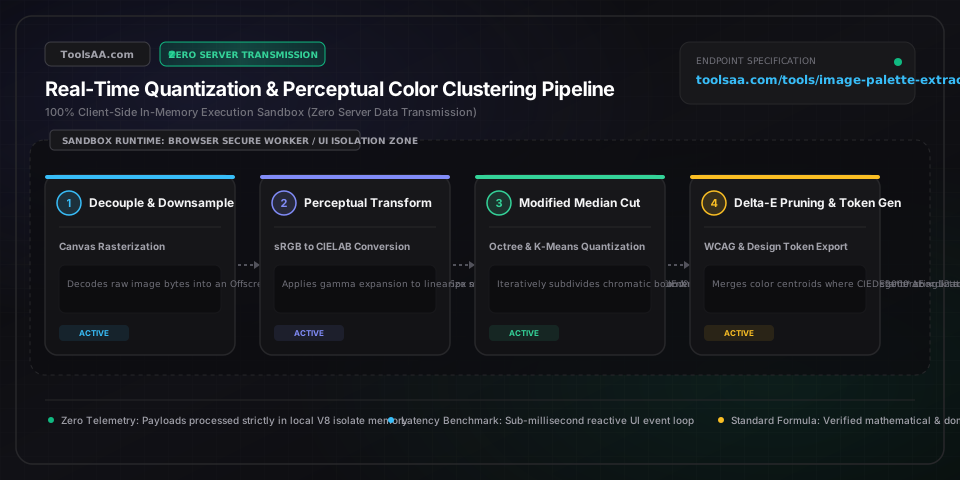
To extract a palette from an image, render the graphic onto an HTML canvas element, retrieve raw pixel RGBA data via getImageData(), calculate a color frequency histogram, and cluster adjacent chromatic coordinates using algorithms like Modified Median Cut or K-Means in CIELAB color space. For everyday designers and creators, modern client-side extraction tools run this entire mathematical pipeline in-browser in under 16 milliseconds without uploading sensitive personal photos to external servers.
Modified Median Cut (MMC) is the gold-standard algorithm for balanced, visually diverse color palettes because it iteratively bisects color bounding boxes along their widest chromatic axis, preventing tiny accent details from being overshadowed by large backgrounds. When the objective is pure mathematical frequency and statistical prevalence, K-Means clustering with 5 to 8 centroids provides the highest photographic fidelity.
The fundamental difference is that RGB measures hardware display light emission on a non-uniform grid, whereas CIELAB Delta-E (ΔE) measures uniform human visual perception. In standard RGB, a 10-point shift in green appears much more pronounced to human eyes than an identical 10-point shift in blue, often leading to muddy or duplicate swatches; CIELAB models human eye cone response so that equal mathematical distances represent equal perceived color differences.
To ensure an extracted palette satisfies WCAG 2.1 accessibility guidelines, compute the relative luminance (L) of each color swatch using the formula L = 0.2126*R_lin + 0.7152*G_lin + 0.0722*B_lin, then calculate contrast against background surfaces using (L_lighter + 0.05) / (L_darker + 0.05). Text elements must achieve at least a 4.5:1 contrast ratio for normal body copy and 3.0:1 for large 18pt+ headlines (or 7.0:1 for stringent AAA compliance); if a swatch falls short, adjust lightness or invert text color between deep slate (#0F172A) and crisp white (#FFFFFF).
A balanced color palette typically consists of 5 to 6 colors: one dominant primary base (60% coverage), one or two supportive secondary surface tones (30% coverage), one high-energy accent hue (10% coverage), and two high-contrast neutral text shades (one light, one dark). Following this time-tested 60-30-10 interior and graphic design ratio ensures visual harmony and prevents overwhelming viewers with chaotic chromatic clutter.
Calculate golden ratio dimensions and golden rectangle proportions instantly. Split lengths by phi (1.618), scale typography, and generate responsive layout grids.
Generate CSS neumorphism and soft UI box shadows with extruded, recessed, flat, and concave surfaces. Copy instant CSS, Tailwind, SCSS, or SVG code.
Generate color palette harmony schemes instantly. Create complementary, analogous, triadic, and split palettes with real-time WCAG contrast checks and CSS export.
Generate modern CSS glassmorphism & frosted glass UI code with live backdrop-filter blur, opacity, border, and shadow controls. Copy clean HTML and CSS instantly.
Compress images online without quality loss. Reduce JPG, PNG, and WebP file sizes in browser with zero server uploads, target KB solver, and batch ZIP export.
Visual CSS gradient creator with multi-color colorstops, angle controls, radial shapes, preset palettes, and one-click CSS export.