Image Compressor & Photo Size Reducer

Image Compressor & Photo Size Reducer

Compress images online without quality loss. Reduce JPG, PNG, and WebP file sizes in browser with zero server uploads, target KB solver, and batch ZIP export.

Lbl presets
Lbl strategy mode

Btn dropzone prompt

Btn dropzone sub

240 Unit kb
Lbl dimensions
Lbl width prefix
Lbl height prefix
Lbl pipeline titleOffscreenCanvas / O(N)
DECRESDCTBINZIP
0.980
Lbl ssim fidelityLbl perceptually lossless
Lbl compression reduction:-0.0%
0 B0 B
Lbl zoom loupe:
Lbl split position: 50%

Lbl batch queue empty

Lbl original size0 B
Lbl compressed size0 B
Lbl net savings0 B
Lbl ratio0.0%
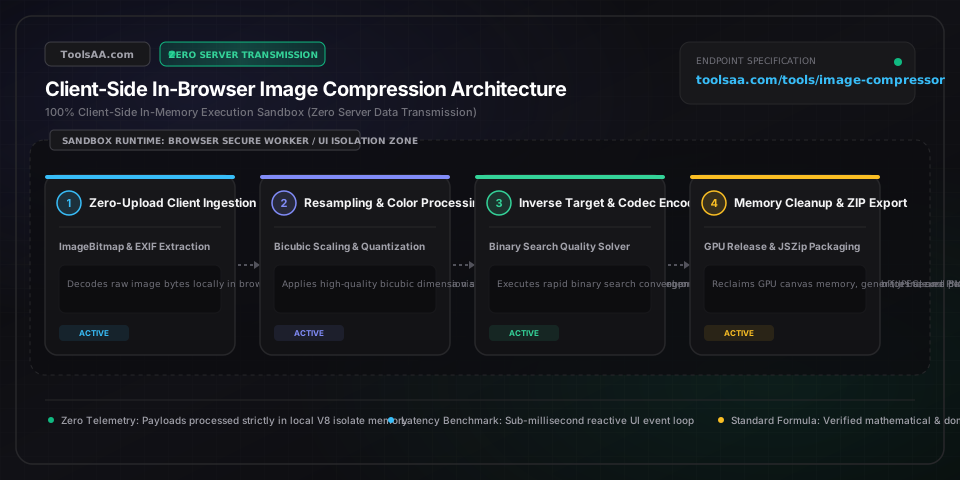
Technical Reference & Architecture Guide

Image Compressor & Photo Size Reducer Guide

Compress images online without quality loss. Reduce JPG, PNG, and WebP file sizes in browser with zero server uploads, target KB solver, and batch ZIP export.

Image Compressor & Photo Size Reducer Guide — Client-Side In-Memory Architecture & Data Flow

Key Parameters & Controls

sourceFilesFileList | Drag-and-Drop Inflow

Raw image byte buffers decoded locally via createImageBitmap and FileReader in isolated browser thread memory without network socket transmission.

Default: Single or Multi-File Selection
compressionMode"quality" | "targetSize"

Algorithmic execution strategy toggling between manual scalar quantization and an automated O(log k) binary search solver targeting strict byte limits.

Default: quality
outputFormat"image/webp" | "image/jpeg" | "image/png"

Destination MIME container determining DCT quantization tables, VP8 intra-frame block prediction, or RFC 1951 DEFLATE 2D filtering routines.

Default: image/webp
qualityFactorFloat Range [0.01, 1.00]

Lossy quantization scale passed to HTMLCanvasElement.toBlob(). Factors below 0.70 risk high-frequency DCT ringing, while 0.80 maintains SSIM > 0.95.

Default: 0.80
targetSizeCeilingInteger (Kilobytes, KB)

Upper file payload threshold (e.g., 200 KB for Schengen visas, 240 KB for US DS-160) enforced by the inverse root-finding convergence loop.

Default: 200
maxDimensionsPixel Bounding Box (Width x Height)

Maximum spatial resolution enforced via stepped bicubic resampling to restrict total pixel operations from O(W × H) and prevent WebKit canvas OOM crashes.

Default: 1920 x 1080 px
colorQuantizationPalette Depth (256 | 128 | 64 Colors | Full)

Color reduction matrix for PNG assets executing octree spatial partitioning and Floyd-Steinberg dithering to preserve alpha transparency within 8-bit index limits.

Default: Full Color (24-bit)
exifSanitization"strip" | "safe" | "retain"

Metadata privacy barrier stripping TIFF/Exif segments (GPS coordinates, camera serial identifiers, timestamps) during canvas raster re-serialization.

Default: strip

Pro Tips & Best Practices

WebP vs JPEG Compression Efficiency Benchmark

Converting photographic assets from baseline JPEG to WebP reduces file payload by 25% to 35% at an identical Structural Similarity Index (SSIM > 0.95). WebP leverages VP8 intra-frame macroblock prediction and discrete arithmetic coding, suppressing high-frequency DCT ringing artifacts around high-contrast edges.

Mitigating Mobile WebKit Canvas Memory Ceilings

iOS Safari imposes a hard canvas memory threshold (typically 256 MB to 384 MB cumulative GPU allocation). When processing multi-megapixel photos (>12 MP), execute stepped downsampling via OffscreenCanvas or createImageBitmap, and explicitly set canvas.width = canvas.height = 0 post-compression to force immediate hardware context garbage collection.

Binary Search Convergence for Strict Visa and Passport Caps

Official consular portals enforce strict file size thresholds (e.g., 240 KB for US DS-160 or 200 KB for EU Schengen visas). Use Target File Size mode, which executes an automated 7-step binary search over JPEG/WebP quantization parameters, converging to the maximum perceptual quality within 300 ms without manual trial-and-error.

Octree Palette Quantization for Alpha UI Assets

For UI icons, logos, and screenshots with flat color fields and alpha transparency, converting to JPEG destroys transparency, while lossy WebP can produce edge halo artifacts. Applying 8-bit octree palette quantization with Floyd-Steinberg dithering to PNG assets yields 60% to 75% file reduction while maintaining pixel-perfect boundary definitions.

Common Gotchas & Troubleshooting

⚠️Compressed Output File Is Larger Than the Original Input

Re-encoding an already compressed JPEG or WebP file at high quality (≥85%) forces the transform encoder to treat existing quantization noise and blocking artifacts as authentic high-frequency data, expanding the entropy table. Set quality to 75% or apply a 10% dimensional downscale to re-quantize the frequency domain efficiently.

⚠️Transparent Background Turns Solid Black or White After Compression

The JPEG container standard (ISO/IEC 10918-1 / JFIF) does not support an alpha transparency channel and flattens translucent pixels against an opaque matte. Switch the target output format to WebP (which supports lossy compression with 8-bit alpha channels) or 8-bit quantized PNG.

⚠️Target Size Solver Fails to Reach Ultra-Low Kilobyte Ceiling

When requesting an aggressive size threshold (such as <50 KB on a 4K image), quantization reaches a minimum quality floor (1%) where DCT baseline header tables and minimal run-length codes cannot compress further. Enable Maximum Dimensions downscaling to reduce pixel surface area proportionally, as byte weight scales quadratically with linear dimensions.

⚠️Mobile Browser Freezes or Reloads Tab During Batch Image Processing

Decoding multiple camera photos simultaneously exceeds mobile VRAM limitations, triggering browser tab crashes. Limit batch concurrency to 1 (serialized sequential execution) in settings, enabling each image buffer to be released and garbage-collected before initializing the next decoding context.

Frequently Asked Questions

How does target file size compression calculate exact KB limits?▼

Target size compression executes an O(log k) binary search over the discrete cosine transform (DCT) quantization parameter space [1, 100]. In each iteration, the canvas encoder tests canvas.toBlob() against the byte limit; if the payload exceeds the target, the upper bound is bisected, converging to the highest possible visual quality within 7 iterations in under 300 ms.

What is the optimal image quality and file size benchmark for web performance?▼

The recommended web benchmark is 75% to 82% quality in WebP format, maintaining a Structural Similarity Index (SSIM) above 0.96 while capping hero images under 150 KB and content thumbnails under 70 KB. This satisfies Google Core Web Vitals criteria for Largest Contentful Paint (LCP < 2.5s) without introducing perceptible high-frequency compression artifacts.

WebP vs JPEG vs PNG: Which format produces the smallest image file size?▼

WebP delivers 25% to 35% smaller file sizes than baseline JPEG at equivalent SSIM visual fidelity due to VP8 intra-frame macroblock prediction, and reduces 24-bit PNG sizes by over 70% with lossy alpha transparency. PNG remains necessary only for lossless diagrammatic assets or 8-bit indexed palettes where sharp text boundaries must avoid DCT quantization noise.

Why does re-compressing an already compressed image increase file size?▼

Lossy transform coding is non-idempotent: re-compressing an image at high quality (≥85%) causes mismatched 8x8 DCT block boundaries, forcing the entropy encoder to record prior compression artifacts as genuine high-frequency pixel information. This inflates the Huffman or arithmetic coding tables, resulting in a 10% to 25% larger file payload unless re-quantized aggressively.

How does client-side browser execution protect confidential image data?▼

All image decoding, resampling, and re-encoding operations run entirely in local memory using the browser HTML5 Canvas, createImageBitmap, and Web Workers without making outbound HTTP requests. Cryptographic integrity can be verified via the Web Crypto API (crypto.subtle.digest) within the local origin sandbox, ensuring full compliance with HIPAA, GDPR, and RFC 6454 security specifications.

Why do transparent image backgrounds turn solid black or white when converting to JPG?▼

The JPEG specification (JFIF / ISO/IEC 10918-1) lacks an alpha channel and only encodes YCbCr luminance-chrominance planes. When exporting RGBA canvas pixel buffers to image/jpeg, the browser automatically composites transparent pixels against an opaque matte (typically 0x000000 black or 0xFFFFFF white); maintaining transparency requires selecting WebP or PNG.

Related Tools & Utilities

All Tools →