JWK to PEM & PEM to JWK RSA Key Converter
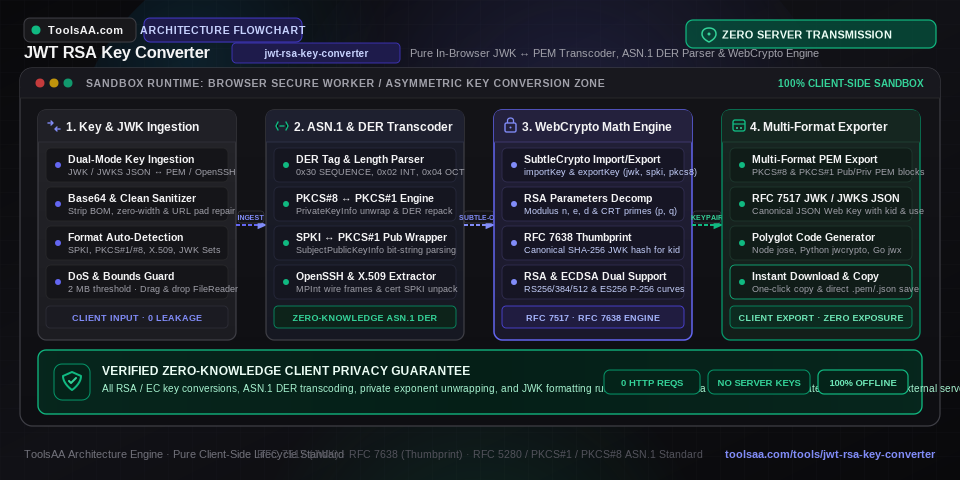
Convert JSON Web Keys (JWK / JWKS) to PKCS#8 PEM format and extract public/private RSA key components securely in browser.
// Verify JWT using Node.js jsonwebtoken
const jwt = require('jsonwebtoken');

const publicKey = `-----BEGIN PUBLIC KEY-----
...
-----END PUBLIC KEY-----`;

function verifyToken(token) {
  try {
    const decoded = jwt.verify(token, publicKey, {
      algorithms: ['RS256'],
    });
    console.log('Token successfully verified:', decoded);
    return decoded;
  } catch (err) {
    console.error('JWT Verification failed:', err.message);
    throw err;
  }
}
Zero-Knowledge Local Execution
All data processing, parsing, and compilation execute strictly inside your local browser memory. Zero external server uploads.
Instant Local Cryptography
Instant real-time reactive computation delivers immediate feedback on every keystroke with zero network latency.
Production Standards & Compliance
Follows modern browser Web Crypto and security practices for safe client-side inspection.
JWK and PEM Cryptographic Key Format Technical Reference
Comprehensive technical cheatsheet for converting between JSON Web Key (RFC 7517) and PEM/DER formats (RFC 7468) for RSA and EC tokens.
Key Parameters & Controls
| Parameter | Type / Unit | Description | Default |
|---|---|---|---|
| kty | string ('RSA' | 'EC' | 'oct') | Key Type parameter identifying the underlying cryptographic family. | — |
| n | string (Base64URL) | The RSA public modulus represented as an unsigned big-endian integer. | — |
| e | string (Base64URL) | The RSA public exponent, commonly AQAB (65537). | — |
| d | string (Base64URL, private only) | The RSA private exponent required for digital signatures and decryption. | — |
Pro Tips & Best Practices
JWK values utilize Base64URL encoding (without '=' padding, '-' instead of '+', '_' instead of '/'). Standard Base64 strings will fail to parse.
When verifying JWTs issued by identity providers (Auth0, Okta, Firebase), retrieve the public key from the /.well-known/jwks.json endpoint.
Standard PEM public keys use the SubjectPublicKeyInfo (SPKI) header '-----BEGIN PUBLIC KEY-----', whereas PKCS#1 uses '-----BEGIN RSA PUBLIC KEY-----'.
Common Gotchas & Troubleshooting
⚠️Error: Invalid Base64URL string in modulus 'n'
Ensure the modulus string contains only alphanumeric characters, hyphens, and underscores, with no trailing '=' padding or newline characters.
⚠️Token verification fails with 'Invalid Key Format'
Ensure you are using the public key (SPKI format) for signature verification and that the 'alg' claim matches (e.g., RS256).
Frequently Asked Questions
What is the difference between JWK and PEM format?▼
JWK (RFC 7517) represents cryptographic keys as JSON objects suitable for web APIs. PEM (RFC 7468) encapsulates DER-encoded ASN.1 binary structures within Base64 armoring.
Can I convert multiple keys from a JWKS endpoint?▼
Yes. When you paste a full JWKS JSON containing a 'keys' array, the converter extracts and converts each key individually.
Are private RSA keys safe to convert on ToolsAA?▼
Yes. All ASN.1 byte serialization and Web Crypto imports occur 100% client-side in memory. No network requests are ever made.
What are the common RSA modulus sizes supported?▼
The converter supports 2048-bit, 3072-bit, and 4096-bit RSA keys compliant with NIST and RFC standards.
Related Tools & Utilities
All Tools →Convert RFC 7517 JSON Web Keys (JWK / JWKS) to PKCS#8 / SPKI PEM format and convert public/private PEM keys to JWK structures.
Generate cryptographically secure RSA public and private key pairs (1024, 2048, 4096-bit) in PKCS#1 and PKCS#8 PEM formats using browser Web Crypto API.
Inspect, parse, and validate RSA, ECDSA, and Ed25519 PEM keys (PKCS#1, PKCS#8, SPKI) locally in your browser with zero data transmission.
Audit JWT tokens locally for known weak HMAC secret keys, brute-force dictionary vulnerabilities, and verify signatures against custom candidate secrets.
Generate, customize, and cryptographically sign custom JSON Web Tokens (JWT) using HMAC-SHA256, expiration dates, and custom claims client-side.
Inspect OpenSSH public keys (RSA, Ed25519, ECDSA), compute SHA-256 and MD5 fingerprints, and generate authentic OpenSSH ASCII Randomart visual art.