SVG to PNG & WebP Converter
Standard image resizing causes fuzzy, pixelated edges. Our client-side rasterizer dynamically adjusts vector viewport targets before rasterizing onto high-density canvas buffers, yielding razor-sharp anti-aliased output even up to 8K (8x) or 16x.
Subpixel Vector Supersampling
Renders vector coordinate paths directly onto high-density raster grids up to 8K resolution with crisp anti-aliasing.
Full 32-bit Alpha Transparency
Preserves transparent alpha channels without fringes or jagged borders, perfect for logos, UI icons, and dark themes.
100% Client-Side In-Browser Processing
Your vector graphics and proprietary assets are parsed locally via HTML5 Canvas. Zero bytes are ever sent to remote servers.
Svg To Png Developer Reference
Production-grade developer cheatsheet for client-side SVG rasterization, high-DPI canvas rendering, viewBox scaling, alpha channel preservation, and WebP/PNG export.
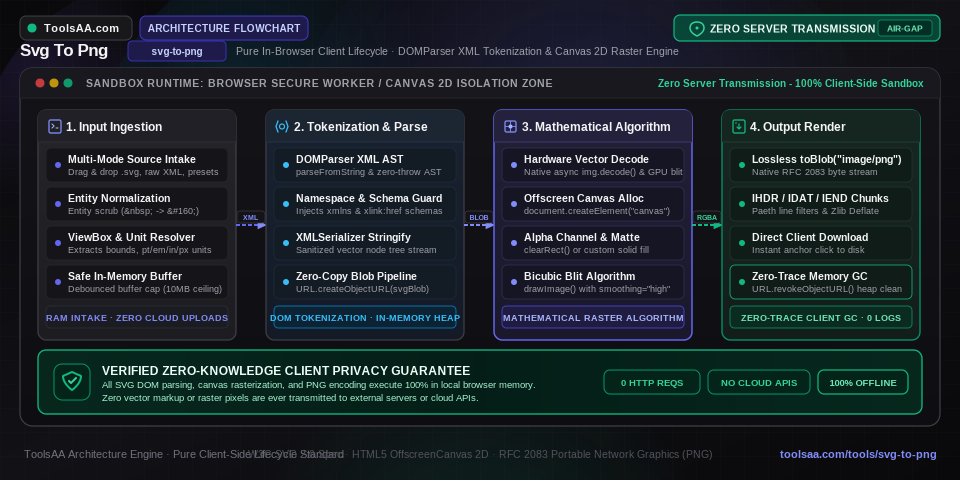
Key Parameters & Controls
| Parameter | Type / Unit | Description | Default |
|---|---|---|---|
| exportFormat | "png" | "webp" | Target raster image MIME encoding format. PNG provides lossless compression with complete alpha transparency, while WebP delivers smaller byte payloads with modern browser support. | "png" |
| canvasBg | "transparent" | "white" | "dark" | "zinc" | "custom" | Base fill style composited onto the 2D canvas buffer prior to drawing vector paths. Prevents dark mode blending issues when vector elements lack explicit fill colors. | "transparent" |
| scalePreset | ScalePreset (1x | 2x | 4x | 8x) | Integer or fractional multiplier applied to intrinsic SVG width and height dimensions, establishing physical canvas pixel density for crisp retina display rendering. | {"label": "2x", "factor": 2} |
| smoothingQuality | "high" | "medium" | "low" | CanvasRenderingContext2D imageSmoothingQuality hint governing bicubic and bilinear interpolation algorithms during vector transformation and raster downsampling. | "high" |
| customBgColor | string (hex | rgba) | Hexadecimal or RGBA color code evaluated and assigned to context fillStyle when canvasBg is set to custom, allowing exact brand backdrop matching. | "#ffffff" |
| maxDimensionConstraint | number (pixels) | Hard ceiling clamp for canvas width and height up to 8192px and 33.5 megapixels, preventing GPU texture allocation failure and browser tab crash. | 8192 |
Pro Tips & Best Practices
Always define viewBox attributes instead of hardcoded width and height tags. When scaling SVGs onto HTML5 Canvas, coordinate math relies on viewBox aspect ratios to prevent vector distortion across uneven dimension presets.
Remote webfonts referenced via @import or external link tags fail silently during canvas rasterization due to browser security sandboxes. Embed fonts directly as base64 WOFF2 data URIs within an SVG defs style block to ensure typography renders accurately.
High-resolution 8K exports allocate up to 134MB of uncompressed GPU buffer memory. Always revoke object URLs via URL.revokeObjectURL and zero canvas dimensions (width=0, height=0) immediately after generating the raster blob.
When converting flat illustration SVGs with transparency, target WebP with quality 0.92 to achieve 30% to 50% smaller file sizes than standard 32-bit PNGs without introducing visible boundary fringing or color quantization artifacts.
Common Gotchas & Troubleshooting
⚠️SecurityError: The canvas has been tainted by cross-origin data on export
Occurs when the SVG references external cross-origin images, SVG glyphs, or remote CSS styles. Convert all linked bitmap assets into base64 Data URIs (data:image/...) and embed stylesheets directly within SVG <style> tags before rendering to canvas.
⚠️Rendered PNG output is completely blank with zero byte visual contents
Ensure the SVG root element includes valid width, height, or viewBox coordinates, along with the xmlns="http://www.w3.org/2000/svg" namespace declaration. Without explicit viewBox bounds, Canvas cannot compute source coordinates and paints empty pixels.
⚠️Canvas pixel dimension exceeds MAX_CANVAS_DIMENSION allocation ceiling
Scaling oversized vectors with high multipliers (e.g., 8x on 2048px vectors) triggers GPU buffer allocation failures. Downscale the factor or clamp output dimensions so that Math.max(width, height) <= 8192 and total pixel area stays below 33,554,432 pixels.
Frequently Asked Questions
Why does SVG rasterization require an explicit xmlns namespace attribute?▼
The W3C XML DOM parser requires the namespace URI 'http://www.w3.org/2000/svg' when deserializing XML strings or converting blobs to Image objects. Without this attribute, the browser parser treats the payload as generic XML rather than graphical vectors, causing raster decoding to fail.
How much memory does rendering an 8K raster image require in browser Canvas?▼
An uncompressed 8192x8192 pixel canvas at 32-bit RGBA color depth consumes exactly 268,435,456 bytes (256 megabytes) of raw RAM in GPU and CPU graphics buffers. Releasing temporary Blob URLs and clearing canvas context buffers prevents browser tab crashes during high-resolution batch jobs.
Can external CSS stylesheets and webfonts be preserved when exporting to PNG?▼
Standard canvas rasterization via Image elements sandboxes cross-origin requests. To include custom typography or CSS styles, you must convert all external stylesheets, @font-face definitions, and referenced images into base64 Data URIs and embed them within inline <style> tags directly inside the SVG code.
When should developers choose WebP over PNG for vector rasterization?▼
WebP is optimal when minimizing download payload size for web delivery, offering roughly 25% to 35% smaller file sizes than PNG with identical 24-bit RGB and 8-bit alpha transparency. PNG is preferred when lossless source archiving or legacy tool compatibility across desktop image editors is required.
Related Tools & Utilities
All Tools →Clean, minify, and strip metadata from SVG graphics in browser to drastically reduce file sizes while preserving visual quality.
Encode, optimize, URL-escape, and convert raw SVG vector markup into clean CSS background-image, mask-image, and Data URI properties locally.
Convert modern Google WebP images to lossless transparent PNG or optimized JPEG format entirely in browser via HTML5 Canvas with zero cloud upload and batch processing.
Convert raw SVG vector markup into clean, accessible React functional components with TypeScript interfaces, props spreading, memoization, and SVGR-compliant attribute camelCasing.
Inspect, parse, and debug SVG path definitions with interactive cubic/quadratic Bézier handles, arc dissecting, bounding box analytics, and relative-to-absolute command conversion.
Bundle multiple SVG icons into a single SVG <symbol> sprite sheet with clean IDs, viewBox preservation, and HTML usage snippets.