Base58 & Base58Check Encoder / Decoder
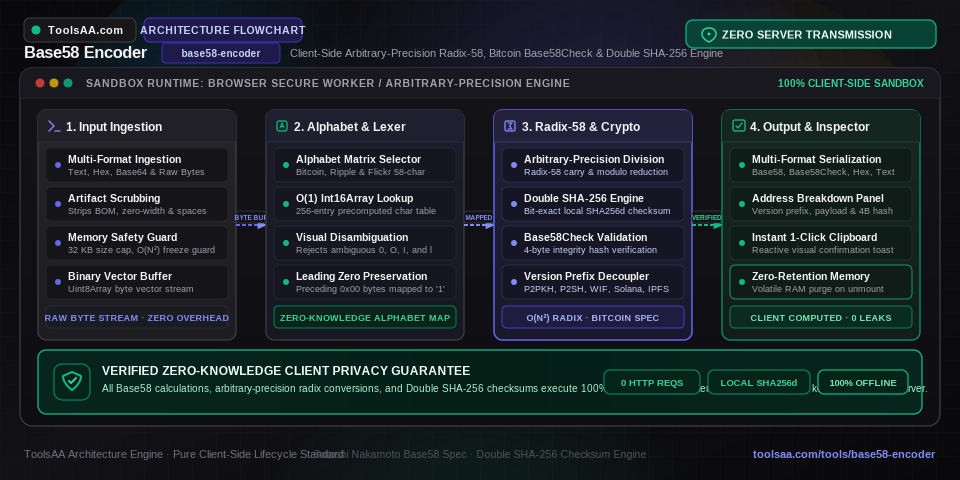
Convert text, hex, and cryptographic public keys to and from Bitcoin and IPFS Base58 / Base58Check formats with SHA-256 double-hash checksum verification.
Base58Check Structure & Cryptographic Integrity Inspector
Base58Check encapsulates: 1 Version Byte + Payload Data + 4-Byte Double SHA-256 Checksum.
Standard public key hash address
Determines the leading characters (e.g. 0x00 starts with '1').
Expected: 0xC29B7D93
Zero-Knowledge Local Execution
All data processing, parsing, and compilation execute strictly inside your local browser memory. Zero external server uploads.
Instant Local Cryptography
Instant real-time reactive computation delivers immediate feedback on every keystroke with zero network latency.
Production Standards & Compliance
Follows modern browser Web Crypto and security practices for safe client-side inspection.
Base58 & Base58Check Encoder / Decoder — Reference Guide
Convert text, hex, and cryptographic public keys to and from Bitcoin and IPFS Base58 / Base58Check formats with SHA-256 double-hash checksum verification.
Key Parameters & Controls
| Parameter | Type / Unit | Description | Default |
|---|---|---|---|
| Conversion Mode | selection | Action: Encode string/hex to Base58 or Decode Base58 string back to payload. | Encode |
| Input Encoding | selection | Format of source data: UTF-8 plain text or hexadecimal byte string. | UTF-8 |
| Base58Check Checksum | boolean | Appends or validates 4-byte double SHA-256 checksum (Bitcoin address standard). | true |
Pro Tips & Best Practices
Base58 eliminates characters that look visually identical in many fonts: 0 (zero), O (capital o), I (capital i), and l (lower L). It also avoids punctuation (+, /) to prevent URL line-wrapping.
Base58Check calculates checksum = SHA256(SHA256(data))[:4]. This guarantees that mistyping any character in a Bitcoin address will be detected with 99.999999% probability.
In Base58, each leading zero byte (0x00) is encoded as a leading '1'. A Bitcoin address beginning with '1' indicates a standard P2PKH address.
Common Gotchas & Troubleshooting
⚠️Checksum validation failed on decode
Ensure you did not mistype any character. If decoding arbitrary Base58 text (like IPFS CIDv0), disable the Base58Check checksum option.
⚠️Invalid character error
Base58 strictly forbids the characters '0', 'O', 'I', 'l', '+', and '/'. Remove any invalid symbols from the input.
Frequently Asked Questions
What is the difference between Base58 and Base64?▼
Base58 uses a 58-character alphabet excluding ambiguous glyphs (0, O, I, l) and symbols (+, /), making it ideal for human copying and QR scanning.
How is Base58 used in IPFS?▼
IPFS uses Base58 (specifically the 'Qm...' prefix) to represent multihash content identifiers (CIDv0) in a human-readable form.
Does this tool support Solana addresses?▼
Yes. Solana public keys and transaction signatures are standard Base58 encoded 32-byte and 64-byte binary arrays.
Can I convert raw hexadecimal bytes?▼
Yes, toggle the Input Encoding selector from UTF-8 to Hexadecimal to encode raw cryptographic keys.
Related Tools & Utilities
All Tools →Parse and inspect PEM-encoded SSL/TLS certificates locally, displaying Subject Alternative Names (SAN), issuer authority, SHA-256 fingerprints, and expiration validity dates.
Convert internationalized domain names (IDN) bidirectionally between Unicode and ASCII Punycode (xn--) with built-in homograph attack and script spoofing analysis.
Decode, verify, and inspect JWT headers, payloads, and claims with local secret or public key without sending data to servers.
Inspect, parse, and validate RSA, ECDSA, and Ed25519 PEM keys (PKCS#1, PKCS#8, SPKI) locally in your browser with zero data transmission.
Generate bcrypt password hashes with custom salt rounds and verify candidate passwords against existing hashes locally.
Calculate Keyed-Hash Message Authentication Codes (HMAC) for webhook signing (Stripe, GitHub, Shopify) directly in browser memory.