X.509 SSL / TLS Certificate Decoder & Inspector
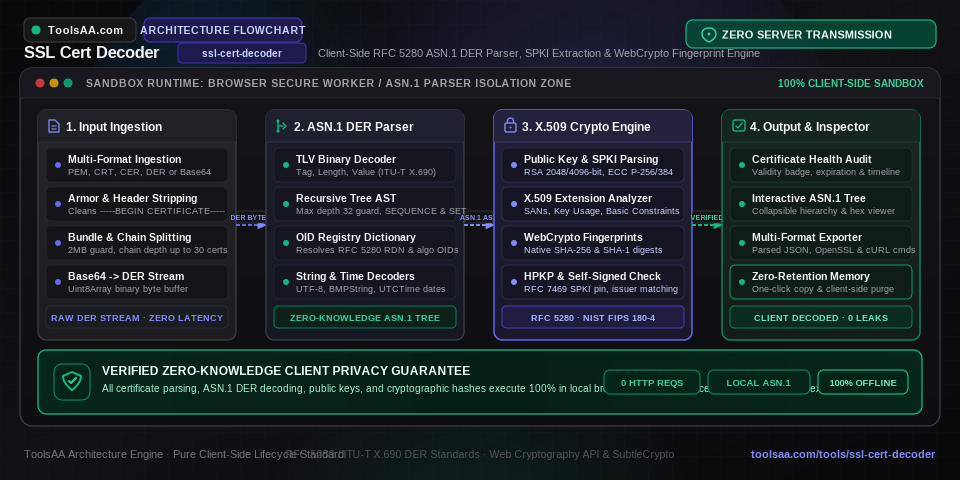
RFC 5280Parse and inspect PEM-encoded SSL/TLS certificates locally, displaying Subject Alternative Names (SAN), issuer authority, SHA-256 fingerprints, and expiration validity dates.
Zero-Knowledge Local Execution
All data processing, parsing, and compilation execute strictly inside your local browser memory. Zero external server uploads.
Instant Local Cryptography
Instant real-time reactive computation delivers immediate feedback on every keystroke with zero network latency.
Production Standards & Compliance
Follows modern browser Web Crypto and security practices for safe client-side inspection.
X.509 SSL / TLS Certificate Decoder & Inspector — Reference Guide
Parse and inspect PEM-encoded SSL/TLS certificates locally, displaying Subject Alternative Names (SAN), issuer authority, SHA-256 fingerprints, and expiration validity dates.
Key Parameters & Controls
| Parameter | Type / Unit | Description | Default |
|---|---|---|---|
| Certificate Payload (PEM) | string | X.509 certificate text block beginning with '-----BEGIN CERTIFICATE-----'. | Sample Certificate |
| Date Verification Base | datetime | Calendar anchor used to calculate days remaining until expiration. | Current Date |
| Fingerprint Algorithm | selection | Cryptographic digest used for certificate fingerprinting (SHA-256, SHA-1). | SHA-256 |
Pro Tips & Best Practices
Modern browsers and TLS clients enforce RFC 6125 and strictly ignore the legacy Common Name (CN) field in favor of Subject Alternative Names (dNSName entries).
Automated CAs like Let's Encrypt issue 90-day certificates. Industry best practice recommends triggering automated renewals when 30 days remain.
Inspect the Issuer field to verify your certificate chain. Commercial public CAs never issue leaf certificates directly from root keys; they always use an intermediate CA.
Common Gotchas & Troubleshooting
⚠️Failed to decode certificate or ASN.1 parse error
Ensure you included the complete PEM header ('-----BEGIN CERTIFICATE-----') and footer ('-----END CERTIFICATE-----') without truncated Base64 lines.
⚠️Expired certificate warning displayed
Compare your local computer system clock against the 'Valid To' timestamp to rule out local time drift.
Frequently Asked Questions
Can I inspect private keys with this tool?▼
No. This tool is designed exclusively for public X.509 certificates. You should never paste private keys into web inspectors.
Does this tool contact external certificate revocation lists (CRL or OCSP)?▼
No. The decoder inspects the static cryptographic and structural claims of the certificate 100% locally in your browser.
What is the difference between DV, OV, and EV certificates?▼
Domain Validation (DV) only verifies domain ownership. Organization Validation (OV) and Extended Validation (EV) verify legal corporate identities in the certificate Subject.
How do I download a site's certificate using OpenSSL?▼
Run 'openssl s_client -showcerts -connect example.com:443 </dev/null' to display and copy the live PEM certificate.
Related Tools & Utilities
All Tools →Simulate and debug modern TLS cryptographic handshakes, ECDHE key exchanges, ALPN protocol negotiation, and AES-GCM / ChaCha20 cipher suite security.
Inspect, parse, and validate RSA, ECDSA, and Ed25519 PEM keys (PKCS#1, PKCS#8, SPKI) locally in your browser with zero data transmission.
Convert RFC 7517 JSON Web Keys (JWK / JWKS) to PKCS#8 / SPKI PEM format and convert public/private PEM keys to JWK structures.
Build unified OpenVPN .ovpn profiles with embedded CA, client certs, private keys, and TLS-Crypt for iOS, Android, and Linux.
Convert JSON Web Keys (JWK / JWKS) to PKCS#8 PEM format and extract public/private RSA key components securely in browser.
Generate RFC 8461 Mail Transfer Agent Strict Transport Security (MTA-STS) policy files and _mta-sts/_smtp._tls DNS TXT records.