OpenVPN Client Profile & Unified .ovpn Builder
Assemble unified .ovpn configuration profiles with embedded CA, client certificates, private keys, and TLS keys. Eliminates external disk file dependencies for effortless one-tap import into OpenVPN Connect.
Download file name: corporate-vpn-profile.ovpn
FQDN hostname or public IPv4/IPv6 address.
iOS & Android OpenVPN Connect require tun.
One backup endpoint per line. OpenVPN will sequentially attempt these if the primary host fails.
Encrypts initial TLS control channel, preventing port scanning and deep packet inspection.
Enforces that the server Common Name matches the specified identity to prevent rogue certificate substitution.
Drop ca.crt, client.crt, client.key, and ta.key / tc.key here to automatically populate all slots!
Disabled by default to prevent compression oracle attacks on encrypted sessions.
Arbitrary directives appended verbatim to the configuration block.
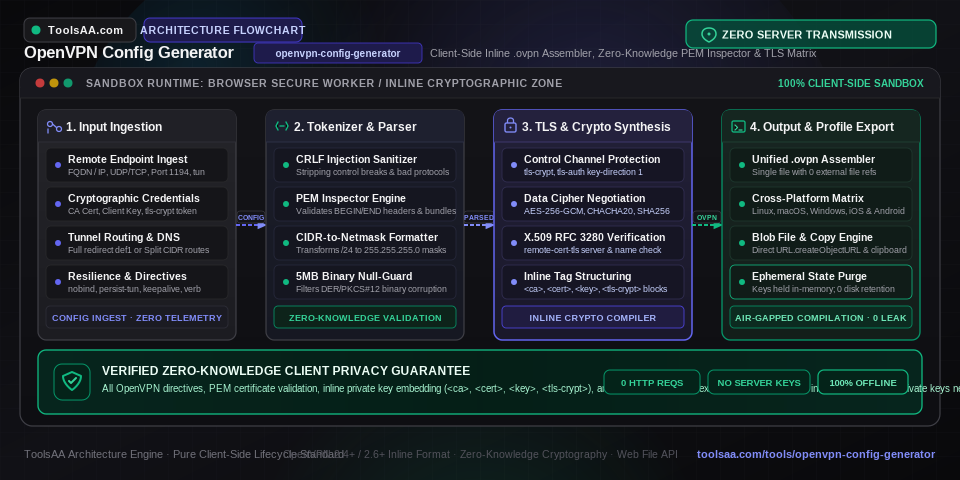
By packaging cryptographic blocks inside inline XML tags (<ca>, <cert>, <key>, <tls-crypt>), this single profile can be directly loaded into:
Zero-Knowledge Local Execution
All data processing, parsing, and compilation execute strictly inside your local browser memory. Zero external server uploads.
Instant Client-Side Engine
Instant real-time reactive computation delivers immediate feedback on every keystroke with zero network latency.
Production Standards & Compliance
Validates syntax, edge cases, and formatting rules reliably inside your browser with zero input uploads.
OpenVPN Client Profile & Unified .ovpn Builder — Reference Guide
Build unified OpenVPN .ovpn connection profiles with embedded CA certificates, client certificates, private keys, and TLS-Auth/TLS-Crypt signatures for seamless multi-platform import on iOS, Android, macOS, and Linux.
Key Parameters & Controls
| Parameter | Type / Unit | Description | Default |
|---|---|---|---|
| client | Directive | Declares that this profile operates as a client and pulls network options from the server. | Required |
| proto | Directive | Transport protocol (udp or tcp). UDP is standard for maximum throughput without TCP meltdown. | udp |
| remote | Directive | Hostname or IP address and port of the remote OpenVPN access server (e.g. vpn.example.com 1194). | Required |
| <ca> ... </ca> | Inline Block | PEM-encoded Certificate Authority certificate validating the authenticity of the VPN server. | Required |
Pro Tips & Best Practices
Use <tls-crypt> instead of <tls-auth> to encrypt initial TLS handshake packets and defeat active port-scanning censors.
Always include 'remote-cert-tls server' to prevent a rogue client certificate holder from impersonating the VPN gateway.
Include 'mssfix 1400' in client profiles to automatically constrain TCP MSS size across MTU-restricted mobile networks.
Common Gotchas & Troubleshooting
⚠️TLS Handshake Failed with server timeout
Verify that your remote server IP is accessible and that UDP port 1194 is not blocked by your hosting provider firewall.
⚠️Certificate verification error: Certificate has expired or not yet valid
Check your client device's clock. If system time differs from UTC due to disabled NTP, valid certificates will fail verification.
Frequently Asked Questions
What is an inline .ovpn configuration file?▼
Traditional OpenVPN setups required separate .crt and .key files. An inline .ovpn embeds the CA, user certificate, private key, and TLS secret directly between XML-like tags, creating a single portable file.
Why should I choose UDP over TCP for VPN tunneling?▼
Running TCP over TCP can trigger catastrophic retransmission storms (TCP Meltdown) when packets are lost. UDP transmits packets independently, maximizing throughput.
Are private keys or certificates stored on ToolsAA servers?▼
Never. All profile assembly, PEM formatting, and configuration validation occur 100% in your local browser runtime. Zero certificates or keys are uploaded.
How do I import the resulting .ovpn file onto iOS or macOS?▼
Save the .ovpn file and open it using the official OpenVPN Connect app or Tunnelblick on macOS.
Related Tools & Utilities
All Tools →Create production-hardened Linux sshd_config files disabling root login, enforcing public keys, limiting ciphers, and setting idle timeouts.
Generate Curve25519 keys, preshared keys, and wg0.conf WireGuard profiles locally in browser with instant QR codes.
Parse and inspect PEM-encoded SSL/TLS certificates locally, displaying Subject Alternative Names (SAN), issuer authority, SHA-256 fingerprints, and expiration validity dates.
Generate WireGuard Curve25519 public and private key pairs, preshared keys (PSK), and client/server configuration blocks.
Generate secure Content Security Policy (CSP) headers instantly. Configure script-src, style-src, nonces, and hashes to prevent XSS attacks and fix CSP errors.
Compute instant cryptographic hashes entirely in browser with zero server transmission.