Short title
Badge hero category•Badge hero compliance

Content Security Policy & CSP Generator

Generate secure Content Security Policy (CSP) headers instantly. Configure script-src, style-src, nonces, and hashes to prevent XSS attacks and fix CSP errors.

100
Lbl owasp scoreGrade hardened
Presets label
1
Pipe stage1 title
Pipe stage1 sub
2
Pipe stage2 title
Pipe stage2 sub
3
Pipe stage3 title
Pipe stage3 sub
4
Pipe stage4 title
Pipe stage4 sub
Parameters & Inputs
Lbl deployment regime
Lbl enforcement mode
Lbl high order optionsLbl w3c level label Level 3
Lbl csp level compat
Lbl nonce synthesizer
window.crypto.subtle
Lbl nonce prefixdG9vbHNhYS1zZWN1cmUtbm9uY2UtMjAyNg==
Lbl inline hasher'sha256-RFWzHiTAeaP0v89upId2U1QGEGNhBlCe/JC9Zdqvqo='
Lbl verified services
default-srcCat fetchBadge no inherit
Universal fallback boundary for all fetch directives when omitted.
'self'
script-srcCat fetchBadge inherits
Governs valid sources for JavaScript execution and inline scripts.
'self''strict-dynamic''nonce-dG9vbHNhYS1zZWN1cmUtbm9uY2UtMjAyNg=='https:'unsafe-inline'
style-srcCat fetchBadge inherits
Governs valid sources for stylesheets, inline styles, and CSS fonts.
'self''unsafe-inline'
img-srcCat fetchBadge inherits
Governs valid sources of images, SVG vectors, and favicons.
'self'data:https:
connect-srcCat fetchBadge inherits
Restricts script interfaces: fetch(), XMLHttpRequest, WebSocket, and sendBeacon.
'self'
font-srcCat fetchBadge inherits
Governs sources for web fonts loaded via @font-face rules.
'self'data:
object-srcCat fetchBadge inherits
Restricts plugins (<object>, <embed>, <applet>). OWASP mandates 'none'.
'none'
media-srcCat fetchBadge inherits
Governs valid sources for <audio> and <video> HTML5 media streams.
Msg inheriting
frame-srcCat fetchBadge inherits
Governs valid sources for nested browsing contexts (child <iframe> elements).
Msg inheriting
worker-srcCat fetchBadge inherits
Restricts Worker, SharedWorker, and ServiceWorker execution origins.
Msg inheriting
manifest-srcCat fetchBadge inherits
Governs valid sources of progressive web application (PWA) manifests.
Msg inheriting
base-uriCat documentBadge no inherit
Restricts URLs in <base> tags. CRITICAL: does NOT inherit from default-src!
'none'
form-actionCat navigationBadge no inherit
Restricts target submission endpoints for HTML <form> elements.
'self'
frame-ancestorsCat documentBadge no inherit
Clickjacking Armor: restricts parents embedding this site. HTTP header only!
'none'
report-uriReportingBadge no inherit
Legacy URI collector endpoint for W3C CSP Level 2 violation reports.
Msg unconstrained
report-toReportingBadge no inherit
Modern W3C Reporting API endpoint group identifier.
Msg unconstrained
Lbl directives active 11Lbl total sources 18
Regime strict
Content-Security-Policy: upgrade-insecure-requests; default-src 'self'; script-src 'self' 'strict-dynamic' 'nonce-dG9vbHNhYS1zZWN1cmUtbm9uY2UtMjAyNg==' https: 'unsafe-inline'; style-src 'self' 'unsafe-inline'; img-src 'self' data: https:; connect-src 'self'; font-src 'self' data:; object-src 'none'; base-uri 'none'; form-action 'self'; frame-ancestors 'none'; require-trusted-types-for 'script'; trusted-types default dompurify

# Recommended Defense-in-Depth Headers:
Cross-Origin-Opener-Policy: same-origin
Cross-Origin-Embedder-Policy: require-corp
Cross-Origin-Resource-Policy: same-origin
X-Content-Type-Options: nosniff
X-Frame-Options: DENY
Referrer-Policy: strict-origin-when-cross-origin
Permissions-Policy: camera=(), microphone=(), geolocation=()
Lbl header mode Content-Security-Policy
Lbl client zero upload
Primary Metric100Lbl score scale
Efficiency / Capacity11 Unit directives18 Unit sources
Net OutputTxt enforce

Client-Side Processing

High-performance calculation executed entirely in browser memory.

Zero Server Upload Privacy

All payloads remain strictly local with zero external server communication.

Production Ready Export

Clean, optimized output formats ready for immediate deployment.
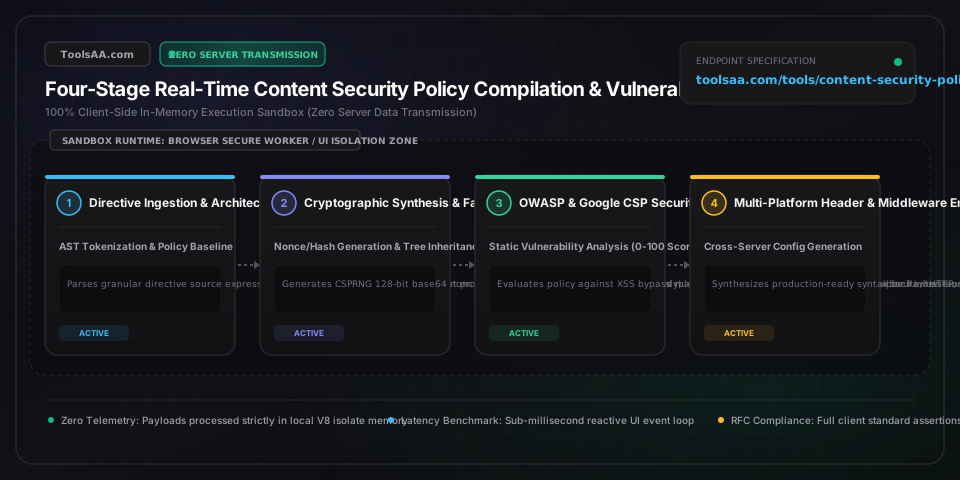
Technical Reference & Architecture Guide

Content Security Policy & CSP Generator Guide

Generate secure Content Security Policy (CSP) headers instantly. Configure script-src, style-src, nonces, and hashes to prevent XSS attacks and fix CSP errors.

Content Security Policy & CSP Generator Guide — Client-Side In-Memory Architecture & Data Flow

Key Parameters & Controls

default-src (Fallback Fetch Boundary)source list (W3C fetch fallback)

Serves as the universal fallback directive for all fetch directives (script-src, style-src, img-src, connect-src, font-src, object-src, media-src, frame-src, worker-src, manifest-src). Setting 'self' restricts unassigned categories to the current origin, while setting 'none' enforces absolute explicit declarations across all resource types.

Default: 'self' (Origin-Only Fallback)
script-src & 'strict-dynamic' (XSS Execution Shield)source list & keyword expressions

Governs JavaScript execution origins, preventing cross-site scripting (XSS). In W3C CSP Level 3, combining a cryptographic nonce or hash with 'strict-dynamic' instructs modern browsers to trust scripts created dynamically by authorized root scripts, while ignoring legacy host allowlists and 'unsafe-inline'.

Default: 'self' 'strict-dynamic' 'nonce-...' (Modern Strict)
object-src & base-uri (Plugin & Navigation Defense)source list (document integrity)

object-src restricts plugins like Flash, Java, and Silverlight; setting 'none' is an OWASP mandatory baseline. base-uri restricts URLs allowed in HTML <base href> tags; critically, base-uri does NOT fall back to default-src, meaning omitting it leaves the site vulnerable to base-tag injection which hijacks relative script URLs.

Default: object-src 'none'; base-uri 'none'
frame-ancestors (Clickjacking & UI Redressing Armor)framing policy (HTTP response header only)

Specifies valid parents that may embed the page in <frame>, <iframe>, <embed>, or <applet> tags, superseding the legacy X-Frame-Options header. Setting 'none' prevents any site from framing the page (preventing clickjacking), while 'self' allows framing only by the same origin. Note: frame-ancestors is ignored inside HTML <meta> tags.

Default: 'none' or 'self' (Clickjacking Armor)
connect-src (Data Exfiltration & API Boundary)URL origin list (fetch / XHR / WebSocket)

Restricts the target URLs that can be loaded using script interfaces including fetch(), XMLHttpRequest, WebSocket (wss://), EventSource, and navigator.sendBeacon(). Crucial for mitigating data exfiltration by compromised third-party scripts attempting to send session tokens to unauthorized external servers.

Default: 'self' (Current Origin API Only)
upgrade-insecure-requests & report-to (Transport & Telemetry)directive flag & reporting group

upgrade-insecure-requests instructs browsers to treat all HTTP URLs as HTTPS before fetching them, preventing mixed-content warnings. report-to defines the Reporting API endpoint group to which browsers dispatch structured JSON violation reports, modernizing and eventually replacing the deprecated report-uri directive.

Default: upgrade-insecure-requests (Enabled)

Pro Tips & Best Practices

'strict-dynamic' Completely Disables Host Allowlists in CSP3 Browsers

When 'strict-dynamic' is present alongside a nonce or hash in script-src, W3C CSP Level 3 specifications dictate that browsers automatically ignore host-based allowlists like https: or https://*.google.com, as well as 'unsafe-inline'. Host allowlists are left in the header solely as backward-compatible fallbacks for legacy browsers (CSP Level 2). Do not rely on domain allowlists to permit specific third-party scripts if you are using 'strict-dynamic'—the initial loader script must carry the nonce!

Missing base-uri Allows Attacker-Controlled Script Hijacking via HTML Injection

Many developers assume setting default-src 'self' secures the entire document. However, base-uri does NOT inherit from default-src. If base-uri is omitted, an attacker who finds a minor HTML injection flaw (such as an unescaped comment or markdown tag) can inject <base href='https://evil-attacker.com/'>. The browser will then resolve all relative scripts (like <script src='/static/app.js'>) against evil-attacker.com, bypassing your script-src 'self' policy entirely. Always explicitly declare base-uri 'none' or 'self'.

'unsafe-inline' is Safely Ignored When a Nonce or Hash is Present in CSP2+

If you need to support legacy browsers that only implement CSP Level 1 while maintaining maximum security on modern browsers, you can safely specify: script-src 'nonce-XYZ123' 'unsafe-inline'. According to W3C CSP Level 2 and Level 3 specs, whenever a nonce or hash is specified, any modern browser will completely ignore 'unsafe-inline'. This provides seamless backward compatibility without degrading modern security.

default-src Does NOT Protect Against Clickjacking or Form Hijacking

A common misconception is that default-src 'none' locks down all document behaviors. In reality, default-src only governs fetch directives. It has zero effect on frame-ancestors (which prevents your site from being embedded inside malicious iframes for clickjacking) and zero effect on form-action (which restricts where <form> elements can submit sensitive credentials). You must declare frame-ancestors 'none'/'self' and form-action 'self' explicitly.

Common Gotchas & Troubleshooting

⚠️Browser console displays: Refused to execute inline script because it violates the following Content Security Policy directive: 'script-src 'self''

This error occurs because an inline <script> tag or an inline HTML event handler (like onclick or onload) is executing without authorization. To fix this according to modern standards: (1) Add a cryptographic nonce to the script tag (<script nonce='...'>) and declare that matching nonce in script-src 'nonce-...'; (2) Alternatively, compute the SHA-256 hash of the exact script content and add 'sha256-...' to script-src; or (3) Refactor inline handlers into external JavaScript files bound with addEventListener.

⚠️API call fails with: Refused to connect to 'https://api.example.com' because it violates connect-src

Modern browsers restrict fetch(), XMLHttpRequest, WebSocket (wss://), and sendBeacon calls to origins declared in connect-src. If connect-src is not explicitly declared, the browser falls back to default-src. If your frontend talks to a separate backend or third-party service (e.g., Stripe, Sentry, or an external API gateway), add the exact origin (e.g., connect-src 'self' https://api.example.com https://api.stripe.com) to your CSP configuration.

⚠️SHA-256 hash declared in script-src still fails with CSP violation error in Google Chrome or Firefox

CSP script hashing is bitwise-exact. Even a single trailing newline, carriage return (\r\n vs \n), or whitespace character difference between your calculated hash and the inline script content will cause a cryptographic mismatch. In addition, do not include the opening <script> or closing </script> tags when computing the hash—only hash the inner code text. Ensure your server template does not reformat or minify the inline script after computing the digest.

⚠️frame-ancestors directive appears to be ignored when declared in an HTML <meta> tag

According to the W3C Content Security Policy specification, frame-ancestors, report-uri, and report-to directives are strictly disallowed and ignored inside HTML <meta http-equiv='Content-Security-Policy'> elements. To prevent clickjacking and configure frame-ancestors, the policy MUST be delivered as a true HTTP response header sent by your web server (e.g., via Nginx add_header, Apache Header set, or Next.js middleware).

Frequently Asked Questions

How do I create a Content Security Policy to stop XSS attacks?▼

To stop Cross-Site Scripting (XSS), implement a Strict CSP using cryptographic nonces or hashes alongside 'strict-dynamic' and object-src 'none'. A robust starter header is: Content-Security-Policy: default-src 'self'; script-src 'self' 'strict-dynamic' 'nonce-RANDOM_BASE64' 'unsafe-inline'; object-src 'none'; base-uri 'none'; frame-ancestors 'none';. This prevents unauthorized inline script execution, blocks Flash/plugin exploits, and stops base-tag URL hijacking.

What is the difference between default-src and script-src in CSP?▼

default-src is the fallback directive that applies to all resource types that lack an explicit directive (including script-src, style-src, img-src, connect-src, and font-src). script-src specifically governs where JavaScript files and inline scripts can be executed from. If script-src is defined, it overrides default-src for all script resources; if script-src is omitted, the browser falls back to default-src.

Why is 'unsafe-inline' considered dangerous in Content Security Policy?▼

'unsafe-inline' is dangerous because it allows the browser to execute any inline JavaScript found on the page, including attacker-injected scripts from stored or reflected XSS vulnerabilities. Allowing 'unsafe-inline' completely dismantles CSP's primary defense against script execution unless it is safely accompanied by a cryptographic nonce or 'strict-dynamic', which causes modern browsers to ignore the inline keyword.

How do CSP nonces work and how are they generated?▼

A CSP nonce (number used once) is a cryptographically strong, random token (typically 128 bits encoded in Base64) generated dynamically on the web server for every single HTTP request. The server outputs this token in the HTTP header (script-src 'nonce-abc123xyz') and attaches the matching attribute to authorized inline scripts (<script nonce='abc123xyz'>). Attackers cannot predict the nonce, preventing injected scripts from executing.

What is the difference between Content-Security-Policy and Report-Only?▼

Content-Security-Policy actively enforces the policy by blocking violating scripts, connections, and stylesheets while reporting infractions. Content-Security-Policy-Report-Only allows violating resources to load and execute normally without breaking user functionality, while sending detailed violation reports to configured endpoints (report-to / report-uri). Report-Only is the industry gold standard for auditing production applications prior to enforcement.

Can you configure Content Security Policy using an HTML meta tag?▼

Yes, Content Security Policy can be delivered via an HTML <meta http-equiv='Content-Security-Policy' content='...'> element within the <head> of your document. However, W3C specifications strictly prohibit framing and reporting directives inside meta tags; directives like frame-ancestors, report-uri, and report-to will be completely ignored by the browser. For complete protection against clickjacking and telemetry, CSP should always be delivered as an HTTP response header.

Related Tools & Utilities

All Tools →