Convert colors between HEX, RGB, HSL, HSV, and CMYK formats
Real-time bidirectional color space calculation with live preview, shades and tints generator, WCAG accessibility contrast scoring, and code snippets for web and mobile frameworks.
#6366F1
99, 102, 241
239°, 84%, 67%
59%, 58%, 0%, 5%
Tailwind CSS Color Ramp (50 - 950)
Click any shade to inspect or copy hex code
Tints (Mix with White)
10% to 90% white mix increments
Shades (Mix with Black)
10% to 90% black mix increments
Color Theory Harmonies
Mathematically balanced color combinations based on geometric angles on the color wheel. Click any color chip to set as active.
Direct opposite (180°) on the color wheel. Maximum visual contrast.
Adjacent colors (±30°), creating serene and harmonious palettes.
Equally spaced (120°) on the color wheel for balanced vibrancy.
Four colors spaced evenly (90°) for rich chromatic variation.
Base color paired with the two shades adjacent to its complement (150° and 210°).
Same hue with varying saturation and lightness depth levels.
WCAG 2.1 Color Contrast Checker
Verify compliance with Web Content Accessibility Guidelines (WCAG) for digital accessibility with authentic alpha compositing.
Heading Text Sample
The quick brown fox jumps over the lazy dog.
Export Snippets & Framework Code
Ready-to-use syntax for CSS, Tailwind, SwiftUI, Flutter, Android, and GLSL
#6366F1#6366F1FFrgb(99, 102, 241)rgba(99, 102, 241, 1)rgb(99 102 241 / 100%)hsl(239, 84%, 67%)hsla(239, 84%, 67%, 1)hsv(239, 59%, 95%)cmyk(59%, 58%, 0%, 5%)--color-primary: #6366F1FF;primary: '#6366f1',Color(red: 0.388, green: 0.400, blue: 0.945)<color name="primary">#ff6366f1</color>Color(0xff6366f1)vec3(0.388, 0.400, 0.945)100% Private Browser Execution
All data processing, parsing, and compilation execute strictly inside your local browser memory. Zero external server uploads.
Instant Unit Conversion
Instant real-time reactive computation delivers immediate feedback on every keystroke with zero network latency.
Production Standards & Compliance
Uses exact International System (SI) and metric conversion factors for dependable numerical precision.
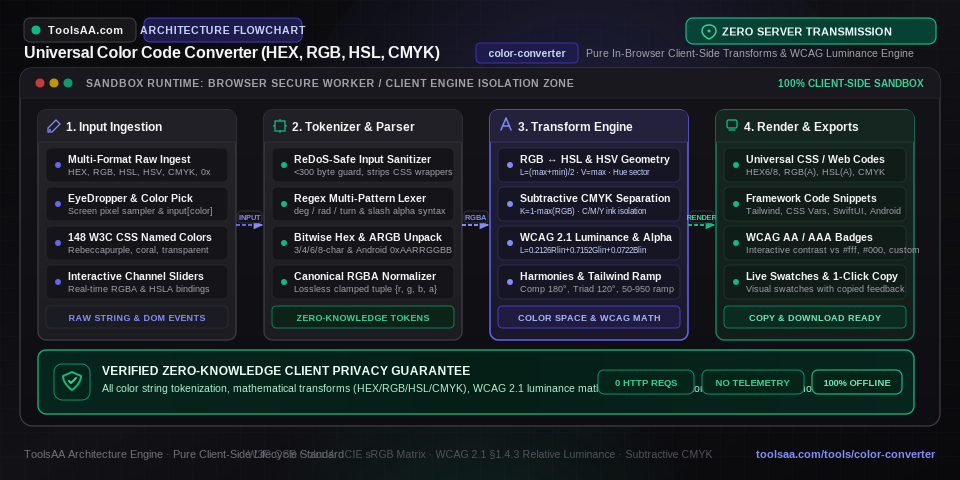
Universal Color Space Converter & Palette Architecture Guide
Comprehensive engineering reference for multi-space color transformations, photometric transfer curves, gamut clamping, and WCAG accessibility standards.
Digital Color Space Specifications & Mathematical Ranges Table
Mathematical channel ranges, component definitions, primary target media, and modern CSS syntax across standard digital color models.
| Color Model | Channel Components | Channel Value Ranges | Primary Medium | CSS Syntax Example |
|---|---|---|---|---|
| HEX | Red, Green, Blue (optional Alpha) | #00 to #FF per channel (0-255) | Web design & UI codebases | #3B82F6 or #3B82F6FF |
| RGB / RGBA | Red, Green, Blue, Alpha | R/G/B: 0–255, A: 0.0–1.0 | Computer monitors & digital screens | rgb(59, 130, 246) |
| HSL / HSLA | Hue, Saturation, Lightness, Alpha | H: 0–360°, S: 0–100%, L: 0–100% | Human-intuitive palette generation | hsl(217, 91%, 60%) |
| HSV / HSB | Hue, Saturation, Value / Brightness | H: 0–360°, S: 0–100%, V: 0–100% | Figma/Photoshop color pickers | hsv(217, 76%, 96%) |
| CMYK | Cyan, Magenta, Yellow, Key Black | C/M/Y/K: 0% to 100% | Subtractive physical 4-color printing | device-cmyk(76% 47% 0% 4%) |
Key Parameters & Controls
| Parameter | Type / Unit | Description | Default |
|---|---|---|---|
| HEX / Hexadecimal | #RRGGBB / #RRGGBBAA | Standard base-16 color notation with optional 8-digit alpha transparency channel. | — |
| RGB / sRGB | rgb(r, g, b) / rgba(r, g, b, a) | Additive primary color light values ranging from 0 to 255 for digital displays. | — |
| HSL | hsl(h, s%, l%) | Cylindrical-coordinate representation: Hue (0-360°), Saturation (0-100%), and Lightness (0-100%). | — |
| HSV / HSB | hsv(h, s%, v%) | Artist-centric color model mapping Hue to Saturation and absolute Value/Brightness. | — |
| CMYK | cmyk(c%, m%, y%, k%) | Subtractive 4-color process ink model for four-color commercial printing presses. | — |
Pro Tips & Best Practices
When designing dark-mode interfaces, adjust HSL Lightness (L) rather than Opacity to maintain clean contrast without muddying underlying surfaces.
Always verify CMYK total ink coverage (TIC/TAC) before commercial print runs to avoid exceeding standard 300% paper saturation limits.
Use delta-E (CIE76 / CIEDE2000) distance calculations to verify perceptual consistency when mapping vibrant brand colors to print.
Common Gotchas & Troubleshooting
⚠️CMYK colors appear washed out or dull compared to on-screen RGB
RGB has a significantly wider color gamut than subtractive CMYK inks. Use out-of-gamut previewing and select Pantone spot colors if ultra-vibrant printing is essential.
⚠️Hex transparency (#RRGGBBAA) does not render in legacy browsers
Convert the hex code to rgba(r, g, b, a) syntax or use modern CSS color-mix() with fallback properties for legacy CSS parsers.
Frequently Asked Questions
What is the difference between HSL and HSV/HSB?▼
Both use a cylindrical coordinate system with Hue from 0 to 360°, but HSL measures Lightness (where 100% is always pure white regardless of saturation), while HSV measures Value/Brightness (where 100% Value at 100% Saturation produces the most vibrant pure hue).
Is color conversion between RGB and CMYK completely lossless?▼
No. RGB is an additive light model with a broad gamut, whereas CMYK is a subtractive physical ink model. Converting from RGB to CMYK often clamps vibrant neon tones, and converting back may result in slight rounding approximations.
How does WCAG contrast ratio calculation relate to color spaces?▼
WCAG 2.1 calculates contrast using Relative Luminance (L), which requires converting sRGB channel values into linear photometric values by un-gamma-mapping them before applying standard weightings (0.2126*R + 0.7152*G + 0.0722*B).
Can I use CSS custom properties with converted color formats?▼
Yes. This tool outputs standard CSS custom property definitions (e.g., --color-primary-rgb: 59, 130, 246;) making it effortless to construct dynamic rgb(var(--color-primary-rgb) / 0.8) alpha-blends in modern stylesheets.
Related Tools & Utilities
All Tools →Convert HEX color codes into CSS rgb(), rgba() with opacity, hsl(), hsv(), and print-ready CMYK values with real-time contrast checking and WCAG compliance ratings.
Convert hex to decimal and hexadecimal to dec with signed two's complement, 64-bit BigInt precision, IEEE 754 floats, byte endianness, and step-by-step math.
Encode any document, binary file, font, or archive into Base64 strings and HTML Data URIs, or decode raw Base64 payloads back to downloadable files.
Convert length, mass, temperature, data storage (bytes, MB, GB), speed, and area with ultra-high floating-point precision.
Professional dimensional weight and chargeable weight calculator for FedEx, UPS, DHL, USPS, and IATA air freight. Compare carrier DIM divisors, model box bulge, optimize carton dimensions to eliminate ghost weight, and consolidate multi-piece consignments.
Calculate shipment CBM, cubic feet (CFT), dimensional chargeable weight across Air, Ocean LCL, and Express courier modes, and optimize 20ft/40ft container stuffing capacity.