High-Speed CSV / TSV to JSON Converter & Data Table Inspector
Parse large comma-separated (CSV) and tab-separated (TSV) datasets into structured JSON arrays, key-value objects, and typed numeric schemas entirely client-side.
[
  {
    "order_id": 1001,
    "customer_name": "Alice Chen",
    "email": "alice.chen@example.com",
    "items_count": 3,
    "total_amount": 149.5,
    "is_paid": true,
    "status": "delivered",
    "created_at": "2024-03-15"
  },
  {
    "order_id": 1002,
    "customer_name": "Bob Martin",
    "email": "bob.m@example.com",
    "items_count": 1,
    "total_amount": 29.99,
    "is_paid": true,
    "status": "shipped",
    "created_at": "2024-03-16"
  },
  {
    "order_id": 1003,
    "customer_name": "Clara Dupont",
    "email": "clara.d@example.com",
    "items_count": 5,
    "total_amount": 482,
    "is_paid": false,
    "status": "pending",
    "created_at": "2024-03-17"
  },
  {
    "order_id": 1004,
    "customer_name": "David Kim",
    "email": "david.k@example.com",
    "items_count": 2,
    "total_amount": 85.2,
    "is_paid": true,
    "status": "delivered",
    "created_at": "2024-03-18"
  },
  {
    "order_id": 1005,
    "customer_name": "Elena Rostova",
    "email": "elena.r@example.com",
    "items_count": 4,
    "total_amount": 310,
    "is_paid": true,
    "status": "delivered",
    "created_at": "2024-03-19"
  },
  {
    "order_id": 1006,
    "customer_name": "Frank Wright",
    "email": "frank.w@example.com",
    "items_count": 1,
    "total_amount": 14.5,
    "is_paid": false,
    "status": "cancelled",
    "created_at": "2024-03-20"
  }
]| # | order_id | customer_name | email | items_count | total_amount | is_paid | status | created_at |
|---|---|---|---|---|---|---|---|---|
| 1 | 1001 | Alice Chen | alice.chen@example.com | 3 | 149.50 | true | delivered | 2024-03-15 |
| 2 | 1002 | Bob Martin | bob.m@example.com | 1 | 29.99 | true | shipped | 2024-03-16 |
| 3 | 1003 | Clara Dupont | clara.d@example.com | 5 | 482.00 | false | pending | 2024-03-17 |
| 4 | 1004 | David Kim | david.k@example.com | 2 | 85.20 | true | delivered | 2024-03-18 |
| 5 | 1005 | Elena Rostova | elena.r@example.com | 4 | 310.00 | true | delivered | 2024-03-19 |
| 6 | 1006 | Frank Wright | frank.w@example.com | 1 | 14.50 | false | cancelled | 2024-03-20 |
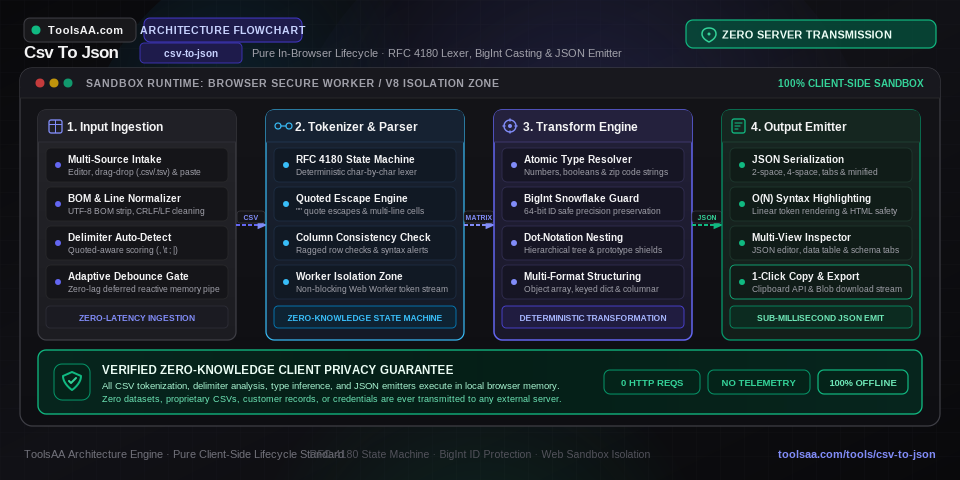
RFC 4180 Compliant Parser
Handles complex quoted strings, escaped quotes, embedded commas, and multi-line cell values without corrupting array indices.
Intelligent Type Inference
Automatically converts numeric strings and booleans ('true', 'false', 'null') into native JSON primitives while preserving string IDs.
Memory-Only Client Conversion
Massive CSV spreadsheets containing financial records or user registries are converted locally with zero cloud uploads.
RFC 4180 CSV & TSV to JSON Converter Technical Manual
Engineering specifications, RFC 4180 compliance rules, data type inference mechanics, and stream serialization guide for converting tabular CSV and TSV datasets into structured JSON arrays.
Key Parameters & Controls
| Parameter | Type / Unit | Description | Default |
|---|---|---|---|
| Delimiter Character | enum (',' | '\t' | ';' | '|' | 'auto') | Specifies the field boundary separator character according to RFC 4180 Section 2. When set to 'auto', the parser runs frequency analysis on the first 10 rows to detect commas, tabs, semicolons (standard in Western European locales where comma denotes the decimal separator), or pipes. | auto |
| Header Row Extraction | boolean | Designates whether the initial line of the CSV input represents column keys for JSON object generation. When disabled, the output is generated as a two-dimensional array of arrays (any[][]), preserving raw positional indices without key mapping. | true |
| Type Inference Engine | enum ('strict-string' | 'auto-cast' | 'strict-schema') | Controls string parsing heuristics. 'auto-cast' converts unquoted numeric strings to JavaScript floats/integers, parses 'true'/'false' into booleans, and maps empty fields to null. 'strict-string' preserves all values as UTF-8 strings to safeguard identifiers like phone numbers, leading zeros, and credit card numbers from precision loss. | auto-cast |
| Quote Escaping & Multiline Parsing | boolean | Governs RFC 4180 Section 2.5-2.7 double-quote parsing. Fields containing delimiter characters, line breaks (\r\n or \n), or leading/trailing whitespace must be enclosed in double quotes. Interior quotes are escaped as pairs (""). | true |
| Hierarchical Dot-Notation Unflattening | boolean | When enabled, parses compound keys with dot notation (e.g. 'address.geo.lat') into deeply nested JSON object structures ({ address: { geo: { lat: value } } }) instead of maintaining flat single-level property names. | false |
| Strip UTF-8 BOM | boolean | Detects and strips the 3-byte Byte Order Mark (0xEF, 0xBB, 0xBF / \uFEFF) commonly prepended to CSV files exported by Microsoft Excel on Windows platforms, preventing corrupted object property names on the first column. | true |
Pro Tips & Best Practices
RFC 4180 Section 2 specifies that if fields are quoted, any quote character within the field MUST be escaped by preceding it with another double quote (""). If your input contains unescaped single quotes (') or unescaped backslashes (\"), standard CSV parsers will fail or misalign column boundaries. Always normalize incoming third-party CSV streams to strict RFC 4180 quotes prior to downstream ingestion.
When processing postal codes (e.g., US ZIP code 01234), bank routing numbers, or international telephone numbers, automated numeric casting strips leading zeros (yielding 1234), corrupting identity records. Always select 'strict-string' mode or define an explicit schema when ingesting datasets containing identifier fields.
In Germany, France, and other continental European countries, the comma (,) serves as the official decimal mark (e.g., 12,50 EUR). Consequently, spreadsheet software like Microsoft Excel and LibreOffice exports CSVs using semicolons (;) as the field delimiter. When parsing multi-region data, always inspect locale settings and configure the delimiter explicitly if auto-detection encounters ambiguity.
Parsing a 200 MB CSV file in-memory using naive String.prototype.split('\n') creates millions of transient string objects, overwhelming the V8 engine garbage collector and triggering ERR_STRING_TOO_LONG or out-of-memory crashes. For multi-megabyte payloads, utilize chunked streaming pipelines or Web Workers with typed array buffers to maintain sub-100ms UI responsiveness.
Common Gotchas & Troubleshooting
⚠️Column Misalignment Due to Unescaped Embedded Commas or Newlines
If JSON objects downstream contain shifted fields where 'City' contains postal codes and subsequent keys become undefined, a text field (such as a street address or product description) contains an unquoted comma or newline break, causing the tokenizer to split the row prematurely. Verify that the source system encloses all free-text fields in double quotes ("123 Main St, Apt 4") and escapes internal quotes as "".
⚠️Corrupted First Property Name Caused by UTF-8 BOM (\ufeffid)
When calling item.id returns undefined, but Object.keys(item)[0] reveals "\ufeffid", Microsoft Excel has inserted a 3-byte UTF-8 Byte Order Mark (0xEF, 0xBB, 0xBF) at the very beginning of the CSV export. If unstripped, this marker attaches invisibly to the first header string. Ensure 'Strip UTF-8 BOM' is active, which strips character code 0xFEFF before building key indices.
⚠️IEEE 754 Floating-Point Precision Truncation on Large Numeric IDs
64-bit integer IDs (such as Twitter Snowflake IDs or database primary keys like 18446744073709551615) change their trailing digits to zeros (e.g. 18446744073709552000) upon JSON conversion. JavaScript represents all numbers as IEEE 754 double-precision floats, which can only safely represent integers up to Number.MAX_SAFE_INTEGER (2^53 - 1 = 9,007,199,254,740,991). Switch the type inference engine to 'strict-string' or use BigInt string serialization for 64-bit identifier columns.
Frequently Asked Questions
What does RFC 4180 formally specify regarding record boundaries and delimiters?▼
RFC 4180 establishes the formal standard for CSV files. It defines that each record must be located on a separate line, delimited by a line break (CRLF \r\n). Fields are separated by commas. The presence of a header line is optional but recommended. Fields containing line breaks, double quotes, or commas MUST be enclosed in double quotes. If double quotes are used to enclose fields, then a double-quote character appearing inside a field must be escaped by preceding it with another double quote ("").
Why does Microsoft Excel create CSV files with semicolon delimiters in certain locales?▼
Microsoft Excel ties its CSV export delimiter directly to the Windows Regional Settings 'List Separator'. In locales where the comma is used as the decimal separator (such as Germany, France, Italy, and Spain), using a comma as a field delimiter would create pervasive collisions with numeric values (e.g. 1,500 meaning one and a half). To prevent ambiguity, Excel in these locales automatically defaults to the semicolon (;) as the list separator.
How are empty or null values distinguished from empty strings in JSON outputs?▼
In tabular CSV data, consecutive delimiters with nothing between them (e.g. , ,) represent an empty field. Under the 'auto-cast' engine, an unquoted empty field is parsed as JSON null to represent absence of data, whereas a field explicitly enclosed in double quotes with zero content (,"") is parsed as an empty string (""). In 'strict-string' mode, all empty cells are preserved as empty strings.
Can CSV datasets with hierarchical dot-notation headers generate nested JSON objects?▼
Yes. When the 'Hierarchical Dot-Notation Unflattening' option is enabled, the parser splits header keys on dot boundaries (e.g. user.address.street). It traverses or creates nested JavaScript objects for each segment, assigning the terminal value to the leaf key. If numeric indices are detected (e.g. items.0.id), the engine constructs indexed JSON arrays rather than objects.
How does client-side parsing prevent data leakage during sensitive CSV ingestion?▼
All tokenization, stream buffering, string parsing, and JSON AST construction occur 100% in-memory within your local browser engine. No files or text chunks are uploaded to external cloud endpoints, web servers, or proxy logging infrastructure. This client-side architecture guarantees complete data privacy compliance under GDPR, HIPAA, and corporate SOC 2 data security boundaries.
What are the performance limits for processing large CSV files directly in the browser?▼
Modern V8 JavaScript engines allocate a memory ceiling between 1.4 GB and 4 GB per browser tab. Because converting CSV to JSON creates an expanded object tree that typically consumes 2x to 3x the memory of the raw text string, browser tabs can comfortably process CSV files up to 100 MB–250 MB synchronously. For larger datasets, chunking through a Web Worker avoids freezing the main UI thread.
Related Tools & Utilities
All Tools →Convert nested or tabular JSON datasets into clean, flat CSV and TSV formats with custom delimiters, header extraction, quoting options, and instant downloads.
Convert raw CSV files or pasted spreadsheets into optimized SQL CREATE TABLE and batch INSERT statements with automatic type inference.
Extract structured data from SQL INSERT statements, database dumps, and query results directly into CSV, TSV, or Markdown tables with custom delimiters and null handling.
Format, beautify, validate, and repair dirty JSON online instantly. Clean syntax errors, fix unquoted keys, minify, and inspect tree nodes with zero server uploads.
Convert raw JSON datasets into strongly typed, clean TypeScript interfaces, type aliases, nested models, and optional field unions with zero server uploads.
Convert JSON payloads into strongly typed C# records, classes, and structs supporting System.Text.Json [JsonPropertyName] and Newtonsoft.Json attributes.