ePub eBook to PDF Reader & Converter
Convert EPUB digital books into readable, printable PDF documents with table of contents preservation, typography styling, and instant local conversion.
Select or drop your .epub eBook here
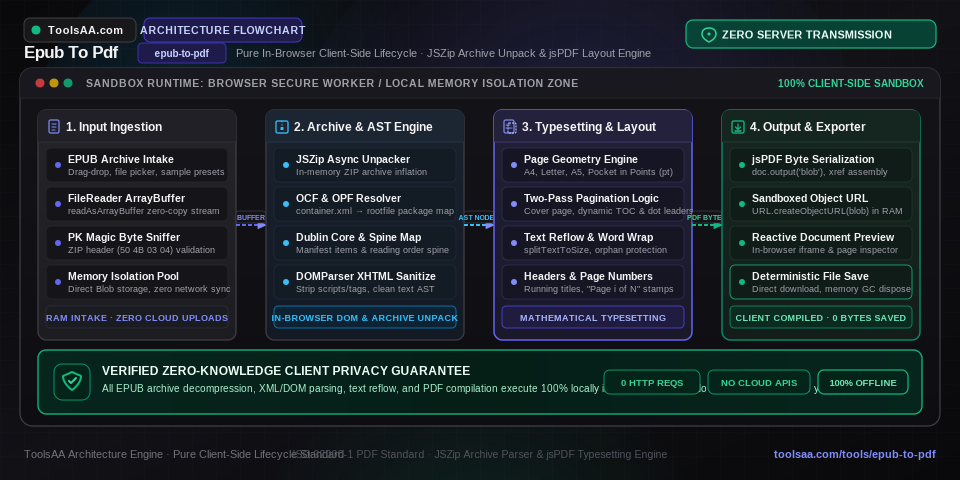
Supports EPUB 2 and EPUB 3 archives. Chapters are decoded, formatted, and rendered locally into high-resolution PDF pages in browser memory.
Client-Side Architecture
Dr. Harrison Ward & Claire Vance
Multi-chapter exploration of zero-retention data sovereignty, browser runtimes, and document engineering.
The Time Machine (Excerpt)
H. G. Wells
Classic Victorian sci-fi prose featuring dialogue with quotes, dashes, and atmospheric narrative chapters.
Meditations & Strategy
Marcus Aurelius & Sun Tzu
Concise aphoristic chapters testing multi-chapter navigation, page boundary layouts, and leader-dot TOC.
In-Browser EPUB OCF & OPF Parser
Decompresses and parses EPUB containers, spine references, and NCX tables of contents directly via JSZip without server uploads.
Intelligent Typesetting & Pagination
Formats chapter breaks, justified text, custom line-heights, running headers, and page numbers using jsPDF.
Client-Side Privacy for Digital Books
Maintains copyright compliance and reader privacy by converting copyrighted digital publications entirely in browser RAM.
ePub eBook to PDF Reader & Converter — Reference Guide
Convert EPUB digital books into readable, printable PDF documents with table of contents preservation, typography styling, and instant local conversion.
Key Parameters & Controls
| Parameter | Type / Unit | Description | Default |
|---|---|---|---|
| Paper Standard | enum | Dimensions: A4, US-Letter, A5 (Digest format), or Pocket book size. | a4 |
| Font Family | enum | Typography: Times (classic serif), Helvetica (clean sans), or Courier (monospace). | times |
| Font Size (pt) | number | Body text font size from 9pt to 18pt. | 11 |
| Text Alignment | enum | Justified book typesetting or clean left-aligned text. | justify |
Pro Tips & Best Practices
Choose A5 paper size with 10pt Times font for a compact, authentic paperback book layout when printing.
Enabling chapter breaks ensures new story chapters begin cleanly at the top of a fresh page.
Include the TOC option to auto-generate a structured directory with page numbers at the front of the book.
Common Gotchas & Troubleshooting
⚠️DRM Protected EPUB Fails to Open
Commercial eBooks protected by Adobe ADEPT DRM cannot be parsed. Decrypt the EPUB with your authorized key before conversion.
⚠️Unusual Characters in Output
Select standard system font families to ensure proper glyph rendering across diverse international languages.
Frequently Asked Questions
Is converting an EPUB eBook to PDF completely confidential?▼
Yes. The EPUB container is unpacked and rendered into PDF purely inside your local browser memory using JSZip and jsPDF. Zero data is uploaded.
Can I customize font styles and line spacing?▼
Yes! You can choose typography fonts (Times, Helvetica), adjust font sizes from 9 to 18pt, and configure line-height spacing.
Does it support tables of contents and chapters?▼
Yes, the parser reads the EPUB spine and NCX index to generate chapter breaks and page-numbered tables of contents.
Can I convert large books with dozens of chapters?▼
Yes, the engine processes multiple chapters sequentially in browser memory without encountering server timeout barriers.
Related Tools & Utilities
All Tools →Convert JPG, PNG, and WebP images into a standardized PDF document with customizable page sizes (A4/Letter), margins, image fit, and page reordering.
Compress and optimize PDF file sizes locally in browser memory by downsampling raster images and stripping metadata without uploading data to third-party servers.
Render and extract PDF pages into crisp PNG or JPEG images at 150/300 DPI using HTML5 Canvas with bulk ZIP download and complete local confidentiality.
Extract custom page ranges or split large PDF files into distinct single or multi-page documents instantly with 100% in-browser processing.
Merge multiple PDF files into a single document entirely in your browser with custom page ordering, zero file uploads, and enterprise-grade privacy.
Rotate individual or all pages in a PDF by 90°, 180°, or 270° clockwise or counter-clockwise with real-time visual previews and instant export.