PDF Page Splitter & Document Range Extractor
Extract custom page ranges or split large PDF files into distinct single or multi-page documents instantly with 100% in-browser processing.
Drop PDF file here or click to browse
Supports all standard PDF documents. Files remain 100% in your local browser memory and are never uploaded to any cloud server.
Multi-Mode Range Extraction Engine
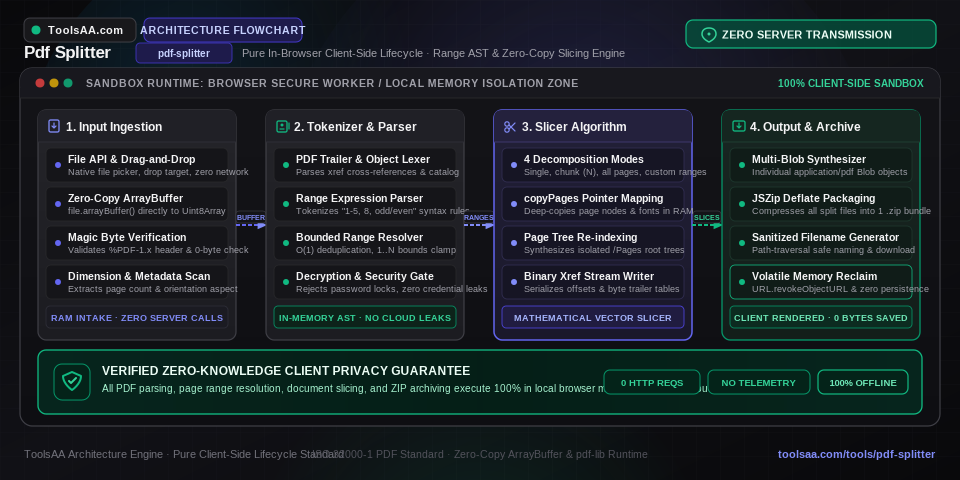
Extract discrete pages, burst all pages into independent files, or split into equal batches of N pages directly in your browser.
Zero-Transmission Confidentiality
Processed exclusively using local WebAssembly pdf-lib without streaming sensitive contracts or financial statements over the wire.
Bulk ZIP Packaging & Preview
Asynchronously generates high-speed JSZip archives for multi-file downloads with instant blob URL previews.
PDF Page Splitter & Document Range Extractor — Reference Guide
Extract custom page ranges or split large PDF files into distinct single or multi-page documents instantly with 100% in-browser processing.
Key Parameters & Controls
| Parameter | Type / Unit | Description | Default |
|---|---|---|---|
| Split Mode | enum | Division strategy: 'extract_selected', 'split_every_n', 'split_all', or 'split_custom_ranges'. | extract_selected |
| Page Ranges | string | Page ranges to extract (e.g. '1-3, 5-8, 12'). | 1-5 |
| Fixed Page Interval | number | Number of pages per split slice when in 'split_every_n' mode. | 1 |
| Output Archive Type | enum | ZIP compression container or single direct PDF download. | ZIP |
Pro Tips & Best Practices
Use the custom range mode with label naming (e.g. 'Chapter 1: 1-15') to automatically generate organized filenames.
Use the 'Split All' mode to instantly convert a 50-page monthly invoice collection into 50 individual PDFs packed in a ZIP.
Supports versatile formats including '1-5', '1~5', '1 to 5', and individual comma-separated numbers.
Common Gotchas & Troubleshooting
⚠️Invalid Page Range Error
Ensure page numbers do not exceed the document's total page count and that ranges are written in ascending order.
⚠️Large ZIP Generation Delay
For documents exceeding 300 pages, allow a few seconds for JSZip compression to compile in browser memory.
Frequently Asked Questions
How does in-browser PDF splitting protect confidential files?▼
Your PDF is parsed locally using WebAssembly. The binary document never leaves your machine, preventing exposure of private records.
Can I extract non-consecutive pages into a single PDF?▼
Yes! Simply use the 'Extract Selected Pages' mode and specify numbers like '1, 4, 9, 15'.
Are PDF bookmarks and metadata preserved in split files?▼
Split pages preserve embedded fonts, graphics, and page content, while document-level metadata is safely recreated for each output file.
Is there a limit on how many files can be generated?▼
You can easily burst documents containing hundreds of pages into individual files without encountering server timeout limits.
Related Tools & Utilities
All Tools →Rotate individual or all pages in a PDF by 90°, 180°, or 270° clockwise or counter-clockwise with real-time visual previews and instant export.
Convert JPG, PNG, and WebP images into a standardized PDF document with customizable page sizes (A4/Letter), margins, image fit, and page reordering.
Compress and optimize PDF file sizes locally in browser memory by downsampling raster images and stripping metadata without uploading data to third-party servers.
Render and extract PDF pages into crisp PNG or JPEG images at 150/300 DPI using HTML5 Canvas with bulk ZIP download and complete local confidentiality.
Merge multiple PDF files into a single document entirely in your browser with custom page ordering, zero file uploads, and enterprise-grade privacy.
Convert EPUB digital books into readable, printable PDF documents with table of contents preservation, typography styling, and instant local conversion.