In-Browser PDF Compressor & Size Reducer
Compress and optimize PDF file sizes locally in browser memory by downsampling raster images and stripping metadata without uploading data to third-party servers.
Drag and drop your PDF here, or browse files
Supports all standard PDF documents • Processed 100% locally in browser memory
Client-Side In-Memory Stream Optimization
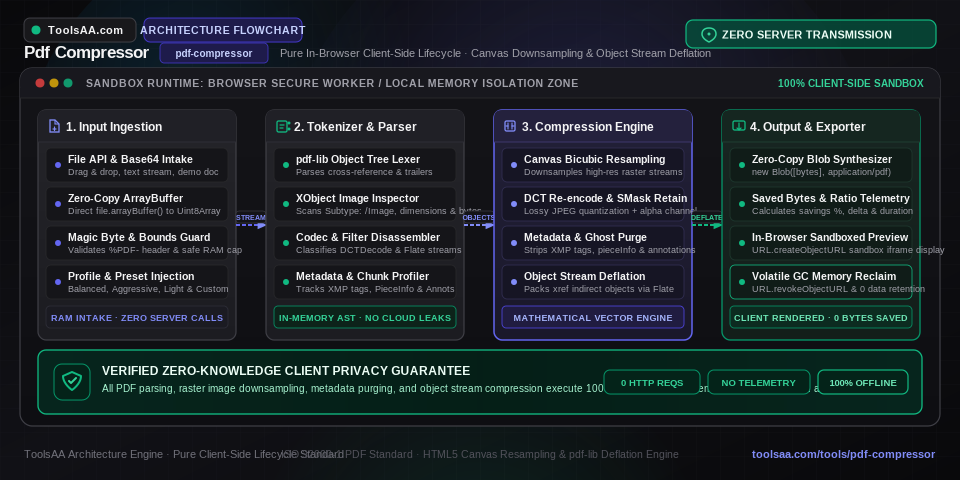
Downsamples embedded raster images and compresses PDF object streams via HTML5 Canvas and pdf-lib with zero data upload.
Intelligent Metadata & Thumbnail Stripping
Purges redundant XML metadata, thumbnail dictionaries, and orphaned objects to maximize byte reduction.
Deterministic Quality Presets
Choose between Balanced, Maximum Reduction, or High Quality modes with instant savings preview.
In-Browser PDF Compressor & Size Reducer — Reference Guide
Compress and optimize PDF file sizes locally in browser memory by downsampling raster images and stripping metadata without uploading data to third-party servers.
Key Parameters & Controls
| Parameter | Type / Unit | Description | Default |
|---|---|---|---|
| Compression Preset | enum | Compression intensity: 'balanced', 'aggressive', or 'light'. | balanced |
| Image Quality Level | number | JPEG canvas rendering quality between 10 (smallest) and 100 (crisp). | 65 |
| Max Image Dimension | number | Pixel constraint for embedded raster images (e.g. 800, 1200, or original). | 1200 |
| Strip Metadata | boolean | Purges unreferenced XML tags, author profiles, and thumbnail dictionaries. | true |
Pro Tips & Best Practices
The Balanced preset typically yields a 40-70% reduction on scanned documents while keeping small fonts perfectly legible.
Documents consisting strictly of vector lines and text don't have images to downsample; their size is minimized through object stream deflating.
Compare the file savings badge to verify the compression ratio before sending to customers.
Common Gotchas & Troubleshooting
⚠️Minimal Size Reduction Observed
If the PDF contains already highly compressed JPEG images or pure vector blueprints, raster downsampling will yield limited byte reduction.
⚠️Browser Memory Alert on Gigabyte Scans
For files exceeding 200MB, close other browser tabs to provide ample memory for the HTML5 Canvas downsampling engine.
Frequently Asked Questions
How does in-browser PDF compression work without uploading files?▼
The application parses PDF objects using pdf-lib, extracts raster image streams to an off-screen HTML5 Canvas, downsamples them, and re-encodes compressed streams in RAM.
Will compressing my PDF make the text blurry?▼
No. Vector text, true-type fonts, and mathematical curves are never converted to bitmaps; only embedded raster photos and scans are resized.
Are my confidential contracts uploaded to any server?▼
Zero data is uploaded. The entire compression process executes inside your browser's private memory space.
Can I choose how aggressive the file size reduction is?▼
Yes, you can select between 'Balanced & Smart', 'Maximum Reduction' (smallest size), and 'High Quality / Print'.
Related Tools & Utilities
All Tools →Convert JPG, PNG, and WebP images into a standardized PDF document with customizable page sizes (A4/Letter), margins, image fit, and page reordering.
Render and extract PDF pages into crisp PNG or JPEG images at 150/300 DPI using HTML5 Canvas with bulk ZIP download and complete local confidentiality.
Merge multiple PDF files into a single document entirely in your browser with custom page ordering, zero file uploads, and enterprise-grade privacy.
Extract custom page ranges or split large PDF files into distinct single or multi-page documents instantly with 100% in-browser processing.
Rotate individual or all pages in a PDF by 90°, 180°, or 270° clockwise or counter-clockwise with real-time visual previews and instant export.
Convert EPUB digital books into readable, printable PDF documents with table of contents preservation, typography styling, and instant local conversion.