Split-Screen Live Markdown Editor & HTML Exporter
Full-featured client-side Markdown suite with real-time GitHub-flavored preview, syntax highlighting, table of contents, and offline HTML/PDF export.
Empty Document
Start typing Markdown in the editor, drag-and-drop a .md file, or click below to load a rich template.
GFM Compliant & Sub-Millisecond Preview
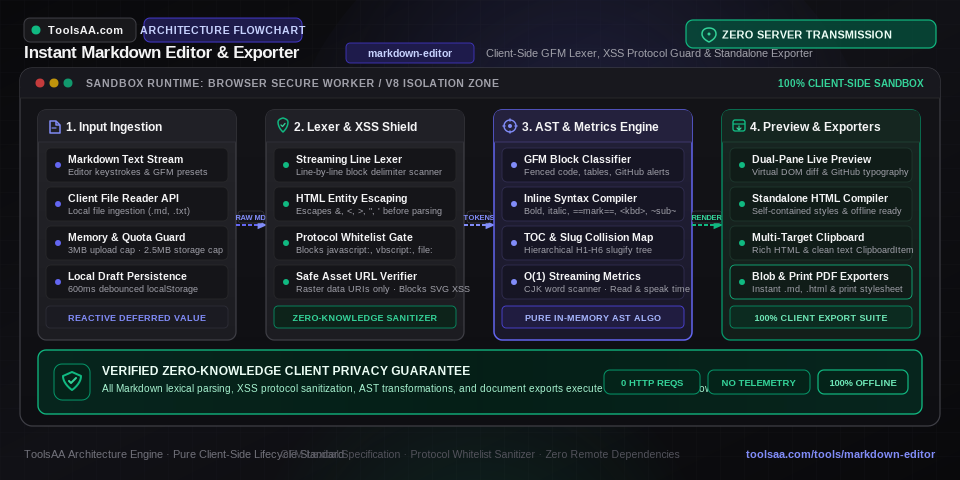
Fully compliant with the GitHub Flavored Markdown (GFM) specification. Renders tables, task lists, code syntax highlighting, and math formulas with near-zero latency.
Standalone HTML5 & Print PDF Export
Generates self-contained, offline-ready HTML5 documents or triggers native print stylesheets engineered for crisp, high-contrast PDF document saving.
100% In-Browser Privacy Guarantee
All lexical analysis, tree construction, and local storage persistence run strictly inside your browser. No document text is ever transmitted over the network.
Split-Screen Live Markdown Editor Cheatsheet
Full-featured client-side Markdown suite with real-time GitHub-flavored preview, syntax highlighting, table of contents, and offline HTML/PDF export.
Key Parameters & Controls
| Parameter | Type / Unit | Description | Default |
|---|---|---|---|
| markdownSource | string | Raw Markdown document text entered or pasted into the live editor pane. | Auto |
| splitMode | string | Viewport layout configuration: split-screen, editor-only, or preview-only. | split |
| autoSave | boolean | Persists document changes to local browser storage to prevent data loss on reload. | true |
| showToc | boolean | Extracts document h1-h6 headings into an interactive hierarchical table of contents. | true |
Pro Tips & Best Practices
When reviewing lengthy documentation, enable synchronized split-screen scrolling to keep your editing cursor aligned with rendered HTML preview paragraphs.
Pressing Ctrl+P / Cmd+P activates print media styles that hide editor toolbars and apply high-contrast serif/sans-serif fonts tailored for professional PDF export.
Use '- [ ] ' and '- [x] ' syntax to generate interactive checkboxes directly in preview mode without external plugins.
Common Gotchas & Troubleshooting
⚠️Markdown tables do not render as formatted grid in preview
Ensure a blank newline precedes your table and that header rows contain at least 3 delimiter hyphens (e.g., | --- | --- |).
⚠️HTML export is missing syntax highlighting colors
Make sure to download the standalone HTML5 export format, which bundles CSS stylesheets inline for full offline fidelity.
Frequently Asked Questions
How does this online markdown editor ensure 100% data privacy?▼
Every lexical analysis step, code block syntax highlighter, and HTML renderer runs 100% in client-side Web APIs and JavaScript in your browser. There is zero telemetry, zero server backend calls, and zero external transmission. Your notes, credentials, and API docs stay strictly on your local device.
What makes the live markdown preview and split-screen mode so responsive?▼
Our custom TypeScript GFM compiler processes hundreds of lines in less than 1 millisecond without heavy third-party regex dependencies. Changes reflect simultaneously with zero input lag on both desktop split views and mobile single-pane screens.
How do I convert markdown to HTML or export to PDF?▼
Click 'Export HTML' to download a complete, standalone HTML5 document ready for offline reading or static hosting. Click 'Print / PDF' or press Ctrl+P to trigger your browser's native Print engine, which applies clean print stylesheets optimized for high-contrast PDF saving.
Can I reload or close the browser tab without losing my text?▼
Yes. Document content and settings are saved automatically to your browser's localStorage, so your work is restored immediately upon reopening.
Related Tools & Utilities
All Tools →Convert Markdown text into styled, sanitized HTML with Prism.js code syntax highlighting, table generation, and one-click copy.
Design GitHub Flavored Markdown tables visually with cell alignment, column reordering, and instant markdown copy.
Cleanly convert HTML snippets, tables, nested lists, and code blocks into formatted GitHub Flavored Markdown (GFM) with heading hierarchy normalization and tag stripping.
Generate production-ready structured Markdown test documents with GitHub Flavored syntax, nested tables, blockquotes, syntax-highlighted code fences, and hierarchical task lists.
Extract custom page ranges or split large PDF files into distinct single or multi-page documents instantly with 100% in-browser processing.
Generate custom paragraphs, sentences, and words of placeholder text for designers.