Connection Pool Calculator & DB Sizing

Connection Pool Calculator & DB Sizing

Production-grade database connection pool calculator and capacity planning workbench. Accurately calculate optimal pool sizes per Kubernetes pod, prevent thread thrashing, estimate queue wait times, and safeguard database memory against out-of-memory crashes using Little's Law, HikariCP core saturation formulas, and PgBouncer transaction multiplexing ratios.

Btn select preset
Sec workload traffic
Mode forward

Mode forward desc

Lbl effective traffic 5,880 Unit qps
6.5 Unit ms
Sec architecture pooling
Sec database hardware
16 Unit vcpu
Sec memory breakdownLbl mem healthy
Lbl bp short: 32Unit gb short
Lbl conn short
Lbl work short
Lbl os short: 30.99Unit gb short
Lbl mem buffer: 32 Unit gbLbl mem connections: 720 Unit mbLbl mem work mem: 312 Unit mbLbl mem os cache: 30.99 Unit gb (48.4%)
# ==============================================================================
# HikariCP Production Configuration (Spring Boot application.yml)
# Mode: forward_sizing | DB: postgresql
# Target Pod Replicas: 15 | Sized Pool per Pod: 4
# ==============================================================================
spring:
  datasource:
    type: com.zaxxer.hikari.HikariDataSource
    url: jdbc:postgresql://db-cluster-endpoint:5432/app_db?sslmode=require
    hikari:
      pool-name: AppHikariPool
      maximum-pool-size: 4
      minimum-idle: 2
      connection-timeout: 30000
      idle-timeout: 600000
      max-lifetime: 1800000
      leak-detection-threshold: 5000
      validation-timeout: 3000
      auto-commit: true
      data-source-properties:
        cachePrepStmts: true
        prepStmtCacheSize: 250
        prepStmtCacheSqlLimit: 2048
        useServerPrepStmts: true
        useLocalSessionState: true
        rewriteBatchedStatements: true
Lbl queuing curve descSvg operating point: 38.2 Unit conn @ 0.00 Unit ms
23466991Svg hardware satSvg pool capSvg x axisSvg y axis
Svg little pointSvg hardware satSvg pool capSvg thrash zone
Lbl effective qps5,880
Lbl concurrency littles law38.2 Unit conn
Lbl hardware capacity33 Unit conn
Lbl optimal pool per pod4 Unit conn
Lbl total backend conn60 Unit conn
Lbl est queue wait time0.00 Unit ms
Technical Reference & Architecture Guide

Connection Pool Calculator & DB Sizing Guide

Production-grade database connection pool calculator and capacity planning workbench. Accurately calculate optimal pool sizes per Kubernetes pod, prevent thread thrashing, estimate queue wait times, and safeguard database memory against out-of-memory crashes using Little's Law, HikariCP core saturation formulas, and PgBouncer transaction multiplexing ratios.

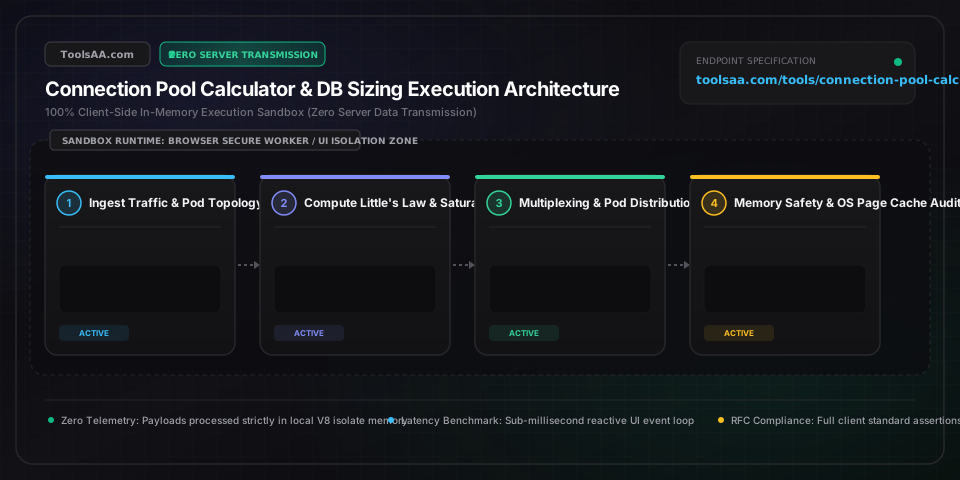
Connection Pool Calculator & DB Sizing Guide — Client-Side In-Memory Architecture & Data Flow

Key Parameters & Controls

Database Host CPU Cores (vCPUs)string

Physical CPU cores or hyperthreads available to the database instance.

Default: auto
Average Query Execution Time (ms)string

Mean database query processing time excluding network transit and pool acquisition wait times.

Default: auto
Proxy Multiplexing Ratiostring

Ratio of incoming client application connections serviced by one persistent backend database connection in PgBouncer or AWS RDS Proxy transaction mode.

Default: auto
Peak Burst Headroom Multiplierstring

Safety margin applied over steady-state Little's Law concurrency to absorb sudden traffic spikes.

Default: auto

Pro Tips & Best Practices

Set minimumIdle Equal to maximumPoolSize

In HikariCP and high-throughput connection pools, keep minimumIdle equal to maximumPoolSize to maintain a fixed-size pool. Dynamically resizing pools under traffic spikes introduces TCP handshakes, TLS negotiations, and authentication latency right when the system is already stressed.

Size from the Database Inwards, Not Pods Outwards

Never calculate pool sizes on a per-pod basis without checking the aggregate sum against database CPU and memory ceilings. Always define: pool_size_per_pod = (db_safe_connections / max_hpa_pod_replicas).

Account for PostgreSQL work_mem per Query Node

PostgreSQL work_mem is allocated per sort or hash operation, NOT per connection. A complex query involving multiple joins and sorts can allocate 3x to 5x work_mem simultaneously. High connection counts combined with generous work_mem trigger catastrophic Linux OOM killer invocations.

Use PgBouncer Transaction Mode with Prepared Statement Caching

Modern PgBouncer (v1.21+) supports protocol-level prepared statements in transaction pooling mode. Ensure your application driver disables client-side named prepared statement cleanup or uses unnamed statements to maximize PgBouncer compatibility.

Common Gotchas & Troubleshooting

⚠️HikariCP ConnectionTimeoutException / Connection acquisition timeout

Identify slow queries via pg_stat_activity or MySQL slow query log; optimize queries with composite indexes; if DB CPU is low (<50%), incrementally increase pool size or deploy PgBouncer.

⚠️PostgreSQL 'FATAL: sorry, too many clients already'

Deploy PgBouncer in transaction mode between Kubernetes pods and PostgreSQL, or reduce maximumPoolSize per pod such that (max_pods * pool_size) < max_connections.

⚠️Database host terminated by Linux Out-Of-Memory (OOM) Killer

Reduce max_connections or lower work_mem. Ensure shared_buffers (typically 25% of RAM) plus max_connections * 20MB leaves at least 20-30% of RAM free for the OS page cache.

Frequently Asked Questions

How do I calculate the optimal database connection pool size?▼

Optimal pool sizing relies on two governing principles: Little's Law for application concurrency demand, and hardware saturation limits for database capacity. First, calculate Little's Law concurrency: Concurrency = Target QPS * (Average Query Latency in seconds). For example, 2,000 QPS with an average latency of 5ms (0.005s) requires exactly 10 active connections. Adding a 30% burst headroom yields 13 connections. Next, check the database hardware sweet spot: ((CPU Cores * 2) + Disk Spindles). On a 16-core SSD database, the hardware limit is ~33 connections. If running 5 Kubernetes pods, set each pod's HikariCP pool size to 3 connections (15 total), staying safely within the 33-connection hardware limit without queue starvation.

Why does HikariCP recommend pool size = (core_count * 2) + effective_spindle_count?▼

This empirical formula was popularized by Brett Wooldridge (creator of HikariCP) based on hardware benchmarks conducted by PostgreSQL and Oracle performance engineers. A single CPU core can only execute one instruction stream at a time. When a query accesses cached memory, 1 connection fully saturates 1 core. However, during occasional disk I/O waits (even on fast NVMe storage), the thread enters an I/O wait state, allowing a second thread to utilize the CPU. Adding a second connection per core ((Cores * 2)) plus an effective spindle factor provides full CPU pipeline saturation without causing excessive context switching. Benchmarks proved that reducing a pool from 2,048 connections to 96 connections reduced query latency from 100ms down to 2ms while increasing throughput.

What happens when database connection pool size is set too large?▼

Over-allocating database connections triggers three severe failure modes: 1) CPU Context Switching Thrashing: When hundreds of database threads compete for CPU cores, the OS kernel spends more time saving and loading CPU register states than executing actual SQL queries. 2) Memory Exhaustion & OOM Crashes: Each connection process allocates private session memory (such as PostgreSQL backend private memory or MySQL thread buffers). Under heavy queries with sorting or hashing, total memory exceeds physical RAM, prompting the Linux kernel OOM killer to terminate the primary database process. 3) Disk I/O Queue Serialization: Excessive concurrent writes overwhelm disk controllers and cache queues, escalating I/O wait times and causing connection timeout cascades across all microservices.

How do you size connection pools across multiple Kubernetes pods or microservices?▼

When sizing connection pools across microservices or autoscaling Kubernetes pods, size from the database inwards, not the pod outwards. First determine your database's safe connection budget (e.g., max_connections = 200, reserve 20 for DBAs/monitoring, leaving 180 for applications). Determine your maximum expected pod count under Kubernetes Horizontal Pod Autoscaler (HPA) peak load (e.g., 30 pods). Divide the connection budget by the maximum pod count: 180 / 30 = 6 connections per pod. If 6 connections per pod is insufficient to satisfy Little's Law for your target QPS, you must introduce a transaction connection pooler like PgBouncer or AWS RDS Proxy between your pods and the database rather than increasing the pod pool sizes.

What is the difference between session pooling and transaction pooling in PgBouncer?▼

In Session Pooling mode, PgBouncer assigns a dedicated server connection to a client application when it connects, and holds it until the client disconnects. While safe for all SQL features, it offers negligible multiplexing benefits for long-lived application pools. In Transaction Pooling mode, PgBouncer assigns a database connection to a client only for the duration of a single database transaction (BEGIN ... COMMIT). As soon as the transaction completes, the server connection is returned to the pool and immediately loaned to another pod, enabling a 5:1 to 10:1 multiplexing ratio. However, transaction pooling restricts certain session-level SQL features such as LISTEN/NOTIFY, PREPARE without explicit naming, temporary tables, and session-level advisory locks.

How much memory does each PostgreSQL or MySQL database connection consume?▼

In PostgreSQL, every connection spawns an independent OS process consuming approximately 5MB to 10MB of baseline resident memory. Additionally, each active backend dynamically allocates work_mem (default 4MB) per sort, hash, or join node within a query. A complex query with 3 sort/hash operations can consume 12MB of work_mem, bringing total connection memory to 22MB. In MySQL InnoDB, connections use an OS thread consuming ~256KB to 1MB stack memory plus session buffers (read_buffer_size, sort_buffer_size, join_buffer_size), averaging 2MB to 6MB per connection. Sizing 1,000 PostgreSQL connections requires budgeting at least 10GB to 20GB of RAM purely for connection processes, which directly reduces the memory available for shared_buffers and the OS disk page cache.
Related Tools & Utilities

All Tools →