Nav slash
Email DNS Record Generator (SPF DKIM DMARC)

Email DNS Record Generator (SPF DKIM DMARC)

Generate complete email DNS records including SPF, DKIM, DMARC, MX, and BIMI. Export BIND zone files, prevent spoofing, and ensure 100% inbox deliverability.

Presets heading

Svg title

Lbl active policyLbl prefix policynone
Svg senderacme-corp.comSvg spf~all (1/10 Unit lookups)Rfc7208Svg dkimgoogle (RSA-2048)Rfc6376Svg dmarcLbl prefix policynone (100%)Rfc7489Svg inboxSvg monitoredSvg quarantineSvg bypassSvg rejectSvg inactive
Lbl domain and provideracme-corp.com
Sec spf1/10 Unit lookups
Sec dkim
Sec dmarc_dmarc.acme-corp.com
Lbl rollout pct100%
Sec mx1 Lbl servers count
1smtp.google.com.
Sec bimi
Lbl apex domain acme-corp.comLbl status lookups 1/10
Matrix intro4 Lbl total records
Th typeTh hostTh ttlTh valueTh action
MX@1 (Lbl ttl prefix 3600)smtp.google.com.
TXT@3600v=spf1 include:_spf.google.com ~all
TXTgoogle._domainkey3600v=DKIM1; k=rsa; p=MIIBIjANBgkqhkiG9w0BAQEFAAOCAQ8AMIIBCgKCAQEA0w9Z8fGk3wIDAQAB
TXT_dmarc3600v=DMARC1; p=none; rua=mailto:[email protected]; ruf=mailto:[email protected]; fo=1
Lbl status records 4Lbl status security B (65/100)
Stat1 title
1 / 10Badge within limit
Stat2 title
RSA-2048Badge single string
Stat3 title
Lbl prefix policynone100% Badge rollout

Client-Side Processing

High-performance calculation executed entirely in browser memory.

Zero Server Upload Privacy

All payloads remain strictly local with zero external server communication.

Production Ready Export

Clean, optimized output formats ready for immediate deployment.
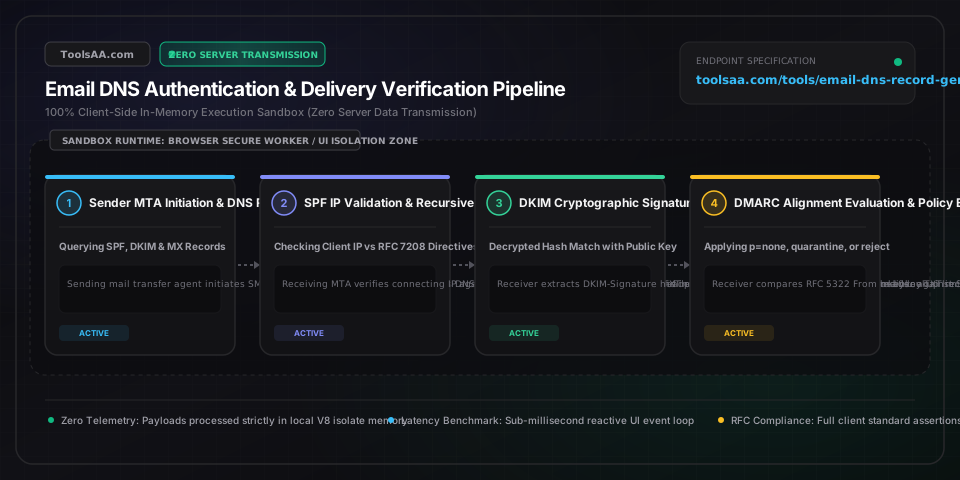
Technical Reference & Architecture Guide

Email DNS Record Generator (SPF DKIM DMARC) Guide

Generate complete email DNS records including SPF, DKIM, DMARC, MX, and BIMI. Export BIND zone files, prevent spoofing, and ensure 100% inbox deliverability.

Email DNS Record Generator (SPF DKIM DMARC) Guide — Client-Side In-Memory Architecture & Data Flow

Key Parameters & Controls

v=spf1 (Sender Policy Framework Version)String ("v=spf1")

Designates the TXT record as an SPF version 1 policy definition (RFC 7208). Must appear as the very first prefix tag in the record string; any preceding characters or lowercase variants cause receiving MTAs to reject the syntax as PermError.

Default: v=spf1
include (SPF Authorized Domain Delegates)Domain String List ("include:domain.com")

Delegates SPF authorization to a third-party sending service SPF record. Each include statement triggers a recursive DNS query contributing to the mandatory RFC 7208 10-lookup limit.

Default: _spf.google.com
all (SPF Fallback Qualifier)Enum ("-all" | "~all" | "?all" | "+all")

Specifies the policy outcome for messages originating from unauthorized IP addresses. -all enforces hard fail rejection; ~all indicates soft fail (acceptable but suspect); ?all specifies neutral disposition.

Default: ~all
k & p (DKIM Key Algorithm & Public Key Data)Enum ("rsa" | "ed25519") & Base64 Key String

Published in the TXT record at <selector>._domainkey.<domain>. Defines cryptographic algorithm k and base64-encoded public key p used by receiving MTAs to verify DKIM-Signature headers per RFC 6376 and RFC 8463.

Default: k=rsa; p=...
p & sp (DMARC Policy & Subdomain Policy)Enum ("none" | "quarantine" | "reject")

Dictates how receiving mail servers handle messages that fail DMARC alignment under RFC 7489. none collects telemetry reports without filtering; quarantine diverts failures to spam folders; reject drops delivery entirely.

Default: none
rua & ruf (DMARC Feedback Reporting URIs)URI List (mailto:[email protected])

rua receives daily aggregated XML telemetry reports summarizing delivery volume and authentication pass/fail rates; ruf receives near-real-time individual failure forensic notices under RFC 6591 AFRF format.

Default: mailto:[email protected]
aspf & adkim (DMARC Identifier Alignment Modes)Enum ("r" | "s")

r (relaxed) allows subdomains to align with the root organizational domain; s (strict) requires an exact byte-for-byte match between the RFC 5322 From domain and the SPF return-path / DKIM d= domain.

Default: r
BIMI Location & Authority (l= and a= tags)HTTPS URI String

Published under default._bimi.<domain>. The l= tag points to a square SVG Tiny Portable/Secure format brand logo; the a= tag optionally links to a Verified Mark Certificate (VMC) in PEM format.

Default: None

Pro Tips & Best Practices

Avoid the Fatal SPF 10-DNS-Lookup Void

RFC 7208 strictly limits SPF evaluations to 10 DNS queries across include, a, mx, ptr, and redirect tags. Exceeding 10 lookups yields a permanent PermError result, causing major receivers (Gmail, Yahoo, Outlook) to treat your messages as unauthenticated or spam. Use IP CIDR blocks instead of a or mx tags, and periodically flatten third-party include chains.

Split DKIM 2048-Bit Keys for BIND and Cloudflare

DNS TXT records enforce a maximum single-string limit of 255 octets (RFC 1035). Standard 2048-bit RSA keys produce roughly 400 base64 characters. Never truncate the key; instead, enclose the payload in concatenated quotes: ("v=DKIM1; k=rsa; p=FIRST_200_CHARS" "REMAINING_CHARS"). Cloudflare and modern DNS UIs split this automatically, but raw BIND zone files require explicit parenthesized string concatenation.

Execute a 3-Stage Progressive DMARC Rollout

Never jump directly to p=reject on production domains. Begin with p=none; rua=mailto:... for 2 to 4 weeks to discover all legitimate shadow IT senders (CRMs, ticketing tools, payroll). Progress to p=quarantine; pct=25 stepping up to pct=100, and finally transition to p=reject; sp=reject once all legitimate streams pass DKIM and SPF alignment.

Prevent Subdomain Shadow Spoofing with sp=reject

Attackers frequently spoof inactive subdomains (e.g., invoices.yourbrand.com). If your root domain runs on p=none during an onboarding phase, explicitly add sp=reject to immediately block attackers from weaponizing unconfigured subdomains while keeping your main domain email flow unimpacted.

Common Gotchas & Troubleshooting

⚠️DMARC fails alignment even though SPF and DKIM both report PASS

Authentication passing is insufficient; DMARC requires identifier alignment. Check if the visible RFC 5322 From: header domain matches the RFC 5321 Return-Path (Mail From) domain for SPF, or the DKIM d= tag domain. If sending via third-party providers (e.g., Mailchimp or Zendesk), configure custom DKIM domain keys and a custom Return-Path CNAME so headers originate from your branded domain rather than the vendor shared domain.

⚠️Gmail and Yahoo reject emails with 550-5.7.26 authentication checks failed

Since February 2024, Google and Yahoo mandate SPF, DKIM, and DMARC for all bulk senders (>5,000 daily messages). Ensure your domain has an active DMARC record (minimum p=none), valid reverse DNS (rDNS/PTR) matching your sending MTA hostname, and one-click RFC 8058 unsubscribe headers on bulk mail. Verify your SPF record does not exceed the 10-lookup threshold.

⚠️DNS provider throws String exceeds 255 characters or Invalid TXT record syntax

This occurs when pasting a 2048-bit or 4096-bit DKIM key into a DNS control panel that does not support automated string splitting. Use this tool 255-Byte Safe Split toggle to export the record formatted into multiple double-quoted substrings, or convert your DKIM setup to use 1024-bit RSA or modern Ed25519 if supported by your mail transfer agent.

Frequently Asked Questions

How does the SPF 10 DNS lookup limit affect email deliverability?▼

RFC 7208 mandates that evaluating an SPF record must not exceed 10 direct or nested DNS queries across include:, a, mx, ptr, exists:, and redirect mechanisms. If an incoming message triggers an 11th lookup, the receiving MTA immediately terminates evaluation with a PermError (permanent error). Most modern receiving servers (Google Workspace, Microsoft 365, Yahoo) interpret a PermError as authentication failure, resulting in emails being routed directly to the spam folder or rejected outright. To stay below the limit, eliminate unnecessary a and mx mechanisms, consolidate CIDR IP blocks directly into ip4: / ip6: directives, and avoid nesting multiple SaaS providers on the apex domain.

Why do emails fail DMARC alignment despite SPF and DKIM showing pass?▼

DMARC authentication requires not only that SPF or DKIM passes cryptographic checks, but also that the authenticated domain strictly aligns with the visible RFC 5322 From: header displayed to the recipient. When sending through third-party services like SendGrid, Salesforce, or Shopify without custom domain setup, the SPF check passes for the vendor domain (e.g., sendgrid.net in the Return-Path) and DKIM may pass using the vendor key, but neither matches yourcompany.com. Because the authenticated domain and visible From header domain are different, DMARC alignment fails. To fix this, you must configure a branded Return-Path subdomain for SPF and create dedicated CNAME DKIM records that sign messages using your own domain name.

How to split DKIM 2048-bit public keys exceeding 255 characters in DNS TXT records?▼

Under RFC 1035, a single text string within a DNS TXT record cannot exceed 255 octets. A 2048-bit RSA public key encoded in base64 is approximately 400 characters, requiring the record to be partitioned into two or more substrings. In BIND zone files and PowerDNS, this is accomplished by wrapping the record in parentheses and quoting each chunk: ( "v=DKIM1; k=rsa; p=PART_1" "PART_2" ). When queried over DNS, recursive resolvers automatically concatenate these adjacent character-strings into one seamless key string without adding whitespace. Cloudflare, AWS Route 53, and Google Cloud DNS automatically handle this splitting under the hood if pasted as a continuous string, whereas older cPanel or registrar interfaces require manual chunking or multi-line quotes.

What is the difference between DMARC p=none, p=quarantine, and p=reject policies?▼

The p= tag specifies the policy action receiving MTAs must execute when an email claiming to originate from your domain fails both SPF and DKIM alignment. p=none is passive monitoring mode; messages are delivered normally while aggregate XML telemetry reports are dispatched to your rua= email address. p=quarantine instructs receivers to divert unaligned messages to the recipient spam, junk, or quarantine folder, preventing direct phishing while allowing message inspection. p=reject represents full enforcement, commanding receiving MTAs to reject unaligned messages during the SMTP conversation (HTTP 550 SMTP reject), completely preventing spoofed emails from ever reaching the recipient mail server.

How to configure BIMI records with Verified Mark Certificates (VMC) for Gmail and Apple Mail?▼

Brand Indicators for Message Identification (BIMI) allows verified brand logos to appear alongside emails in supporting inboxes like Gmail, Apple Mail, and Yahoo. To implement BIMI: 1) Ensure your domain has an active DMARC policy with p=quarantine (pct=100) or p=reject; 2) Prepare an SVG logo conforming strictly to the SVG Tiny Portable/Secure profile (square aspect ratio, zero external scripts or animations, XML formatted); 3) Obtain a Verified Mark Certificate (VMC) from an approved Certificate Authority (such as DigiCert or Entrust) validating your registered trademark; 4) Publish a TXT record at default._bimi.yourdomain.com with the content v=BIMI1; l=https://yourdomain.com/bimi-logo.svg; a=https://yourdomain.com/vmc-cert.pem. While Yahoo displays logos without a VMC, Gmail and Apple Mail strictly require a valid VMC for logo presentation.

Related Tools & Utilities

All Tools →