⏱️Event Countdown Timer & Days Until Clock

Event Countdown Timer & Days Until Clock(HOLIDAY)

Free live event countdown timer and days until clock. Track days, hours, minutes, and seconds to any target date with timezone shift and business day calculation.

Lbl regime
Lbl quick presets

Card event setup

Lbl living journey
Lbl workweek filter
Lbl chime audio

Card reverse planner

Badge target solver

Desc reverse planner

Status active
425
Lbl days
19
Lbl hours
46
Lbl minutes
15
Lbl seconds
Lbl milestone progress0.0%
Lbl kickoff ----/--/--Lbl target ----/--/--

Desc checkpoints

25% Kickoff Phase----/--/--
Status pending
50% Halfway Horizon----/--/--
Status pending
75% Final Home Stretch----/--/--
Status pending
90% Launch Countdown----/--/--
Status pending
Stat elapsed percent0.0%
Stat working days balance305
Stat circadian sleep~6,813
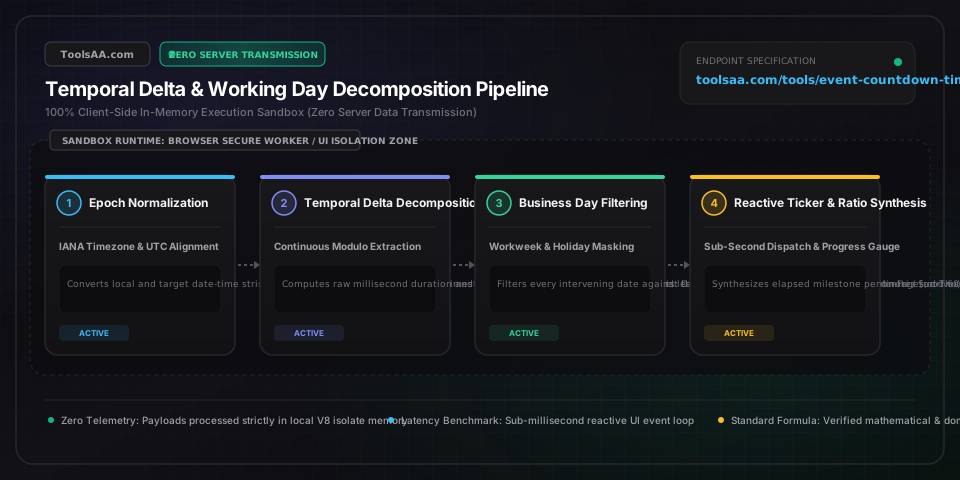
Technical Reference & Architecture Guide

Event Countdown Timer & Days Until Clock Guide

Free live event countdown timer and days until clock. Track days, hours, minutes, and seconds to any target date with timezone shift and business day calculation.

Event Countdown Timer & Days Until Clock Guide — Client-Side In-Memory Architecture & Data Flow

Key Parameters & Controls

Target Event Date and Arrival Moment (Milestone Deadline)Calendar Date and Clock Time

The exact future calendar date, hour, minute, and second marking your milestone arrival—such as a marathon starting gun, wedding ceremony, final academic exam, baby due date, or retirement day. Setting a precise clock minute prevents the common 12-hour error where an all-day event is mistakenly assumed to end at midnight.

Default: 90 Days Ahead at 09:00:00 (Standard Planning Quarter)
Event Location Time Zone (Daylight Saving Anchor)Geographic Regional Time Zone

The official regional time zone where your event physically takes place (such as America/New_York or Europe/London). Anchoring to the local destination guarantees the clock adjusts smoothly across the 1-hour daylight saving time shift ('spring forward' 23-hour days or 'fall back' 25-hour days) without drifting off schedule.

Default: Local Device Time Zone (Automatic Location Sync)
Kickoff Baseline Date (Journey Progress Denominator)Historical Start Date and Time

The foundational starting day when your training block, semester study plan, wedding planning, or project sprint officially began. Establishing this historical baseline allows the timer to calculate elapsed journey percentage, helping runners pace marathon tapers and students balance study workloads across 8- to 16-week milestones.

Default: 30 Days Prior to Today (Active Milestone Baseline)
Workweek Schedule Format (Business Day Filter)Standard Workweek Classification

Defines your operational schedule to separate total calendar days from true productive working days. Options include the standard 5-day Monday-to-Friday schedule (typical 20 to 22 workdays per month), the 6-day trade or academic week (Monday to Saturday), or the Sunday-to-Thursday schedule common in Middle Eastern business environments.

Default: 5-Day Workweek (Monday through Friday)
Public and Bank Holiday Exclusions (Statutory Days Off)Scheduled Calendar Days Off

The total number of official national holidays, school breaks, or company shutdowns falling on weekdays between today and your target date. Deducting these statutory rest days ensures your working days remaining reflect actual available study or sprint hours rather than inflated calendar counts.

Default: 0 Scheduled Holidays (Customizable Allowance)

Pro Tips & Best Practices

The 1-Hour Daylight Saving Shift in Multi-Month Countdowns

When counting down across spring or autumn seasonal time changes, a standard calendar day does not always contain 24 hours. In spring, clocks jump forward, creating a 23-hour day, while autumn falls back to create a 25-hour day. If your event—like an overseas wedding, marathon start, or international flight—crosses a daylight saving boundary, always anchor the timer to the destination's regional city time zone rather than your current location, preventing the clock from being off by exactly one hour on arrival morning.

Preventing Background Tab Freeze on Mobile and Laptop Screens

When you switch browser tabs or lock your smartphone screen while waiting for an event, modern operating systems put background countdown animations into a power-saving sleep state. Timers that simply count internal ticks will lag behind real time by several minutes when re-opened. Our clock continuously synchronizes against atomic wall-clock time the instant your screen wakes up, ensuring your race day or exam countdown displays zero visual drift.

Why Estimating Workdays by 5/7 Multipliers Causes 2 to 4 Day Errors

Many project planners, graduate students, and runners estimate working days by taking total calendar days and multiplying by 5/7 (or 71.4%). This rough shortcut frequently produces errors of 2 to 4 days because it ignores which day of the week the deadline falls upon. A deadline ending on a Monday morning includes weekend days that cannot be used for business filings or laboratory access, whereas a Friday afternoon deadline captures a full 5-day cycle. Always count discrete weekdays for critical visa, thesis, or launch deadlines.

Sharing Private Event Timers Without Cloud Account Sign-Ups

When coordinating shared countdowns with family members, wedding guests, or training partners, you do not need to register an account or store sensitive personal celebration dates on external servers. You can bookmark or share the direct link containing your event name, date, and time zone embedded safely in the web address. All calculation takes place entirely on each person's device, keeping personal family milestones completely private and accessible even offline.

Common Gotchas & Troubleshooting

⚠️The countdown displays 'Event Passed' or negative hours when crossing time zones

This discrepancy occurs when a target time is entered using your current domestic time zone instead of the destination city's time zone. For example, if you schedule a 9:00 AM marathon in Tokyo while residing in Los Angeles, an unlinked clock will expire 16 hours too early. Select the event's physical host city in the Time Zone selector to align arrival hours with local sunrise and scheduled start times.

⚠️Remaining working days do not match corporate project or academic calendars

Standard calendar difference formulas only subtract Saturdays and Sundays. If your organization observes regional public holidays (such as Thanksgiving, Golden Week, or bank holidays) or planned office closures, enter the specific number of non-working days into the Holiday Exclusions field. Also verify whether your organization follows a standard 5-day week or an extended 6-day academic/trade schedule.

⚠️Milestone progress bar reads 100% or fails to show elapsed progress

The Kickoff Baseline Date must be set to a day chronologically earlier than your final event date. If the kickoff date is accidentally set to today or a future date ahead of your deadline, the duration equation cannot establish a positive timeline. Set your baseline date to the actual start of your training cycle, semester, or engagement to visualize your steady daily progress.

⚠️Celebration chime or audio alert does not play when the clock strikes zero

Modern web browsers on mobile phones and desktop computers block unprompted audio autoplay to protect users from sudden loud noises unless permission is granted. To ensure your celebratory bell or chime sounds when your countdown arrives, click 'Test Chime' or toggle the sound switch once during your session, which authorizes your browser to play audio alerts.

Frequently Asked Questions

How do you calculate exact days, hours, minutes, and seconds until a date?▼

To calculate the exact time until an event, subtract the current clock moment from the target event moment in total milliseconds, then divide sequentially: divide the total difference by 86,400,000 for calendar days, take the remaining milliseconds and divide by 3,600,000 for hours, divide the next remainder by 60,000 for minutes, and divide the final remainder by 1,000 for seconds. For example, a difference of 90,000,000 milliseconds equals exactly 1 day, 1 hour, 0 minutes, and 0 seconds. This step-by-step remainder breakdown ensures every passing second ticks down smoothly without rounding errors.

How many business days are in a month or 90-day countdown?▼

A typical calendar month contains 20 to 22 business days, and a standard 90-day quarterly countdown contains approximately 64 to 66 actual working days under a conventional 5-day Monday-to-Friday schedule. Out of 90 calendar days, roughly 26 days fall on weekends (13 Saturdays and 13 Sundays), and statutory public holidays typically remove another 1 to 3 weekdays depending on the season (such as Memorial Day, Labor Day, or Christmas). For students pacing exam revision or professionals tracking project deliverables, allocating study time across 65 true workdays provides an accurate workload target of 1.4% milestone progress per working day.

What is the difference between calendar days and business days in a countdown?▼

The difference is that a calendar day countdown tracks continuous 24-hour astronomical solar rotations including every Saturday, Sunday, and public holiday, whereas a business day countdown measures only operational working days (typically Monday through Friday, excluding statutory office closures). Calendar day countdowns are the standard for personal life events like weddings, vacations, baby arrivals, and marathon races where physical time elapses uninterrupted. Business day countdowns are essential for project sprints, visa processing times, financial settlement deadlines, and academic paper submissions where institutions pause operations over weekends.

Why do countdown clocks lose or gain an hour during daylight saving time?▼

Countdown clocks lose or gain an hour when an event crosses a seasonal daylight saving boundary because local clocks either advance by one hour ('spring forward,' resulting in a 23-hour day) or fall back by one hour ('fall back,' resulting in a 25-hour day). If a timer relies solely on a flat 24-hour multiplier (86,400 seconds per day) without regional time zone awareness, it will display an arrival time that is exactly 60 minutes ahead or behind real solar time on the target morning. Selecting the official geographic time zone for your event's destination ensures the clock automatically accounts for this 3,600-second anomaly.

How do you pace your training or study schedule using a countdown timer?▼

To pace preparation effectively, divide your total curriculum chapters or training mileage by the exact number of active days remaining rather than total weeks. In endurance sports, runners utilize an 8- to 16-week countdown with a 2- to 3-week tapering phase where weekly training volume drops by 40% to 60% before race day. In academic preparation, dividing 400 pages across 20 true business study days requires a steady pace of 20 pages per day, preventing the cognitive exhaustion and sleep deprivation associated with last-minute cramming.

Related Tools & Utilities

All Tools →