Ergonomic Desk & Chair Height Calculator

Ergonomic Desk & Chair Height Calculator

Calculate optimal ergonomic desk and chair height for sitting or standing desks based on body height, posture angles, footwear, and armrest clearance.

Badge science
Lbl load sample
Lbl stature175.0 Unit cm (68.9 Unit in)
Lbl stature
Unit cm
Lbl min stature175.0 Unit cmLbl max stature
Lbl footwear2.5 Unit cm
Hint footwear
Lbl mat1.9 Unit cm
Hint mat
Lbl cushion sag2.0 Unit cm
Hint cushion sag
Lbl tabletop thickness2.5 Unit cm
Hint tabletop thickness
Hint posture
Lbl monitor size27"
Lbl viewing distance: 65 Unit cm
Kpi seat pan
43.5 Unit cm17.1 Unit in
Kpi seat pan sub
Kpi sitting desk
64.8 Unit cm25.5 Unit in
Kpi sitting desk sub
Kpi standing desk
111.9 Unit cm44.0 Unit in
Kpi standing desk sub
Kpi eye level
120.5 Unit cm47.4 Unit in
Kpi eye level sub
Lbl avatar title
Lbl floor plane43.5 Unit cmKpi sitting desk: 64.8 Unit cmKpi eye level: 120.5 Unit cm
Tab cockpit
Kpi seat panKpi seat pan sub
43.5 Unit cm (17.1 Unit in)Lbl recommended
Kpi sitting deskKpi sitting desk sub
64.8 Unit cm (25.5 Unit in)Lbl memory preset1
Kpi standing deskKpi standing desk sub
111.9 Unit cm (44.0 Unit in)Lbl memory preset2
Kpi eye levelKpi eye level sub
120.5 Unit cm (47.4 Unit in)Lbl angle prefix 14.5°
Badge standard specs
Lbl clinical disclaimer title

Lbl clinical disclaimer desc
Stat calorie label+134 Unit kcal day
Stat spine labelStat spine reclined
Stat clearance label4.4 Unit cm Lbl clearance suffix
Technical Reference & Architecture Guide

Ergonomic Desk & Chair Height Calculator Guide

Calculate optimal ergonomic desk and chair height for sitting or standing desks based on body height, posture angles, footwear, and armrest clearance.

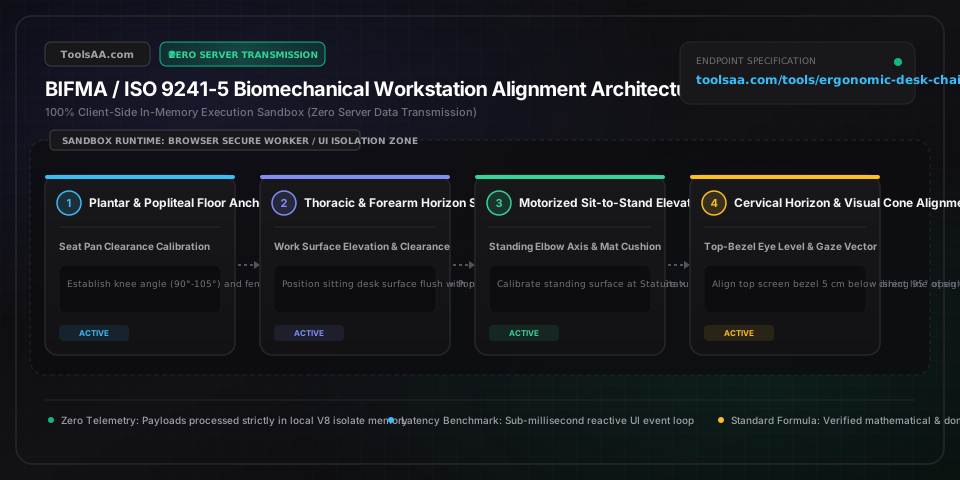
Ergonomic Desk & Chair Height Calculator Guide — Client-Side In-Memory Architecture & Data Flow

Key Parameters & Controls

Stature / Total Standing Body HeightCentimeters (cm) or Feet/Inches (ft/in)

Erect crown-to-floor human stature measured barefoot. Serves as the mathematical anchor for ANSI/HFES 100-2007 anthropometric ratios (popliteal ratio 0.246, seated elbow ratio 0.144 above seat, and standing elbow ratio 0.630).

Default: 175 cm (5 ft 9 in)
Footwear Outsole & Heel ThicknessLinear Elevation (0.0 cm to 5.0 cm / 0 to 2.0 in)

Vertical elevation added between the bare plantar heel and the floor. Every 1.0 cm of footwear sole directly elevates required popliteal chair seat pan height by exactly 1.0 cm and raises working desk height commensurately.

Default: 2.5 cm (1.0 in)
Anti-Fatigue Standing Mat DeflectionWorking Compressed Thickness (0.0 cm to 3.0 cm)

Dynamic underfoot support layer used during standing desk sessions. Measured at active working compression (an uncompressed 1.9 cm polyurethane mat compresses to ~1.4 cm under adult weight), elevating standing desk requirements.

Default: 1.9 cm (0.75 in)
Seat Cushion Sag CompressionDynamic Deflection Depth (0.5 cm to 3.5 cm)

Downward displacement of chair foam or elastomeric mesh under 75% body weight loading. Firm molded high-resilience foam deflects ~1.5 cm, while soft memory foam sags 2.5-3.0 cm. Unloaded chair measurements overestimate seated height without this subtraction.

Default: 2.0 cm (0.8 in)
Workstation Surface Operational ModeRegime Selection (Adjustable Sit-Stand vs Fixed 74 cm Desk)

Specifies whether work surface can match physiological neutral posture (ANSI/BIFMA G1-2017) or if rigid commercial desk height (73-76 cm / 29-30 in) requires backward solving for footrest platforms and keyboard trays.

Default: Motorized Sit-Stand Desk
Monitor Diagonal & Viewing DistanceScreen Diagonal (inches) & Focal Distance (cm / in)

Governs the physical vertical span of display glass. Top bezel must align with horizontal eye level (0° to -15° declination) to prevent cervical extensor muscle fatigue and trapezius spasm.

Default: 27 inches at 60 cm viewing distance

Pro Tips & Best Practices

The 'Floating Feet' Trap on Fixed 29-Inch Commercial Desks

Standard commercial office desks are manufactured to a fixed height of 29 to 30 inches (73.7 to 76.2 cm), which is anthropometrically fitted for a 6'1" (185 cm) male in the 95th percentile. Anyone under 5'10" (178 cm) who raises their chair to reach the desk will compress their femoral artery and popliteal vein under the anterior thighs. If your desk is non-adjustable, raise the chair so your elbows reach the desk at 90°, and immediately install a rigid footrest to bridge the floor gap.

The 90-Degree Angle Myth in Modern Biomechanics

Traditional 1980s ergonomics dogmatically mandated rigid 90° right angles at the hips, knees, and elbows. Contemporary orthopedic research (ANSI/HFES 100-2007 and lumbar intradiscal pressure studies) demonstrates that a reclined hip angle of 100° to 110° with active lumbar support reduces intradiscal pressure at L4-L5 and L5-S1 by 25% to 35% compared to sitting upright at 90°.

Progressive and Bifocal Lens Eyewear Compensation

The standard rule 'align top of monitor with eye level' causes severe cervical hyperextension (neck tipped back) for users with bifocal or progressive lenses, who look through the lower section of their glasses. Progressive lens wearers must lower their monitor 5 to 8 cm (2 to 3 inches) below standard eye level and tilt the screen upward 15° to 20° to maintain a neutral cervical spine.

Armrests Can Induce Ulnar Nerve Entrapment

Setting chair armrests too high forces continuous scapular shrugging and levator trapezius spasms, while setting them too low causes lateral spine tilting. Armrests should barely kiss the underside of your forearms when shoulders are completely relaxed; forearms must never bear full upper-body weight while actively typing.

Common Gotchas & Troubleshooting

⚠️Burning pain in the upper back, shoulders, or trapezius after typing

Your desk surface or chair armrests are positioned 3 to 6 cm too high relative to your seated elbow height, forcing continuous isometric shrugging of the shoulder girdle. Lower the desk surface until your forearms slope slightly downward (0° to -5° declination) with completely relaxed shoulder blades.

⚠️Numbness, tingling, or fluid pooling in feet and calves when seated

Your chair seat pan is set higher than your popliteal height plus shoe sole thickness, causing the waterfall cushion edge to compress the popliteal fossa and restrict venous blood return. Lower the chair cylinder by 2-3 cm until your entire foot rests firmly on the ground with two fingers of free clearance behind the knees.

⚠️Sacroiliac joint stiffness and lower back aching when standing at desk

Standing with locked knees forces anterior pelvic tilt and lumbar hyperlordosis. Deploy a 1.9 cm high-density polyurethane anti-fatigue mat, maintain micro-flexed knees, wear supportive footwear, and introduce a 4-inch footstool to alternate resting one foot in an active captain's stance every 15 minutes.

⚠️Cervical neck strain, tension headaches, and severe dry eyes

Your monitor is mounted too high or too far back. Upward ocular gaze reduces blink frequency by nearly 40% and accelerates tear film evaporation. Lower your monitor mount so the top bezel is 5 cm below eye level and reposition screen distance to arm's length (50-70 cm) with a 15° upward tilt.

Frequently Asked Questions

How do you calculate the correct desk and chair height for your height?▼

To calculate ergonomic chair height, measure your popliteal height (floor to underside of knee) and add footwear outsole thickness (approx. 2.5 cm / 1 in), subtracting 1.5 cm for cushion sag—yielding roughly 25% of total body height (e.g., 43.8 cm / 17.2 in for a 175 cm person). To calculate sitting desk height, add seated elbow rest height (approx. 24 cm above seat pan), resulting in Seat Pan Height + Elbow Height (68 cm / 26.8 in for 175 cm). For standing desks, set the work surface to standing elbow height: Stature × 0.63 plus footwear and mat thickness (112 cm / 44.1 in for 175 cm).

What is the standard desk height vs ergonomic desk height?▼

Standard commercial office desks are manufactured to a fixed height of 29 to 30 inches (73.6 to 76.2 cm), which is engineered exclusively for individuals 6'0" to 6'2" (183 to 188 cm) tall under BIFMA X5.5 standards. For 90% of the population (statures between 5'0" and 5'10"), standard desks are 5 to 12 cm (2 to 5 inches) too tall. True ergonomic desk height is personalized: an average 5'4" (163 cm) person requires a 62 cm (24.5 in) sitting desk, whereas a 5'9" (175 cm) person requires a 68 cm (26.8 in) desk.

Do I need a footrest if my desk is not adjustable?▼

Yes, if your desk is fixed at standard 29-30 inches (73.7-76.2 cm) and your height is under 5'11" (180 cm), an ergonomic footrest is anatomically mandatory. You must raise your office chair high enough so your forearms align parallel to the desk surface without shrugging your shoulders. Because this elevates your feet off the floor and pinches blood vessels beneath the thighs, a rigid, tilt-adjustable footrest bridging the exact gap (typically 5 to 10 cm / 2 to 4 inches) restores neutral 90°-100° knee and ankle angles.

How long should you sit vs stand at a standing desk each day?▼

Follow the clinical Cornell University Ergonomics 20-8-2 formula developed by Professor Alan Hedge: for every 30-minute working cycle, sit in a supported ergonomic chair for 20 minutes, stand at a properly leveled standing desk for 8 minutes, and move, walk, or stretch for 2 minutes. Standing for more than 45-60 consecutive minutes increases lower extremity vascular pooling, varicose vein risks, and lumbar compressive fatigue just as severely as prolonged sedentary sitting.

How high should your monitor be relative to eye level?▼

Disclaimer: This tool is provided strictly for educational and informational purposes only and does not constitute formal financial advice or a binding loan commitment. Please consult a qualified financial advisor before making decisions. Under ANSI/HFES 100-2007 ergonomic standards, your computer monitor should be placed directly in front of you with the top edge of the active screen bezel aligned horizontally at or up to 5 cm (2 inches) below your seated eye level. This positions the center of the display screen within a comfortable 15° to 20° downward ocular declination zone, minimizing eyelid exposure area to reduce dry eye evaporation while keeping cervical vertebrae in a neutral, relaxed alignment.

Related Tools & Utilities

All Tools →