Tool title

Hero title

Hero subtitle

Presets label
Input card title
255, 255, 255
Alpha label100%
H:0° S:0% L:100%
24, 24, 27
H:240° S:6% L:10%
Lbl luminance 0.0093
Typography scale titleBadge normal text
Font size label16px
Pipeline titleLbl standard math
sRGBPipeline step inputC^2.4Pipeline step linearL1/L2Pipeline step luminanceRatioPipeline step ratioAAAPipeline step grade
Status readyLbl fg lum 1.0000 | Lbl bg lum 0.0093
Lbl contrast ratio
17.72:1AAA Badge pass

Lbl perceptual lc: Lc -106.7

1:14.5:17:121:1

aaNormal

Lbl threshold 4.5:1

Badge pass
Lbl rating verdict17.72:1

aaLarge

Lbl threshold 3:1

Badge pass
Lbl rating verdict17.72:1

aaaNormal

Lbl threshold 7:1

Badge pass
Lbl rating verdict17.72:1

aaaLarge

Lbl threshold 4.5:1

Badge pass
Lbl rating verdict17.72:1

uiComponents

Lbl threshold 3:1

Badge pass
Lbl rating verdict17.72:1

apcaLc

Lbl threshold 60:1

Badge pass
Lbl rating verdictLc -106.7
Status calculatedLbl apca lc -106.7 | Lbl scale 16px (400)
Stat card ratio title
17.72:1
Stat card level title
AAA Badge pass
Stat card apca title
Lc -106.7

Client-Side Processing

High-performance calculation executed entirely in browser memory.

Zero Server Upload Privacy

All payloads remain strictly local with zero external server communication.

Production Ready Export

Clean, optimized output formats ready for immediate deployment.
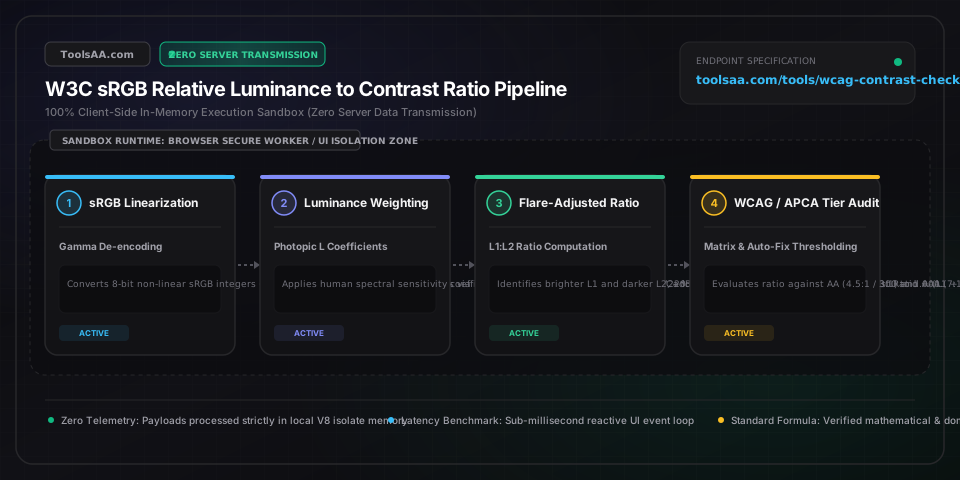
Technical Reference & Architecture Guide

WCAG Contrast Checker & Color Ratio Tool Guide

Check WCAG contrast ratios and color accessibility instantly. Test text and background pairs against WCAG 2.1 AA/AAA standards and find accessible color fixes.

WCAG Contrast Checker & Color Ratio Tool Guide — Client-Side In-Memory Architecture & Data Flow

Key Parameters & Controls

Relative Luminance (L)Normalized sRGB float (0.000 to 1.000)

The relative brightness of any point in a colorspace, normalized to 0.0 for darkest black (#000000) and 1.0 for lightest white (#FFFFFF) via IEC 61966-2-1 sRGB gamma expansion (C_linear = C <= 0.04045 ? C/12.92 : ((C+0.055)/1.055)^2.4) and ITU-R BT.709 photometric coefficients (L = 0.2126*R + 0.7152*G + 0.0722*B).

Default: L1 = 1.000, L2 = 0.038
Contrast Ratio (CR)Photometric ratio (1.00:1 to 21.00:1)

Calculated as (L1 + 0.05) / (L2 + 0.05) where L1 is the lighter color luminance and L2 is the darker color luminance. The constant 0.05 represents standard ambient room light reflection on screen glass.

Default: 4.50:1
WCAG AA Compliance ThresholdMandatory legal benchmark

Requires a minimum ratio of 4.5:1 for standard body text (< 18pt regular or < 14pt bold) and 3.0:1 for large typography (>= 18pt / 24px or >= 14pt / 18.66px bold) and user interface graphical components.

Default: 4.5:1 (Normal) / 3.0:1 (Large)
WCAG AAA Compliance ThresholdEnhanced accessibility benchmark

Requires an enhanced ratio of 7.0:1 for standard body copy and 4.5:1 for large typography, ensuring legibility for individuals with severe visual impairments or under adverse screen glare.

Default: 7.0:1 (Normal) / 4.5:1 (Large)

Pro Tips & Best Practices

The 0.05 Ambient Flare Constant and Subpixel Anti-Aliasing

The W3C contrast equation adds +0.05 to both luminance values to model ambient room reflection off screen glass. Because operating systems apply subpixel font smoothing (ClearType or CoreText), ultra-thin font weights (100-300) lose optical density; a color pair passing 4.5:1 mathematically will fail perceptual readability unless rendered at font-weight 400 or higher.

Semi-Transparent Alpha Channels Cannot Guarantee Conformance

Using CSS rgba() or hex alpha values creates dynamic contrast that shifts across varying background layers. WCAG 2.1 requires contrast evaluation against the worst-case composited pixel. Always blend alpha channels over the solid container backdrop using alpha compositing (C_out = C_fg * alpha + C_bg * (1 - alpha)) before certifying compliance.

APCA vs WCAG 2.1 Polarity Discrepancy

WCAG 2.1 treats contrast symmetrically (black on white has the same 21:1 score as white on black). However, the human visual system perceives dark text on light backgrounds (positive polarity) with significantly higher acuity due to pupil constriction and reduced halation. APCA assigns asymmetric Lc scores, meaning an identical color pair may pass in light mode but require higher lightness differential in dark mode.

Common Gotchas & Troubleshooting

⚠️My brand primary color scores 4.1:1 on white background, failing WCAG AA normal text by a narrow margin.

Instead of redesigning the entire brand identity, reserve the 4.1:1 color for large headers (>= 24px or >= 18.66px bold) or interactive UI container fills where the 3.0:1 threshold applies. For 16px body copy, use the tool's Auto-Fixer to darken the color to approximately 4.54:1 by reducing HSL lightness while retaining original hue and chroma.

⚠️Hover or disabled button states become invisible or fail accessibility audits.

Under WCAG 2.1 Success Criterion 1.4.11 (Non-text Contrast), active interactive boundaries must maintain at least 3.0:1 contrast against adjacent background colors. While purely inactive disabled elements are technically exempt from 1.4.11, accessible UX best practice requires pairing low-contrast disabled states with aria-disabled='true' and visible tooltips rather than dropping contrast below 2.5:1.

Frequently Asked Questions

How is the WCAG color contrast ratio calculated?▼

The WCAG 2.1 contrast ratio is calculated using the formula (L1 + 0.05) / (L2 + 0.05), where L1 is the relative luminance of the lighter color and L2 is the relative luminance of the darker color. Luminance is derived by converting 8-bit sRGB color channels (0 to 255) to linear light values: if C / 255 <= 0.04045, linear C = (C / 255) / 12.92; otherwise, linear C = (((C / 255) + 0.055) / 1.055)^2.4. These are weighted as L = 0.2126*R + 0.7152*G + 0.0722*B. The resulting ratio ranges between 1:1 (identical colors) and 21:1 (pure black #000000 on pure white #FFFFFF).

What is the difference between WCAG AA and AAA contrast requirements?▼

WCAG Level AA is the legal standard referenced by Section 508, ADA Title III, and EU EN 301 549, requiring a minimum 4.5:1 contrast ratio for normal text (under 18pt / 24px regular, or under 14pt / 18.66px bold) and 3.0:1 for large text and essential UI components. WCAG Level AAA is the enhanced tier targeting severe low-vision conditions, demanding 7.0:1 for normal text and 4.5:1 for large text. Most enterprise design systems mandate AA compliance globally and reserve AAA for mission-critical legibility such as legal disclaimers, medical apps, and government public notices.

What font size qualifies as large text under WCAG?▼

Under WCAG 2.1 guidelines, 'large text' is explicitly defined as at least 18 point (typically 24 CSS pixels at standard 96 DPI resolution) or at least 14 point bold (typically 18.66 CSS pixels with font-weight 700 or bolder). Large text only requires a 3.0:1 contrast ratio for Level AA compliance and 4.5:1 for Level AAA compliance, because larger glyph strokes provide greater optical surface area on the human retina.

Why do placeholder text and inactive disabled buttons frequently fail contrast checks?▼

Standard browser default placeholder text (such as #767676 on white) frequently hovers around 4.5:1, but many styling libraries reduce opacity to 0.4 or 0.5, plummeting contrast down to ~2.2:1. While WCAG 1.4.3 specifically exempts inactive user interface components (such as disabled buttons) from mandatory contrast ratios, form placeholder inputs are NOT exempt if they contain essential instructional guidance. Replacing ephemeral placeholder text with persistent floating labels ensures 4.5:1 compliance without relying on low-contrast inputs.

What is the difference between WCAG 2.1 and APCA WCAG 3.0 contrast scoring?▼

WCAG 2.1 uses a static mathematical ratio (1:1 to 21:1) based purely on relative luminance, failing to account for spatial frequency (font weight and stroke thickness) or polarity (light-on-dark versus dark-on-light). APCA (Accessible Perceptual Contrast Algorithm), developed for future WCAG 3.0, calculates a signed Lightness Contrast value (Lc 0 to 108+) based on human photoreceptor response and cortical processing. Under APCA, thin fonts require much higher Lc values than bold fonts, and dark mode requires higher luminance differences to match light-mode legibility.

Related Tools & Utilities

All Tools →