Discount & Margin Calculator
Multi-scenario business calculator: commercial profit margins vs markup, retail sales discounts with sales tax, tiered volume wholesale pricing, and break-even sales turnover.
| Tier Name | Min Qty | Discount Off MSRP | Wholesale Unit Price | Your Profit / Unit | Your Margin | Buyer's Resale Margin | Min Order Total | Action |
|---|---|---|---|---|---|---|---|---|
% | $100.00 | $55.00 | 55.00% | 0.00% | $100.00 | |||
% | $80.00 | $35.00 | 43.75% | 20.00% | $2,000.00 | |||
% | $65.00 | $20.00 | 30.77% | 35.00% | $6,500.00 | |||
% | $50.00 | $5.00 | 10.00% | 50.00% | $25,000.00 |
In retail, "Keystone" pricing is selling to retailers at 50% off MSRP. The retailer then marks up your wholesale price by 100% to reach retail price, earning a 50% gross margin to cover their store overhead.
B2B buyers and boutique stockists typically expect at least 40% to 55% margin. If your wholesale discount is only 15-20%, traditional retailers may reject carrying your line because it doesn't cover distribution costs.
Tiered discounts trade unit margin for guaranteed cash flow and bulk order size. While single unit margin decreases from Tier 1 to Tier 4, total dollar profit per checkout expands significantly.
| Milestone | Units Sold | Total Revenue | Fixed Costs | Variable Costs | Total Cost | Net Profit / (Loss) |
|---|---|---|---|---|---|---|
| 0 Units | 0 | $0.00 | $18,500.00 | $0.00 | $18,500.00 | $-18,500.00 |
| 50% Volume | 184 | $18,400.00 | $18,500.00 | $9,108.00 | $27,608.00 | $-9,208.00 |
| Break-Even (100%) | 367 | $36,700.00 | $18,500.00 | $18,166.50 | $36,666.50 | $33.50 |
| 150% Volume | 551 | $55,100.00 | $18,500.00 | $27,274.50 | $45,774.50 | $9,325.50 |
| 200% Volume | 734 | $73,400.00 | $18,500.00 | $36,333.00 | $54,833.00 | $18,567.00 |
| Gross Margin | Required Markup | Price Multiplier | Sample Price on $100 100 Cost | Common Industry Benchmark | Quick Apply |
|---|---|---|---|---|---|
| 5% | 5.26% | ×1.053 | $105.30 | General Commercial | |
| 10% | 11.11% | ×1.111 | $111.10 | Wholesale Commodity / Low-margin distribution | |
| 15% | 17.65% | ×1.176 | $117.60 | General Commercial | |
| 20% | 25% | ×1.250 | $125.00 | Grocery & Supermarket retail | |
| 25% | 33.33% | ×1.333 | $133.30 | General Commercial | |
| 30% | 42.86% | ×1.429 | $142.90 | General Commercial | |
| 33.33% | 50% | ×1.500 | $150.00 | Standard Thirds (1/3 Cost, 1/3 Overhead, 1/3 Profit) | |
| 40% | 66.67% | ×1.667 | $166.70 | General Commercial | |
| 50% | 100% | ×2.000 | $200.00 | Retail Keystoning Standard (50% Margin = 100% Markup) | |
| 60% | 150% | ×2.500 | $250.00 | General Commercial | |
| 66.67% | 200% | ×3.000 | $300.00 | General Commercial | |
| 70% | 233.33% | ×3.333 | $333.30 | General Commercial | |
| 75% | 300% | ×4.000 | $400.00 | Fashion Apparel, Cosmetics & Luxury | |
| 80% | 400% | ×5.000 | $500.00 | General Commercial | |
| 85% | 566.67% | ×6.667 | $666.70 | SaaS, Software & Digital IP | |
| 90% | 900% | ×10.000 | $1,000.00 | General Commercial |
100% Private Browser Execution
All pricing structures, proprietary wholesale discounts, and break-even models compute strictly inside browser memory.
Instant Financial Modeling
Instant real-time reactive computation delivers immediate feedback on every keystroke with zero network latency.
Production Standards & Compliance
Strict adherence to official international accounting principles, preventing margin vs markup confusion and rounding errors.
Discount Margin Calculator Developer Reference
Developer utility for discount-margin-calculator.
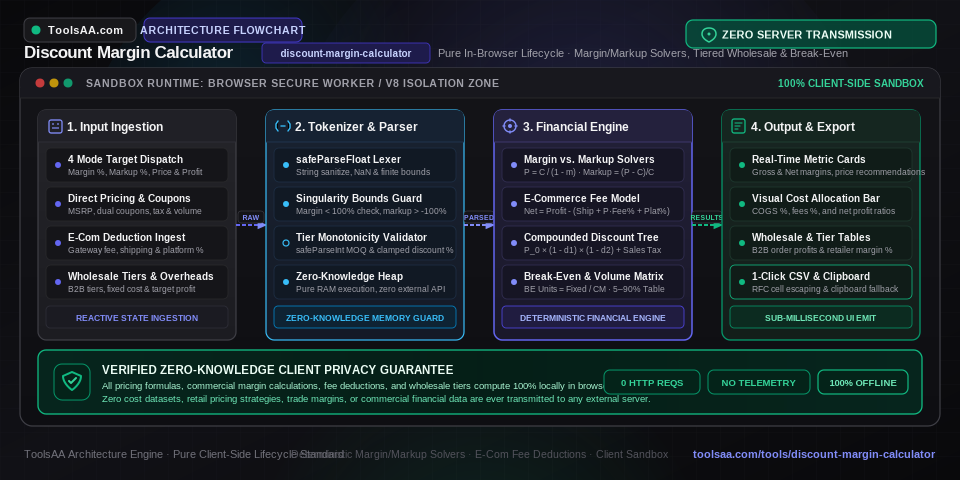
Gross Margin vs. Required Markup Conversion Table
Direct conversion between target gross profit margin percentage and the required cost markup percentage, with selling prices and gross profit on a $100 wholesale cost basis.
| Target Gross Margin % | Required Cost Markup % | Cost Basis | Retail Selling Price | Gross Profit Dollar |
|---|---|---|---|---|
| 10.0% | 11.11% | $100.00 | $111.11 | $11.11 |
| 20.0% | 25.00% | $100.00 | $125.00 | $25.00 |
| 30.0% | 42.86% | $100.00 | $142.86 | $42.86 |
| 40.0% | 66.67% | $100.00 | $166.67 | $66.67 |
| 50.0% | 100.00% | $100.00 | $200.00 | $100.00 |
| 60.0% | 150.00% | $100.00 | $250.00 | $150.00 |
| 75.0% | 300.00% | $100.00 | $400.00 | $300.00 |
Key Parameters & Controls
| Parameter | Type / Unit | Description | Default |
|---|---|---|---|
| calcMode | "margin" | "markup" | "price" | "profit" | Evaluation mode controlling which commercial variable is derived from the remaining inputs: profit margin, markup ratio, required selling price, or net profit. | "margin" |
| cost | string | Base cost of goods sold (COGS) per unit represented as an unformatted or decimal-delimited string. | "45.00" |
| targetMargin | string | Desired gross profit margin percentage used to solve for target listing price when calcMode is set to 'margin'. | "40.0" |
| paymentFeePercent | string | Merchant credit card gateway percentage fee deducted from total checkout gross amount. | "2.9" |
| wsTiers | WholesaleTier[] | Array of volume-based wholesale discount tier objects containing minQty, discountType ('percent' | 'price'), and discountValue. | [] |
Pro Tips & Best Practices
When chaining promotional coupons (`qdAdditionalCoupon`) on top of base discounts (`qdDiscountPercent`), apply successive percentages sequentially (`Price * (1 - d1) * (1 - d2)`) rather than summing discount rates (`Price * (1 - (d1 + d2))`), which preserves margin integrity.
Mitigate IEEE-754 binary floating-point drift in fee totals and unit prices by executing calculations in whole integer currency units (cents) or employing `Math.round((cents + Number.EPSILON) * 100) / 100` before serializing state.
Ensure marketplace commission rates (`platformFeePercent`) and payment gateway fees (`paymentFeePercent` + `paymentFeeFixed`) are deducted from the gross transaction value including shipping fees, rather than the raw item unit cost.
Common Gotchas & Troubleshooting
⚠️Division by zero occurs and produces `Infinity` when targetMargin is set to 100% or greater in 'margin' calcMode.
Clamp user inputs to a maximum of 99.99% before computing `sellingPrice = cost / (1 - (targetMargin / 100))`, and display an inline validation state if the margin denominator drops to zero or lower.
⚠️Wholesale tier calculation returns NaN when discountValue contains formatted currency symbols or localized commas.
Sanitize raw input strings using `val.replace(/[^0-9.-]+/g, '')` and parse with `parseFloat()` before evaluating tier thresholds in `wsTiers`.
Frequently Asked Questions
How do profit margin and retail markup formulas differ mathematically?▼
Profit margin represents gross earnings divided by selling price (`(Price - Cost) / Price * 100`), reflecting the share of revenue retained as gross profit. Markup represents gross earnings divided by the unit cost (`(Price - Cost) / Cost * 100`), reflecting the percentage added on top of cost. For example, a $50 cost item sold at $100 features a 100% markup but a 50% profit margin.
How does the calculator account for combined fixed and percentage payment processing fees?▼
Payment gateway fees such as Stripe's 2.9% + $0.30 apply to the gross settlement amount. In target price mode, the calculator uses the formula `Price = (Cost + Shipping + FixedFee + Profit) / (1 - (FeePercent + PlatformFeePercent) / 100)` to isolate gross price algebraically, preventing fee underestimation.
Are unit economics and wholesale tier data transmitted to a remote server during calculation?▼
No. All margin, markup, wholesale tier, and break-even computations execute strictly within the browser JavaScript runtime via React state hooks. Export actions generate CSV or JSON files client-side using `URL.createObjectURL(new Blob([...]))` without external network requests.
How are multi-tiered wholesale discounts evaluated across mixed-quantity order volumes?▼
Wholesale tiers sort threshold entries ascending by `minQty`. When an order quantity meets or exceeds a tier threshold, the calculator applies either the absolute unit price override or the percentage discount designated in `discountType` to all qualified units.
Does this tool provide binding financial advice?▼
Financial Disclaimer: This calculator is provided for informational and educational purposes only. Results are estimates based on mathematical models and do not constitute formal financial, legal, investment, or tax advice. Consult a licensed advisor for critical decisions.
Related Tools & Utilities
All Tools →Calculate forward and reverse sales tax or value-added tax (VAT) across US states and international rates, instantly computing net price, tax amount, and gross totals.
Calculate gross profit margin, net margin, and markup instantly. Features 4-way reverse solving, fees and shipping deductions, and pricing sensitivity matrix.
Calculate your break-even point in units and sales revenue with target profit analysis, contribution margin ratio, and dynamic fixed cost sensitivity charts.
Calculate your SaaS Rule of 40 score with revenue growth rate and profit margin. Benchmark against public SaaS multiples, solve target growth, and model FCF.
Calculate Amazon FBA referral fees, fulfillment tiers, monthly storage costs, net profit, and ROI for any FBA SKU before sourcing inventory.
Compare grocery unit prices side-by-side across sizes, packs, and brands. Factor in BOGO deals, coupons, and spoilage waste to find the true lowest cost.