HTTP Status Code Checker & Redirect Tester

#HTTP Status Code Checker & Redirect Tester

Check HTTP status codes, test redirect chains, and inspect response headers. Diagnose 1xx to 5xx error codes, RFC specifications, SEO impact, and fixes.

Lbl realistic presets
Card input title
▼
Lbl dynamic simulation vars
Lbl simulated latency45 Unit ms
Lbl cache ttl3,600s (1.0h)
6 Lbl parsed fields
Lbl quick symptoms
Healthy request executionNormal page view
Lbl rfc code 200Lbl idempotent Val yesLbl safe Val yesLbl cacheable Val by default
Lbl svg titleRTT: 45ms | Score: 100%
100%Lbl security score1.0hLbl cache ttl gaugeCLILbl client45ms200Lbl originSAFE
200

OK

RFC 9110 §15.3.1
2xx Lbl class Badge headers ok

Standard successful HTTP response. Action requested was received, understood, and accepted.

Lbl root causes
  • Normal resource fetch
  • Successful query execution
  • API payload return
Lbl remediation
  • Keep payload sizes optimized with gzip/brotli
  • Set explicit Cache-Control headers
Lbl header checklist 200:
Content-TypeVal present
Cache-ControlVal present
ETag / ValidatorVal present
Location HeaderVal not required
Lbl engine title Lbl engine descLbl selected title 200 OK
Stat card1 titleStat card1 value

Stat card1 desc

Stat card2 titleStat card2 value

Stat card2 desc

Stat card3 titleStat card3 value

Stat card3 desc

Client-Side Processing

High-performance calculation executed entirely in browser memory.

Zero Server Upload Privacy

All payloads remain strictly local with zero external server communication.

Production Ready Export

Clean, optimized output formats ready for immediate deployment.

Disclaimer text
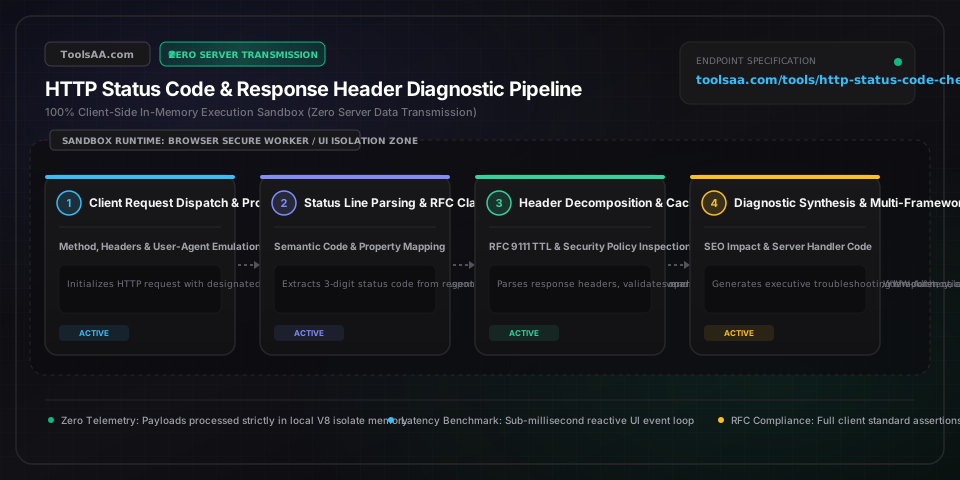
Technical Reference & Architecture Guide

HTTP Status Code Checker & Redirect Tester Guide

Check HTTP status codes, test redirect chains, and inspect response headers. Diagnose 1xx to 5xx error codes, RFC specifications, SEO impact, and fixes.

HTTP Status Code Checker & Redirect Tester Guide — Client-Side In-Memory Architecture & Data Flow

Key Parameters & Controls

HTTP Status Code (RFC 9110)3-Digit Integer (100 to 599)

The 3-digit numerical response status code standardized by IETF RFC 9110. Categorized into 1xx (Informational), 2xx (Success), 3xx (Redirection), 4xx (Client Error), and 5xx (Server Error).

Default: 301
Target URL or Endpoint URIRFC 3986 Uniform Resource Identifier

The destination endpoint URL being evaluated for HTTP response status codes, header configurations, and redirect hop sequences.

Default: https://example.com/old-page
Simulation User-Agent ProfileHTTP Client Header String

The User-Agent request header dispatched during testing. Simulates crawler bots (Googlebot Desktop, Googlebot Smartphone) vs standard web browsers or developer tools.

Default: googlebot-smartphone
Diagnostic Architecture ContextEvaluation Mode Selector

Switches the diagnostic focus between REST API microservices, search engine crawler SEO, client-side browser SPA fetch, and edge CDN/reverse proxy infrastructure.

Default: seo-crawler
Raw HTTP Response HeadersCRLF-Delimited HTTP Header Text

Raw HTTP response status line and header key-value pairs copied from terminal cURL, browser DevTools Network tab, or production server logs for client-side parsing.

Default: HTTP/1.1 301 Moved Permanently Location: https://example.com/new-page Cache-Control: public, max-age=86400
HTTP Request Method (Verb)RFC 9110 Request Method

The HTTP method utilized (GET, HEAD, POST, PUT, DELETE, PATCH, OPTIONS). Determines whether redirect status codes preserve the request body or transform to GET.

Default: GET

Pro Tips & Best Practices

The 301 vs 308 Method Rewriting Trap: Why POST Requests Morph into GET

Historically, major web browsers and HTTP client libraries erroneously converted POST requests into GET requests upon receiving 301 Moved Permanently or 302 Found responses (RFC 7231 §6.4.2). This behavior breaks REST API write operations and file uploads. To guarantee that HTTP methods (POST, PUT, DELETE) and payload bodies are strictly preserved across a permanent redirect, RFC 7538 and RFC 9110 established HTTP 308 Permanent Redirect. Always use 308 for API endpoints and preserve 301 for traditional HTML page migrations.

404 Not Found vs 410 Gone: Accelerating Googlebot De-indexing

When a page is permanently deleted with no replacement, returning HTTP 410 Gone informs search engine crawlers that the removal is intentional and irreversible. While Googlebot treats a 404 Not Found as potentially transient and continues crawling the dead URL for weeks or months to confirm disappearance, Google Search Central documentation confirms that a 410 Gone status code speeds up the removal of the URL from Google index and halts wasted crawl budget much faster.

RFC 9111 Default Heuristic Caching on Error Codes

Under RFC 9111 §6.1, several HTTP status codes are cacheable by default even in the complete absence of an explicit 'Cache-Control' header. Specifically, 200, 203, 204, 206, 300, 301, 404, 405, 410, 414, and 501 permit heuristic caching by intermediary proxies and CDNs. If an API returns a 404 or 405 error caused by a temporary database failover, edge proxies may cache that error response, serving 404s to subsequent legitimate requests unless guarded with 'Cache-Control: no-store, no-cache'.

502 Bad Gateway vs 504 Gateway Timeout: Diagnosing Upstream Failures

Distinguishing 502 from 504 pinpoints the exact failure layer in modern reverse proxy topologies (Nginx, AWS ALB, Cloudflare). A 502 Bad Gateway signifies that the reverse proxy connected to the upstream application container, but received an immediate TCP connection reset, malformed response header, or process crash (e.g., Node.js OOM kill). A 504 Gateway Timeout indicates the upstream process received the request and stayed alive, but failed to complete its execution before the proxy's 'proxy_read_timeout' limit elapsed.

Common Gotchas & Troubleshooting

⚠️ERR_TOO_MANY_REDIRECTS (301/302 Cyclic Infinite Loop)

This error occurs when URL A redirects to URL B, which directly or indirectly redirects back to URL A. In Cloudflare and reverse proxy environments, this most commonly stems from an 'SSL/TLS encryption mode mismatch' (e.g. Cloudflare set to Flexible SSL connecting via unencrypted HTTP to an origin server that enforces HTTP-to-HTTPS 301 redirect). Resolve by changing Cloudflare SSL mode to 'Full (Strict)' or harmonizing web server rewrite rules.

⚠️CORS Preflight Failure on 401 Unauthorized or 403 Forbidden Responses

When a browser issues a CORS preflight OPTIONS request or an authenticated fetch call, backend security filters (such as Spring Security, Express middleware, or AWS API Gateway) frequently reject the call with 401 or 403 before injecting 'Access-Control-Allow-Origin' headers. The browser intercepts this as a generic CORS network error rather than an auth challenge. Ensure your server security pipeline bypasses authentication checks on OPTIONS requests and injects CORS headers on all 4xx error responses.

⚠️Soft 404 Warning in Google Search Console on Missing Content

A Soft 404 occurs when a web server serves a page with an HTTP 200 OK status code, but the page content is virtually blank, says 'Item Not Found', or redirects to the homepage. Googlebot flags this as deceptive because searchers receive a dead end while search indexes treat it as valid content. Configure your web server or Next.js route to return an explicit HTTP 404 Not Found or 410 Gone status code, or use a proper 301 redirect to an equivalent relevant category page.

⚠️503 Service Unavailable Missing Retry-After Header Penalizing SEO

When taking down an application for scheduled maintenance, returning a plain 503 Service Unavailable without an RFC 7231 'Retry-After' header causes search engine crawlers to interpret the downtime as an unplanned outage. Extended 503s without Retry-After lead to temporary de-ranking. Always configure your maintenance page to send 'Retry-After: 3600' (in seconds) or an RFC 1123 HTTP-date string instructing Googlebot exactly when to return.

Frequently Asked Questions

What is the difference between HTTP 301 and 302 redirects?▼

An HTTP 301 Moved Permanently redirect signifies that the requested resource has been definitively moved to a new permanent URL. Search engines like Google transfer 90% to 99% of PageRank link equity to the destination and replace the old URL in the index. Browsers aggressively cache 301 redirects locally. An HTTP 302 Found redirect indicates a temporary relocation; search engines maintain the original URL in the index and browsers do not cache the redirect by default.

What is the difference between 401 Unauthorized and 403 Forbidden?▼

HTTP 401 Unauthorized indicates that the request lacks valid authentication credentials. Under RFC 7235, the server must include a 'WWW-Authenticate' header specifying how the client can authenticate (such as Basic or Bearer token). Once valid credentials are provided, the request may succeed. In contrast, HTTP 403 Forbidden indicates that the server understands the client's identity, but the authenticated user lacks the authorization permissions to access the resource. Providing credentials will not alter the outcome.

How does HTTP status code affect SEO and Google ranking?▼

HTTP status codes directly instruct Googlebot how to crawl and index web pages. 200 OK signals healthy, indexable content. 301 and 308 redirects consolidate link equity and update canonical URLs without ranking loss. 404 and 410 codes tell crawlers to remove dead pages, with 410 accelerating de-indexing to conserve crawl budget. 5xx server errors (especially prolonged 500 or 503) signal infrastructure instability, causing Googlebot to slow crawl rates and temporarily demote search visibility.

What is the difference between 502 Bad Gateway and 504 Gateway Timeout?▼

Both status codes occur at an intermediary reverse proxy or CDN (such as Nginx, Cloudflare, or AWS ALB). A 502 Bad Gateway means the proxy connected to the upstream backend server, but the backend returned an invalid, corrupt, or truncated response (such as an immediate process crash or TCP connection reset). A 504 Gateway Timeout means the proxy connected to the backend, but the backend took longer than the configured timeout threshold (such as proxy_read_timeout) to respond.

Which HTTP status codes are cacheable by default according to RFC 9111?▼

Under RFC 9111 §6.1, status codes defined as cacheable by default (unless overridden by explicit Cache-Control headers) include: 200 OK, 203 Non-Authoritative Information, 204 No Content, 206 Partial Content, 300 Multiple Choices, 301 Moved Permanently, 404 Not Found, 405 Method Not Allowed, 410 Gone, 414 URI Too Long, and 501 Not Implemented. All other status codes require explicit 'Cache-Control: public' or max-age directives to be stored by shared caches.

Why do POST requests change to GET after a 301 or 302 redirect?▼

Historically, early web browsers implemented 301 and 302 redirects by converting POST requests into GET requests to prevent repeated form submissions upon following the redirect Location header. Although RFC 7231 later documented this ubiquitous non-standard behavior, modern HTTP specifications formalized HTTP 307 Temporary Redirect and HTTP 308 Permanent Redirect (RFC 9110) to strictly prohibit altering the HTTP method or request body during redirection.

Related Tools & Utilities

All Tools →